










 Service intake














Maintenance Care is a user-friendly CMMS for facility teams that need work orders and preventive maintenance running fast at a low flat price, while IBM Maximo is an enterprise EAM suite for asset-intensive operations that need predictive maintenance, IoT and deep asset hierarchies, whereas multi-site portfolios that want intake, vendor and compliance work handled look beyond both.
Maintenance Care vs Maximo is a choice between two levels of maintenance. Maintenance Care is a user-friendly computerized maintenance management system (CMMS) for straightforward, cost-effective facility maintenance in small and medium operations.
IBM Maximo Application Suite is a heavy-duty enterprise asset management (EAM) platform for asset-intensive enterprises that need failure analysis, reliability engineering, AI and IoT. Which one fits comes down to your sites, asset complexity, budget and IT help: Maintenance Care costs $250 a month for unlimited users, while Maximo's entry package starts under $40,000 a year.
In this guide, you compare both on key features, pros and cons, named reviews, pricing, AI and fit by company size. Maintenance Care here is Gnxcor's CMMS, not Accruent's Maintenance Connection. Still building a shortlist? Start with this roundup of the best CMMS software.
If you only read one part, read this: the Maintenance Care or Maximo call comes down to scale, asset complexity and budget, set out for each kind of team.
- Pick Maintenance Care if: you run one to a handful of facilities, want work orders, PMs and assets live within weeks, and prefer one flat monthly price with unlimited users.
- Pick IBM Maximo if: you run equipment-heavy operations such as utilities, energy, heavy manufacturing or transport, and need deep asset hierarchies, condition monitoring, predictive maintenance and ERP integration.
- Look beyond both if: your buildings sit across a multi-site portfolio and the hard part is the work around the work order (intake, vendors, invoices, compliance), which is where Facilio fits.
Maintenance Care vs Maximo: the master comparison
This decision table puts Maintenance Care vs Maximo side by side: what each platform does, what is gated or sold extra, what it costs and which team it suits.
| Platform | Key features | Hidden or gated features | Add-ons | Pricing | Reviews | Best for |
|---|---|---|---|---|---|---|
| Maintenance Care (Gnxcor Inc.) | Work orders with request form and auto-assignment; time and usage-based PM; asset tracking with repair history and capital planning; parts and inventory; iMCare mobile app; dashboards and CSV export | Free Plan capped at 2 users, 3 PMs, 5 assets and 3 vendors; barcode scanning, inventory, custom forms and reporting on the paid plan; API, Tableau reporting and enhanced AI on Enterprise Elite only | Paid-plan extras: sensor integration, Amazon Alexa, Zapier; sensor hardware sold separately | Free; $250 per month with unlimited users (yearly pricing); Enterprise Elite by quote | G2 4.6 (111); Capterra 4.7 (111) | Facility teams in healthcare, senior care, education and property management that want fast setup and simple pricing |
| IBM Maximo (Maximo Application Suite) | Maximo Manage for assets, work orders and inventory; Health, Monitor and Predict; Maximo Mobile with offline mode; Inspection and Visual Inspection; space, lease and capital planning packages | Essentials covers one package for up to 25 users and one production environment; predictive maintenance, remote monitoring, visual inspection and ERP, HR and supply chain integrations sit on Standard | Maximo AI Service (draws AppPoints); extra users and packages; outside implementation help | AppPoints (IBM's credit-based licensing); most Essentials packages start under $40,000 per year (Inspection under $47,000); Standard and Premium by quote | G2 4.4 (653); Capterra 4.2 (89); TrustRadius 7.9/10 (219) | Equipment-heavy enterprises in utilities, energy, manufacturing and transportation with an IT team to run it |
Sources: Maintenance Care's pricing page, IBM's Maximo pricing page, G2, Capterra and TrustRadius product pages.
Difference between Maintenance Care and Maximo, feature by feature
Group by group, the difference between Maintenance Care and Maximo gets clearer, and each group closes with a one-line call on which tool comes out ahead.
Core maintenance:
| Capability | Maintenance Care | IBM Maximo |
|---|---|---|
| Work order management | Yes: request form, instant email and text alerts, auto-assignment, duplicate checker | Yes: job plans, approvals, failure codes and priorities in Maximo Manage |
| Preventive maintenance | Yes: time or usage based, with compliance scheduling | Yes: time, meter and condition-based PM |
| Corrective and breakdown work | Yes: requests and work orders for breakdowns, with repair history per asset | Yes: corrective work orders with failure codes and failure reporting |
| Mobile app (iOS and Android) | Yes: iMCare app (Lite on the Free Plan) | Yes: Maximo Mobile |
| Mobile offline mode | Not published | Yes: online and offline work |
| Custom checklists and inspections | Partial: fillable forms on paid plans; some custom forms are built by the vendor | Yes: Maximo Inspection with digital forms |
| Workflow automation | Partial: rules automation on paid plans | Yes: workflow designer and Application Designer |
Edge: Maximo, on depth and offline field work. Maintenance Care wins on how fast a technician can pick it up and start closing jobs.
Asset, inventory and facility management:
| Capability | Maintenance Care | IBM Maximo |
|---|---|---|
| Asset lifecycle tracking | Yes: make, model, serial, repair and cost history, life expectancy | Yes: complete asset lifecycle tracking |
| Complex asset hierarchies | Not published | Yes: parent and child hierarchies, plus linear assets such as pipelines and rail lines |
| Parts and inventory management | Yes: stock levels, re-order minimums and price tracking (paid plan) | Yes: spare parts inventory, procurement and an Inventory Optimization package |
| Capital planning | Yes: replacement cost forecasts | Yes: Capital Planning package |
| Lifecycle cost tracking | Partial: repair and cost history plus replacement cost forecasts | Yes: cost history across the asset lifecycle, tied to capital planning |
| Failure analysis and reliability | Partial: repair history per asset; no published failure analysis | Yes: failure codes, failure reporting and analysis, and FMEA-based reliability strategies |
| Space management | Partial: 3D Virtual Spaces; enhanced Space Center on Enterprise Elite | Yes: Space Management package within the real estate and facilities offering |
| Multi-site roll-ups | Not published | Yes: multi-site structure |
Edge: Maximo, by a wide margin, on asset data depth. Maintenance Care covers what one or a few facilities need without a long setup.
Intelligence and integrations:
| Capability | Maintenance Care | IBM Maximo |
|---|---|---|
| IoT and sensor data | Partial: wireless temperature sensors with minimum and maximum alerts | Yes: Maximo Monitor takes in IoT and building systems data |
| Predictive maintenance | Not published | Yes: Maximo Predict and Health scores |
| AI features | Partial: "AI" on paid plans and "Enhanced AI" on Enterprise Elite, not described publicly | Yes: Maximo AI Service and the Maximo Assistant |
| API access | Partial: Enterprise Elite only | Yes: REST APIs and an integration framework |
| Pre-built integrations | Yes: Google Calendar, RingCentral, Excel, QuickBooks Online, Zapier | Yes: ERP, HR and supply chain systems such as SAP and Oracle (Standard) |
| GIS and spatial | Not published | Yes: Maximo Spatial with ArcGIS |
Edge: Maximo. Maintenance Care's integrations are lighter, but they cover the calendar, text and spreadsheet tools a facility office uses every day.
Deployment, setup and support:
| Capability | Maintenance Care | IBM Maximo |
|---|---|---|
| Free plan | Yes: Free Plan for 2 users | No: free trial only |
| Deployment | Cloud (SaaS) | SaaS or client-managed on Red Hat OpenShift |
| Typical setup | Self-serve start, vendor onboarding | Specialist-led project; reviewers describe months of configuration |
| Support channels | Phone, chat, email, help desk and a 24/7 live rep | IBM Support plus IBM business partners |
| G2 ease of setup | 8.9 / 10 | 7.5 / 10 |
Edge: Maintenance Care, clearly.
Edge summary: Maximo wins on asset depth, condition monitoring, predictive maintenance, AI and enterprise integrations. Maintenance Care wins on time to value, ease of use, support scores and cost. The better tool is the one that matches how complex your assets really are.
How each one runs day to day:
| Operational question | Maintenance Care | IBM Maximo |
|---|---|---|
| Who administers it | A maintenance lead, no specialist skills (G2 ease of admin 9.0) | Trained administrators or outside specialists (G2 ease of admin 7.9) |
| Technician updates from the field | Yes: live work order tracking in the app | Yes: online or offline, with barcode and QR scanning |
| Audit readiness | Yes: compliance scheduling and repair history | Yes: centralized records that reviewers say make audits easier |
| Changing a workflow | Partial: custom fields and forms; some forms need the vendor | Yes: Application Designer, usually with an administrator |
| Scaling up | Add people without changing the plan price | Scales to many sites by adding AppPoints |
Maintenance Care vs Maximo reviews and ratings
Across G2, Capterra and TrustRadius, Maintenance Care vs Maximo reviews agree: Maintenance Care wins on ease and support, Maximo on asset depth at scale.
| Review site | Maintenance Care | IBM Maximo |
|---|---|---|
| G2 | 4.6 / 5 (111 reviews) | 4.4 / 5 (653 reviews) |
| Capterra | 4.7 / 5 (111 reviews) | 4.2 / 5 (89 reviews) |
| TrustRadius | 4.8 / 10 (2 ratings, no written reviews) | 7.9 / 10 (219 reviews and ratings) |
| G2 head-to-head score (out of 10) | Maintenance Care | IBM Maximo |
|---|---|---|
| Ease of use | 9.2 | 8.3 |
| Ease of setup | 8.9 | 7.5 |
| Ease of admin | 9.0 | 7.9 |
| Quality of support | 9.3 | 8.5 |
| Meets requirements | 9.1 | 9.0 |
Source: G2 comparison of IBM Maximo Application Suite and Maintenance Care.
What users praise: for Maintenance Care, ease of use comes up in 13 G2 reviews and support in 6. For Maximo, G2 reviewers most often praise its ease of use and interface (36 mentions) and asset management (33).
What users complain about: Maintenance Care reviewers flag issues with closing and editing work orders (4 mentions) and say it is not user-friendly (3). Maximo reviewers raise complexity 25 times and complex setup 16 times, and TrustRadius reports that 46 percent of its 37 recent verified reviewers call the interface unintuitive and cluttered.
Who writes the reviews: 55.9 percent of Maintenance Care's G2 reviewers work at mid-market firms and only 9.9 percent at enterprises, with hospital and health care the top industry (22.2 percent). For Maximo, 45.1 percent are enterprise reviewers and oil and energy leads (14.9 percent). That split matches who each tool is built for.
Maintenance Care: the easy-to-run CMMS for facility teams
Maintenance Care is a cloud CMMS from Gnxcor Inc. that puts work orders, preventive maintenance, assets and parts in one place, on a desktop or a phone.
Gnxcor is a self-funded software company whose story began in 2003, with offices in Cambridge, Ontario and Davenport, Florida. If the tool on your shortlist is Accruent's product instead, these Maintenance Connection reviews cover it.
The tradeoff is depth for speed. You can start on the Free Plan, move to a single plan price, and have technicians closing work orders from the app quickly. You do not get the asset hierarchy depth, condition monitoring or enterprise integrations of an EAM suite.
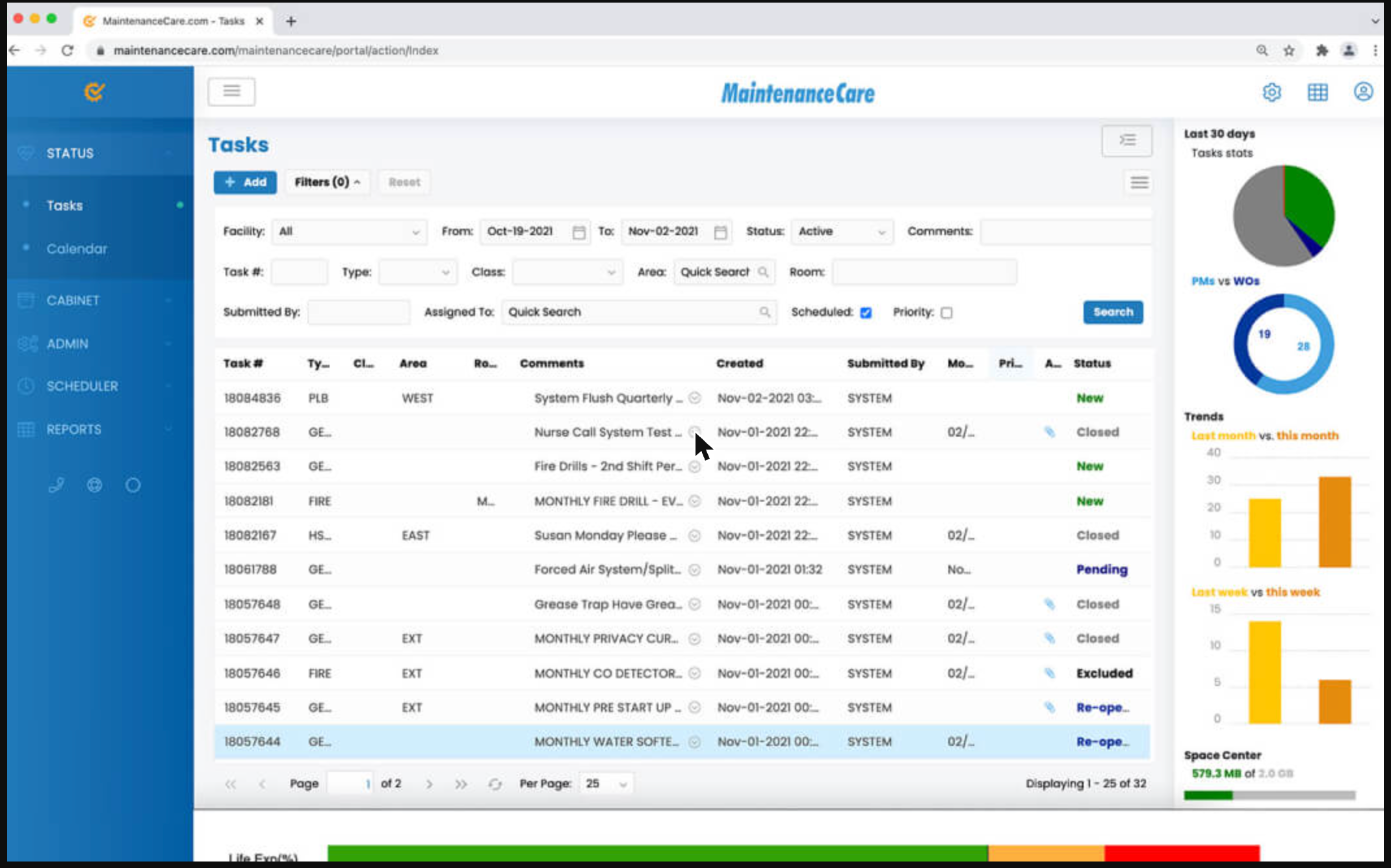
Maintenance Care's Tasks screen, with work orders and PMs filtered by facility, status and date, and 30-day task stats beside the list. Source: Maintenance Care.
Key industries: healthcare and senior care, education and churches, property management and HOAs, government, hospitality, recreation, manufacturing and transportation. Hospital and health care organizations make up its largest G2 reviewer group, so it often lands on shortlists of healthcare maintenance management software.
Key features:
- Work orders: a request form anyone in the building can use, instant email and text alerts, automatic task assignment, a duplicate checker and a live list of open tasks.
- Preventive maintenance: recurring tasks by time or usage, fillable forms attached to PM tasks, and a scheduling-for-compliance view that isolates the tasks needing special attention and reports on them for regulators.
- Asset tracking and capital planning: make, model and serial records, repair and cost history per asset, life expectancy, and replacement cost forecasts for budget planning.
- Parts and inventory: stock counts, low-stock re-order minimums and spare parts price tracking (purchase, re-order and average cost) on the paid plan.
- iMCare mobile app: iOS and Android app to receive requests, update work orders, scan assets and upload photos to free cloud storage; the Free Plan gets Mobile App Lite.
- Reporting and analytics: dashboards and charts on maintenance costs, labor and asset performance, a CSV export wizard, and Tableau reporting on Enterprise Elite.
- Custom data and housekeeping: DetSet advanced custom fields add your own questions to work orders, and housekeeping tracking covers cleaning rounds.
- Sensors, voice and space: low-cost wireless temperature sensors with minimum and maximum alerts, Amazon Alexa requests, and 3D Virtual Spaces for mapping rooms.
- Integrations: Google Calendar, RingCentral text messages, Excel and SurveyMonkey, plus thousands of apps through Zapier; API access on Enterprise Elite.
Pros:
- Setup is quick, and teams can start on the Free Plan before they pay, which one G2 reviewer credits for an easy setup.
- One flat price covers unlimited users, so adding technicians, requesters and contractors never changes the bill.
- Users find it easy to learn and rate it highly for ease of use (9.2 on G2) and support (9.3), and Capterra lists phone, chat and a 24/7 live rep.
- It covers what a facility office runs every day (requests, PMs, assets, parts and compliance records) without months of setup.
What reviewers say: Maintenance Care holds 4.6 out of 5 on G2 and 4.7 on Capterra, each from 111 reviews. Bailyn H., a mid-market reviewer on G2 (July 30, 2026), called it "an all-in-one platform that everyone on our team can use" and said setup was easy because the team began on the free version.
Austin R., a maintenance assistant reviewing on Capterra (December 8, 2025), named the main gap: "Not being able to create custom forms ourselves," which meant paying the vendor to build them.
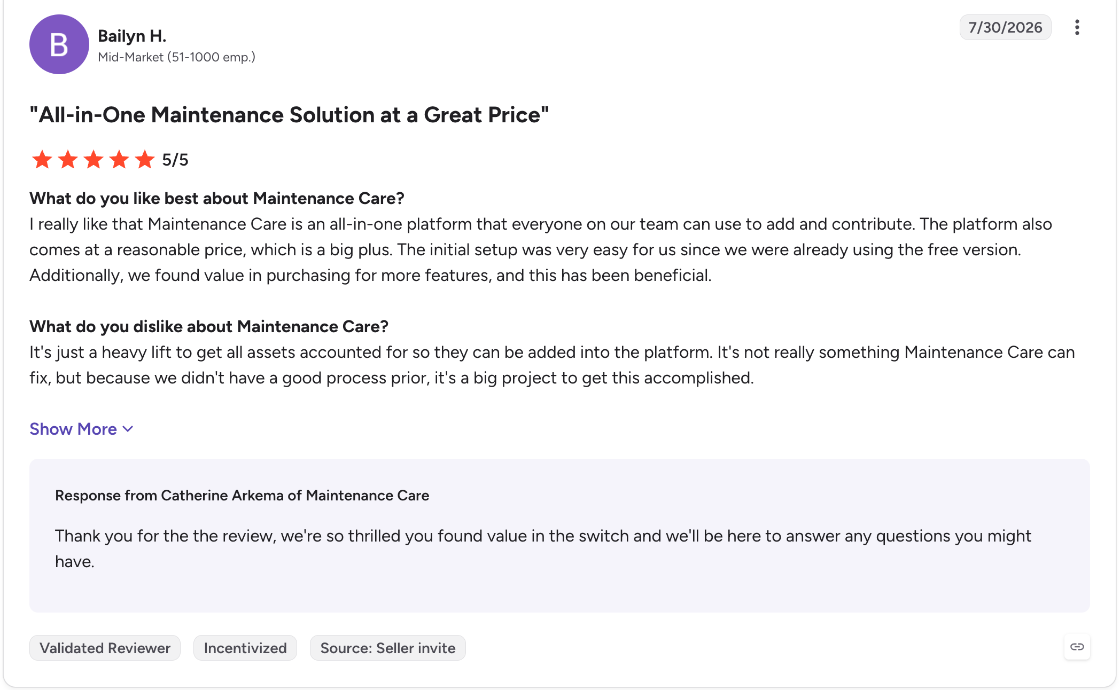
Bailyn H. on G2, July 30, 2026. G2 marks this review incentivized (seller invite).
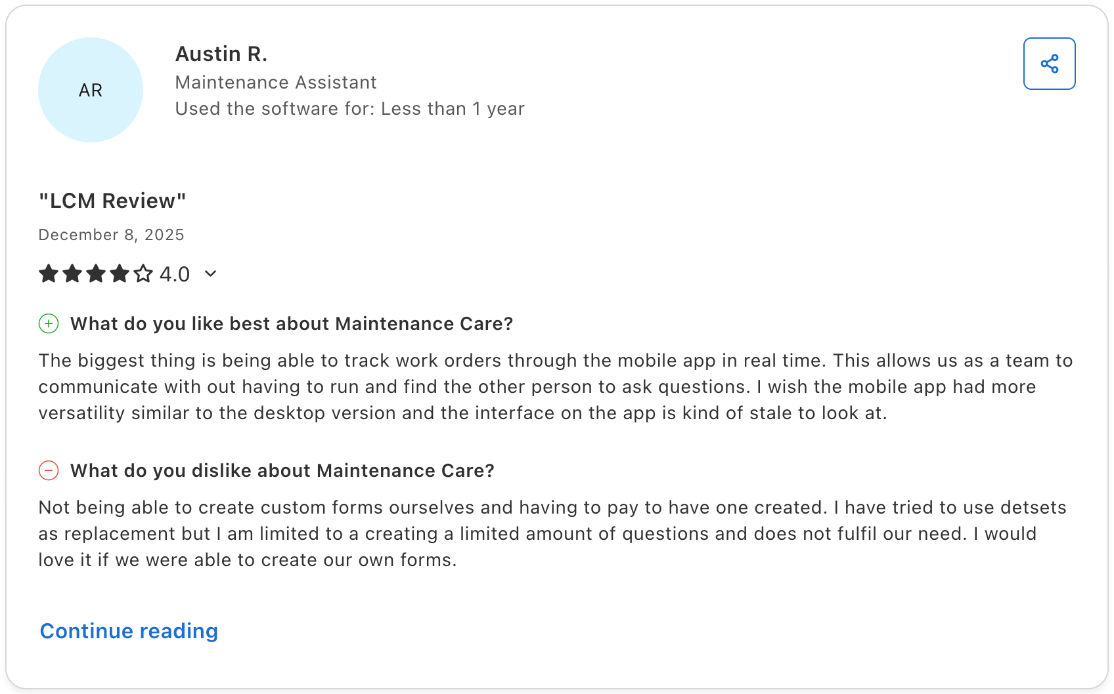
Austin R. on Capterra, December 8, 2025.
Cons:
- The Free Plan works as a trial: a 5-asset, 3-PM, 2-user ceiling covers a pilot, not a building.
- Key tools sit behind upgrades: barcode scanning, inventory, custom forms and reporting need the paid plan, and the API, Tableau reporting and enhanced AI need Enterprise Elite.
- Some users want more control: G2 reviewers flag issues with closing and editing work orders, and a Capterra reviewer pays the vendor to build custom forms.
- The mobile app does less than the desktop version, and the same Capterra reviewer calls its interface stale.
- It is a facility CMMS, not an EAM: there is no published predictive maintenance, offline mode or multi-level hierarchy for complex equipment.
IBM Maximo: the enterprise EAM suite for asset-intensive operations
IBM Maximo Application Suite (MAS) is IBM's enterprise asset management platform for maintenance, inspections and reliability across critical infrastructure.
It combines EAM, asset performance management and asset investment planning under a single license. Maximo came to IBM with its purchase of MRO Software in 2006, and MAS now runs on Red Hat OpenShift as SaaS or client-managed software.
Maximo is built for operations where an asset failure is expensive or dangerous: utilities, oil and gas, heavy manufacturing and transportation. IBM also sells a real estate and facilities offering (space, lease administration and capital planning) that G2 lists as Maximo Real Estate and Facilities, formerly TRIRIGA, so confirm which Maximo a reseller is quoting.
If you are still weighing the two categories, this guide to CMMS vs EAM sets out the difference.
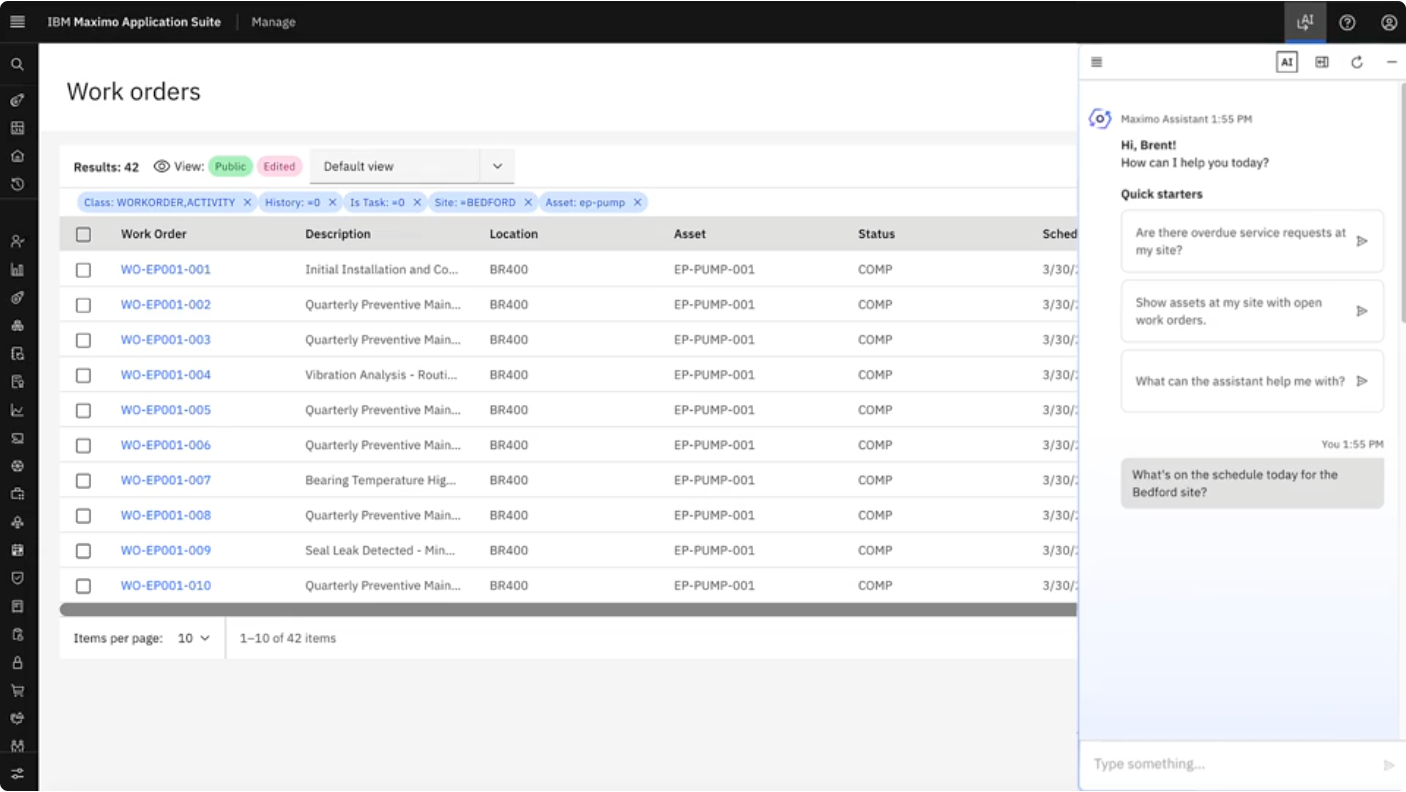
Maximo Manage's Work orders list, filtered by site and asset, with the Maximo Assistant panel open beside it for plain-language questions. Source: IBM.
Key industries: electric utilities, oil and gas, heavy manufacturing, transportation, and real estate portfolios through IBM's real estate and facilities offering.
Key features:
- Maximo Manage: the EAM core for asset records, locations and hierarchies, work orders with job plans and approvals, procurement and spare parts inventory.
- Health and reliability: Maximo Health scores equipment health and supports reliability-centered maintenance and FMEA (failure mode and effects analysis) based reliability strategies, so reliability engineering teams repair or replace based on operational risk.
- Monitor and Predict: Monitor brings IoT and building systems data into dashboards and alerts, and Predict estimates failure risk for condition-based and predictive maintenance (Standard and up).
- Maximo Mobile and Inspection: technicians work online or offline, scan barcodes and QR codes, and complete digital inspections on site.
- Visual Inspection: computer vision models check equipment images for visible defects.
- Inventory Optimization: spare-parts stocking analysis, sold as its own Essentials package.
- Spatial and GIS: Maximo Spatial maps assets with ArcGIS, which matters for spread-out networks.
- Real estate and facilities: space utilization, lease administration and capital planning packages for property portfolios.
- Configuration: Application Designer and workflow automation tailor screens, business rules, complex workflows and approval processes, usually with a trained administrator.
Pros:
- Its asset depth is the main draw: hierarchies, lifecycle history, reliability analysis and predictive analytics in one record, which is why it appears on most lists of the best EAM software.
- It scales to complex, multi-site operations, as reviewers at large enterprises describe.
- AI and IoT sit inside the suite: Monitor, Health, Predict, Visual Inspection and the Maximo AI Service.
- It integrates with ERP, HR and supply chain systems on the Standard edition.
- You choose how to run it: SaaS or client-managed on Red Hat OpenShift, and you can buy it through AWS Marketplace.
What reviewers say: Maximo holds 4.4 out of 5 on G2 (653 reviews), 4.2 on Capterra (89) and 7.9 out of 10 on TrustRadius (219). Two recent reviews show both sides:
- The upside: Vicki Maxwell, a business systems manager at Duke Energy, wrote on TrustRadius (October 29, 2026) that it "allows for limitless customization to fit your business needs."
- The cost of that power: mostafa s., a senior network security engineer at an enterprise, praised its multi-site asset tracking on G2 (November 8, 2026) but warned that "the overall middleware footprint can feel unnecessarily complex and resource-intensive."
This IBM Maximo CMMS review goes deeper.
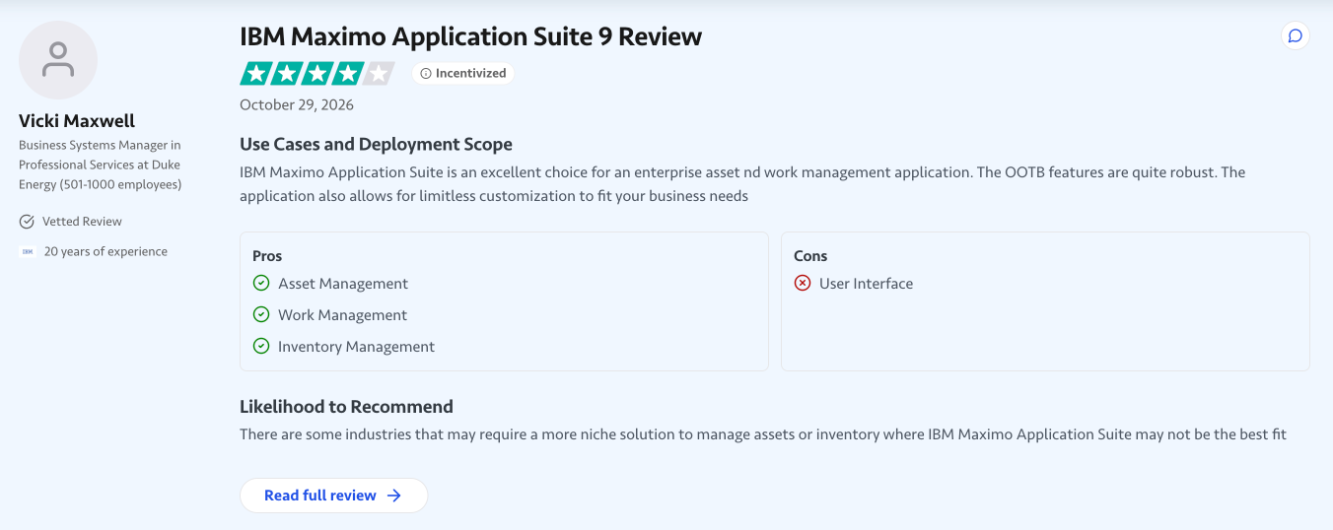
Vicki Maxwell on TrustRadius, October 29, 2026. TrustRadius marks this review incentivized.
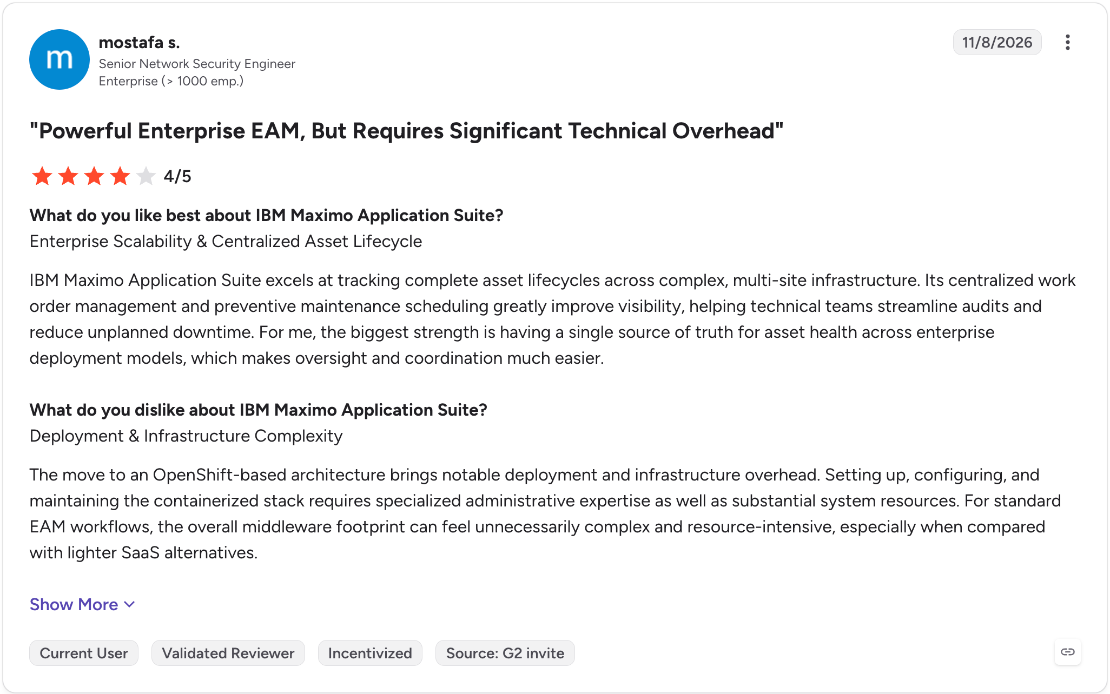
mostafa s. on G2, November 8, 2026. G2 marks this review incentivized (G2 invite).
Cons:
- Setup is a project: G2 reviewers raise complexity 25 times and complex setup 16 times, often describing months of configuration.
- The interface splits opinion: 46 percent of recent verified TrustRadius reviewers call it unintuitive and cluttered.
- Running it takes specialist IT skills, since IBM's Red Hat OpenShift platform needs trained administrators or outside help.
- Entry cost is high: Essentials Maintenance starts under $40,000 a year before outside services and extra AppPoints. If that rules it out, see this roundup of every IBM Maximo alternative.
Maintenance Care vs Maximo pricing
Pricing is where Maintenance Care vs Maximo splits furthest: one fixed monthly fee with unlimited users against yearly AppPoints licensing sold per package.
Maintenance Care publishes three plans. The Free Plan costs $0 for 2 users, work orders, 3 PMs, 5 assets, 3 vendors and Mobile App Lite.
The Maintenance Care plan costs $250 per month with unlimited users, work orders, PMs, assets, vendors and parts inventory, based on yearly pricing. Enterprise Elite is quoted and adds Tableau reporting, enhanced onboarding, enhanced AI, enhanced custom fields, an enhanced Space Center and the API.
IBM sells Maximo Application Suite with AppPoints, a credit system that pays for apps and users under one contract, as SaaS or client-managed software.
Essentials packages start under $40,000 per year each (Maintenance, Space Management, Capital Planning and Lease) and under $47,000 for Inspection, with up to 25 users included. Standard and Premium are quoted. This breakdown of IBM Maximo pricing walks through the AppPoints math.
| Pricing factor | Maintenance Care | IBM Maximo |
|---|---|---|
| Pricing model | Flat monthly subscription, unlimited users | AppPoints per year, SaaS or client-managed |
| Published prices | Yes, except Enterprise Elite | Partly: Essentials starting points only |
| Free option | Free Plan (2 users, 3 PMs, 5 assets) | Free trial only |
| Entry paid tier | $250 per month (yearly pricing), unlimited users | Essentials Maintenance, under $40,000 per year, up to 25 users |
| Top tier | Enterprise Elite, quote | Premium, quote |
| Bills separately | Sensor hardware; Enterprise Elite features | Extra users and packages, outside implementation help; AI Service draws on your AppPoints |
Sources: Maintenance Care's pricing page and IBM's Maximo pricing page.
What a year costs: the Maintenance Care plan comes to $3,000 a year however many users you add. Maximo's Essentials Maintenance package starts under $40,000 a year for up to 25 users, before implementation, so the entry gap can reach roughly 13 times at list price.
Watch for old prices: G2 still lists Maintenance Care at $225 or $500 a month and Maximo at $3,150 a month. Neither vendor lists those figures today, so check the vendor page before you build a budget. For typical ranges across other tools, see this guide to CMMS pricing.
Maintenance Care vs Maximo AI and add-ons
On AI, Maintenance Care vs Maximo is uneven: one lists AI as a plan item with no detail, while the other ships an AI service, predictive apps and agentic tools.
AI labels on maintenance software range from a chat box to failure prediction, so the useful question is what each tool does and what it costs to switch on. Maintenance Care's pricing table lists "AI" on paid plans and "Enhanced AI" on Enterprise Elite but does not say what either does.
The automation you can verify is practical: sensor alerts outside a set temperature range, automatic task assignment and Alexa requests.
Maximo's AI is broader. The Maximo AI Service shipped with MAS 9.1 and, in MAS 9.2, the Maximo Assistant became agentic, able to break a request into multistep tasks inside Maximo, as this IBM Community post explains. On SaaS, the AI Service runs on your existing AppPoints, according to Smartech EAM Experts. Predict, Health and Visual Inspection add failure risk and image-based defect checks.
| AI capability | Maintenance Care | IBM Maximo |
|---|---|---|
| Scope | Not described publicly | Failure risk (Predict, Health), image defect checks (Visual Inspection), the Maximo AI Service and an agentic Maximo Assistant |
| Assist or execute | Not described | Predicts and flags; the MAS 9.2 Maximo Assistant can run multistep tasks inside Maximo |
| Named features | "AI" and "Enhanced AI" plan items | Maximo AI Service, Maximo Assistant, Predict, Health, Visual Inspection |
| Where it sits | Paid plans; enhanced on Enterprise Elite | MAS 9.1 and 9.2; Predict and Visual Inspection on Standard and up |
| How it is paid for | Included in the plan price | Draws AppPoints |
Ease of use, setup and support: Maintenance Care or Maximo
Picking Maintenance Care or Maximo also sets how much setup, training and admin work your team takes on, from a self-serve start to a months-long project.
Maintenance Care is built for quick adoption. G2 users score it 9.2 for ease of use, 8.9 for ease of setup and 9.0 for ease of admin. You can open a free account, add assets and start logging requests on the Free Plan before you pay, then move to the paid plan when you outgrow the limits. Enterprise Elite adds enhanced onboarding for larger teams.
Maximo is configured rather than installed. G2 scores it 8.3, 7.5 and 7.9 on the same three measures, and reviewers describe months of setup, often with an IBM business partner. The Red Hat OpenShift platform it runs on also needs specialist IT administrators, which is the overhead the G2 reviewer above describes.
Support follows the same pattern. Capterra lists phone, chat, email, a knowledge base and a 24/7 live rep for Maintenance Care, with in-person, live online and webinar training, and G2 users score its support 9.3. Maximo customers work through IBM Support and their implementation team, and G2 users score its support 8.5.
Maintenance Care or Maximo by company size and industry
For most buyers, sorting Maintenance Care or Maximo by company size and industry is the fastest way to decide. Find your row, then read why, then shortlist.
By company size:
| Your organization | Better fit | Why |
|---|---|---|
| Single site, small team | Maintenance Care | Free Plan to start, one plan price, no administrator needed |
| Several facilities, mid-sized team | Maintenance Care, unless assets are complex | One plan covers the whole team; check whether you need portfolio roll-ups |
| Large campus or hospital system | It depends | Maintenance Care for core work orders and PMs; Maximo when plant equipment, energy assets and capital planning need one asset record |
| Asset-intensive enterprise with multiple plants | IBM Maximo | Asset hierarchies, reliability, IoT and ERP integration at scale |
By industry:
| Industry | Better fit | Why |
|---|---|---|
| Healthcare and senior care | Maintenance Care | Its largest reviewer group; compliance scheduling for inspections |
| Education and churches | Maintenance Care | A single price for every staff member suits fixed budgets |
| Property management and HOAs | Maintenance Care | Request forms for residents and tenants, simple vendor tracking |
| Manufacturing | It depends | Maintenance Care for light production; Maximo for plants with reliability programs |
| Utilities, oil and energy | IBM Maximo | Its top reviewer industries; GIS and condition monitoring |
| Transportation and fleets | IBM Maximo | Large, distributed asset networks and ERP links |
By requirement:
| What you need | Better choice | Why |
|---|---|---|
| Basic maintenance management | Maintenance Care | Work orders, PMs and assets without setup overhead |
| Small facility management | Maintenance Care | Free Plan to start, then one plan price for every user |
| A large manufacturing plant | IBM Maximo | Asset hierarchies, failure analysis and reliability tools |
| Multiple industrial locations | IBM Maximo | Multi-site structure on one platform |
| Advanced asset reliability | IBM Maximo | Health scores and FMEA-based reliability strategies |
| Predictive maintenance | IBM Maximo | Monitor and Predict on the Standard edition |
| Complex workflows and approvals | IBM Maximo | Application Designer and workflow automation |
| Fast rollout with little IT help | Maintenance Care | Self-serve start; G2 ease of setup 8.9 |
| Lower software investment | Maintenance Care | $250 a month against Maximo's entry of under $40,000 a year |
If you sit between the two (several sites, moderate asset complexity and no appetite for an EAM project), widen the shortlist with this guide to the best enterprise CMMS software.
Maintenance Care vs Maximo in practice: a 500-machine plant
A worked example shows the Maintenance Care vs Maximo difference fastest: one plant, the same 500 machines, and what each tool lets the maintenance team do.
Take a manufacturing plant with 500 machines and one maintenance team.
In Maintenance Care, the team can:
- Create equipment records with make, model and serial number.
- Schedule preventive maintenance by time or usage.
- Raise work orders from requests and breakdowns.
- Track repair history and cost for each machine.
- Follow open work on dashboards and the iMCare app.
In Maximo, the team can do all of that, plus:
- Build a parent and child hierarchy for lines, machines and components.
- Analyze failure patterns with failure codes and reliability strategies.
- Track asset lifecycle costs and plan replacements.
- Manage spare parts and procurement in the same record.
- Run condition-based and predictive maintenance from sensor data.
- Score equipment health and operational risk with Maximo Health.
The second list is why plants pay for Maximo. Swap the plant for a ten-building school district and the first list is usually all the team needs, which is where Maintenance Care fits.
Maximo vs Maintenance Care integrations that matter
Reach is the real split in Maximo vs Maintenance Care integrations: Maximo connects to the enterprise stack, while Maintenance Care links everyday office tools.
| Integration need | Maintenance Care | IBM Maximo |
|---|---|---|
| ERP and finance | QuickBooks Online and Excel; others through Zapier | SAP, Oracle and other ERP, HR and supply chain systems (Standard) |
| Building systems and IoT | Wireless temperature sensors | Maximo Monitor for IoT and building systems data |
| Calendar and messaging | Google Calendar, RingCentral text messages, Microsoft 365 | Through the integration framework |
| GIS | Not published | ArcGIS through Maximo Spatial |
| Reporting and BI | Built-in dashboards; Tableau on Enterprise Elite | Built-in dashboards and KPI reporting |
| API | Enterprise Elite only | REST APIs and an integration framework |
| Single sign-on | Not published | Active Directory and enterprise identity integration |
| No-code automation | Zapier with thousands of apps | Workflow designer and Application Designer |
The practical test: list the three systems your maintenance data must reach (finance, building controls, identity). If they are QuickBooks, a spreadsheet and a calendar, Maintenance Care covers you. If they are an ERP such as SAP, a building management system (BMS) or plant control feed and an enterprise identity directory, Maximo is the closer fit.
When to choose Maintenance Care over Maximo
Choose Maintenance Care over Maximo when speed, simplicity and a fixed budget matter more than asset depth. These four situations describe the teams it suits.
- You need to be live this month: you want technicians logging work orders from their phones within weeks, not after a configuration project.
- Your budget is fixed but your headcount is not: one monthly price covers every user, contractor and requester.
- Nobody administers software full time: Maintenance Care scores 9.0 for ease of admin on G2, and you need no specialist IT skills to run it.
- Your work is buildings, not heavy equipment: HVAC, plumbing, rooms, grounds and compliance checks fit its work order and PM model.
When to choose Maximo over Maintenance Care
Choose Maximo over Maintenance Care when your risk sits in complex assets rather than buildings, and you have the budget and IT team for an enterprise platform.
- An asset failure is expensive or dangerous: you need reliability programs, condition monitoring and failure prediction, not just scheduled PMs.
- Your assets form deep hierarchies: plants, substations, pipelines and fleets need parent and child structures and linear asset tracking.
- You already run SAP or Oracle: maintenance, procurement and finance must share one data flow.
- You can fund the team to run it: administrators, outside specialists and a multi-month rollout are in the plan.
- You want AI at enterprise scale: Predict, Health, Visual Inspection and the Maximo AI Service across thousands of assets.
Switching between Maintenance Care and Maximo
Teams move in both directions when switching between Maintenance Care and Maximo. Here is what moves cleanly, what needs rebuilding and how to time it.
Moving up from Maintenance Care to Maximo:
- Export: pull assets, work order history, PM schedules and parts with the CSV export wizard.
- Redesign: asset hierarchies, failure codes and job plans in Maximo Manage need designing, not just importing, so budget specialist time for it.
- Size the license: count users and the packages you need before AppPoints are quoted.
Moving a facilities team off Maximo to Maintenance Care:
- What maps: asset records, locations, PM schedules and open work orders.
- What does not: job plans, failure hierarchies, condition monitoring history and ERP integrations have no direct home.
- Timing: line the move up with your IBM renewal date so you do not pay for both systems at once.
A phased cutover in four steps:
- Clean the asset register and agree naming before any export.
- Move one site or building first and run both systems in parallel for a few weeks.
- Rebuild PM schedules and forms, then train technicians on the new app.
- Close remaining work orders in the old system, archive its history, then switch off.
Common mistakes when comparing Maintenance Care and Maximo
Most common mistakes when comparing Maintenance Care and Maximo come from mismatched scale, partial budgets and old price data. Avoid these five, then sign.
- Buying an equipment-heavy EAM for building systems: if your assets are mostly HVAC, plumbing and electrical, Maximo's depth can turn into setup and admin cost you may not recover.
- Treating the Free Plan as the long-term option: its 5-asset and 3-PM limits are for testing, so budget for the $250 per month plan from day one.
- Leaving implementation out of the Maximo budget: the license is only part of the cost; outside configuration, data migration and training often take months.
- Comparing on old prices: G2 shows prices neither vendor lists today, so get current figures from each vendor.
- Assuming every "AI" label means the same thing: ask what the feature does on its own, which plan includes it and what it costs to run.
If neither tool fits after this check, a wider list of the best maintenance management software can help.
Maintenance Care vs Maximo vs Facilio: when the job is the whole operation
Both tools center on the asset and the work order. If one building has grown into a portfolio and vendors and compliance fill the week, see a third option.
That is the situation Facilio is built for. It runs operations and maintenance across multi-site real estate with agents that handle intake, dispatch, vendor follow-up, invoice checks and compliance tracking, on top of its own CMMS software.
| Question | Maintenance Care | IBM Maximo | Facilio |
|---|---|---|---|
| Built for | Facility teams that want a simple CMMS | Equipment-heavy enterprises | Multi-site real estate portfolios and the teams that run them |
| Core record | Work orders, PMs and assets | Asset lifecycle and reliability | CMMS for work orders, assets, PM, vendors and SLAs |
| Who does the coordination work | Your team | Your team, with AI recommendations and the agentic Maximo Assistant for tasks inside Maximo | Agents take requests, dispatch, chase vendors and check invoices; people approve exceptions |
| Compliance across sites | Compliance scheduling per facility | Compliance tracking inside the EAM | A building compliance agent tracks certificates and inspections across sites |
| Building systems and energy | Temperature sensors | Maximo Monitor | Connected Buildings: utility bills, alarms to work orders, energy analytics |
| Setup | Self-serve | Specialist-led project | FM Ops Engineers build and run it with your team |
| Pricing | Free, then $250 a month | AppPoints; Essentials Maintenance from under $40,000 a year | Quote by portfolio size, users and scope |
| Not the right pick for | Complex, equipment-heavy operations | Small teams that want a quick, low-admin start | A single site that only needs a work order app |
To be fair to both: Maintenance Care is far cheaper and simpler for one or a few facilities, and it has a free plan that Facilio does not offer. Maximo goes deeper than Facilio on heavy industrial reliability, linear assets and GIS. For a direct comparison, see Maintenance Care vs Facilio.
Choose Facilio when
Choose Facilio when your portfolio has outgrown a CMMS built for a few sites and the work that hurts is coordination across sites, vendors and compliance.
Where Maintenance Care keeps a facility team's work orders in order and Maximo models every asset in a plant, Facilio puts agents to work on the jobs around the work order, with its own CMMS as the core. FM Ops Engineers build and run those agents with your team, so there is no internal IT project and no retraining.
There is no rip-and-replace requirement either. If you are staying on Maximo, the same agents can run on top of it; see how AI agents for IBM Maximo work.
- Requests arrive from everywhere: tenants and occupants call, email and message across many sites, and you want every request answered and turned into the right work order, day and night.
- Vendors do most of the work: you want quotes chased, attendance confirmed and every invoice checked against the work order and contract before it is paid.
- Compliance spans a portfolio: certificates, inspections and statutory tasks need tracking across buildings, with gaps flagged before the audit.
- You want it run for you: a small team of FM Ops Engineers deploys, measures and tunes the agents, and stays after go-live.
What the platform includes:
- Connected CMMS: work orders, planned and reactive maintenance, an asset register with QR and RFID, SLAs and contracts on one data model.
- Mobile and offline-first: technicians raise, update and close work orders from the field, and the app keeps working when the connection drops, with photo checks at closure.
- Vendor and subcontractor management: license and insurance compliance checks and SLA tracking for suppliers and subcontractors.
- Parts, procurement and inventory: stock tied to work orders, with automatic re-ordering and purchase approvals.
- Connected Buildings: utility bills, alarms that open work orders, and energy analytics across the portfolio.
- Atom agents (Facilio's AI agents): service intake, service dispatch, vendor coordination, invoice processing, building compliance, contract validation and utility bill validation, live today, on Facilio's CMMS or the one you already run.
- Reports and dashboards: no-code reports, plus plain-language answers from inside any work order, asset or dashboard.
Deployment note: LLM-agnostic, delivered as SaaS or behind your firewall, with regional data residency.
Facilio is built for large, multi-site portfolios, so a single site that only needs a work order app will pay for more platform than it uses. Pricing is quote-based, set by portfolio size, users and scope; see the pricing page for a portfolio quote.
What industry leaders say about their transition to Facilio
These three organizations run their operations on Facilio, from a 55-building university campus to an Australian office portfolio and a UAE facilities provider.
- Purdue University Fort Wayne (education, US): replaced a 16-year-old CMMS across 55 buildings and 3 million square feet, with 1,100+ assets and 400+ PPM schedules, live ten weeks after kickoff. Read the Purdue University Fort Wayne case study.
- Investa (commercial real estate, Australia): manages 5,000+ service contractors on Facilio's CMMS, with portfolio-wide visibility, fewer tenant escalations and better vendor compliance and SLA adherence. Read the Investa case study.
- A 40-year UAE facilities management provider: raised SLA compliance from about 62 to about 92 percent on Facilio's CMMS, then had a helpdesk agent handle 80 percent of calls (1,110) end to end, with dispatch four times faster. Read the UAE helpdesk case study.
Frequently asked questions about Maintenance Care vs Maximo
Short answers on category, cost, ownership, free options and ease of use, each one written to stand on its own when you weigh Maintenance Care vs Maximo.
What is the difference between Maintenance Care and Maximo?
Maintenance Care is a user-friendly CMMS for facility teams and mid-sized organizations, with work orders, PMs, assets and parts at one monthly price. IBM Maximo is an enterprise EAM suite for asset-intensive enterprises, adding asset hierarchies, reliability, predictive maintenance, IoT and ERP integration, at a much higher cost and setup effort.
Is Maximo a CMMS or an EAM?
Maximo is an EAM. It does everything a CMMS does (work orders, preventive maintenance, inventory) and adds full asset lifecycle management, reliability and asset performance tools, investment planning and enterprise integrations. Maintenance Care is a CMMS: it covers day-to-day maintenance work without the reliability, condition-monitoring and enterprise-integration layer.
Is Maintenance Care free?
Yes, in part. The Free Plan costs $0 and includes 2 users, work orders, 3 PMs, 5 assets, 3 vendors and Mobile App Lite. The Maintenance Care plan at $250 per month removes those limits, with unlimited users, work orders, PMs, assets and vendors.
Is Maximo free?
No. IBM offers a free trial of Maximo Application Suite, but there is no free plan. Licenses are sold through AppPoints, and most Essentials packages start under $40,000 per year (Inspection under $47,000) for up to 25 users, with Standard and Premium editions quoted.
How much does Maintenance Care cost?
Maintenance Care has three plans: Free at $0, the Maintenance Care plan at $250 per month with unlimited users (based on yearly pricing), and Enterprise Elite at a custom price with Tableau reporting, enhanced onboarding, enhanced AI, enhanced custom fields, an enhanced Space Center and the API.
How much does Maximo cost?
Maximo is priced with AppPoints. IBM lists Essentials packages (Maintenance, Space Management, Capital Planning, Lease) from under $40,000 per year each and Inspection from under $47,000, with up to 25 users. Standard and Premium are quoted, and implementation help bills separately.
Who owns Maximo, and who makes Maintenance Care?
IBM owns Maximo. It bought the original developer, MRO Software, in 2006 and now sells it as IBM Maximo Application Suite. Maintenance Care is made by Gnxcor Inc., a self-funded company that began in 2003 and has offices in Cambridge, Ontario and Davenport, Florida.
Is Maintenance Care the same as Maintenance Connection?
No. Maintenance Care is a CMMS from Gnxcor Inc. with a free plan and one published price. Maintenance Connection is a different CMMS, owned by Accruent. The names are close, so check the vendor before you compare reviews or prices.
What is Maximo similar to?
Maximo is closest to other enterprise EAM suites such as SAP EAM, Oracle EAM and HxGN EAM (formerly Infor EAM). For a simpler CMMS, teams look at tools like Maintenance Care instead.
How does Maintenance Care handle preventive maintenance for healthcare and senior living?
Maintenance Care schedules recurring PM tasks by time or usage, attaches fillable forms to each task, and has a scheduling-for-compliance view for the tasks regulators review. Hospital and health care is its largest G2 reviewer industry, at 22.2 percent.
Which is easier to use, Maintenance Care or Maximo?
Maintenance Care. G2 users score it 9.2 for ease of use and 8.9 for ease of setup, against 8.3 and 7.5 for Maximo. Maximo's extra depth comes with a steeper learning curve and a longer setup, often with outside specialists.
What is a modern alternative for multi-site facilities teams?
Teams running many buildings can look at Facilio, which pairs a CMMS with agents that handle intake, dispatch, vendor follow-up, invoice checks and compliance tracking across sites. It suits large portfolios, while Maintenance Care suits one or a few facilities and Maximo suits equipment-heavy enterprises.
The verdict: Maintenance Care or Maximo for your operation
The verdict on Maintenance Care or Maximo depends on where your risk sits: in buildings your team maintains every day, or in complex assets that cannot fail.
For most facility teams (a care group, a school district, a senior living operator, a property manager), Maintenance Care is the better fit. It is faster to start, easier to run, far cheaper, and rated higher for ease of use and support.
Maximo is the better fit when assets, not buildings, drive your risk: plants, grids, fleets and pipelines that need hierarchies, condition monitoring, predictive maintenance and ERP integration, backed by an IT team and outside specialists to run it.
If your real problem is a growing portfolio where requests, vendors, invoices and compliance take up your team's week, add Facilio as the third option; the Maximo vs Facilio page shows how it lines up.
See Facilio on your own portfolio: we will show you how our agents would handle your requests, vendors and compliance across your sites. Request a demo.
---
Want the work done for you?
Our FM Ops Engineers scope your first AI agent on your own sites, then build it, run it and stay with you.
About the Author
