






 Service intake















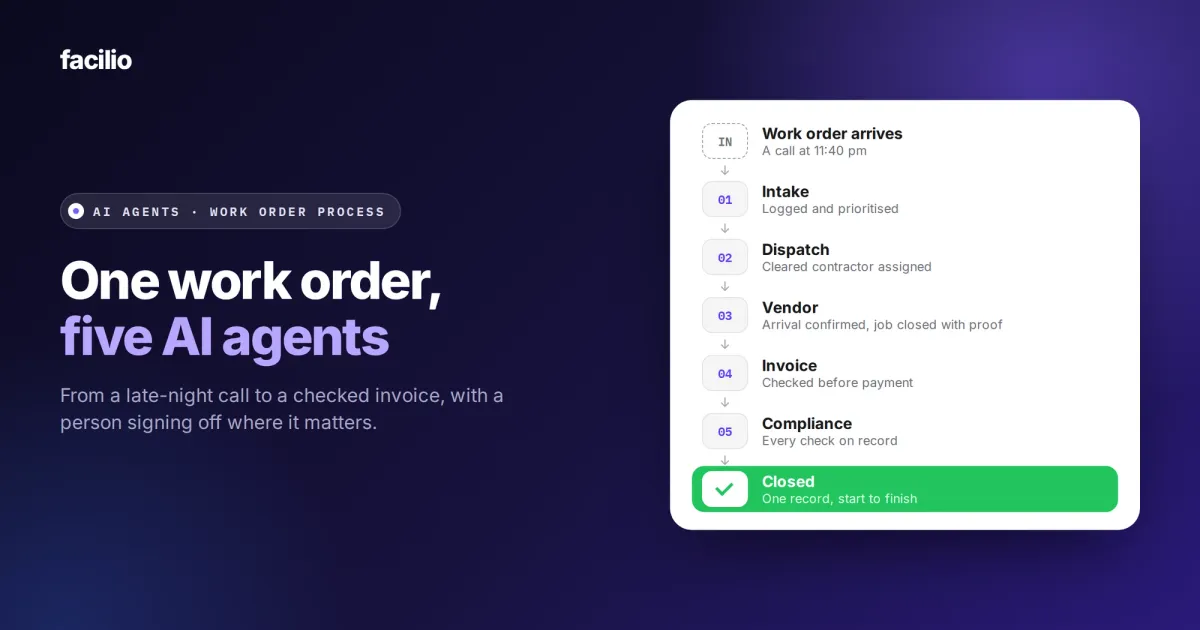

This guide gives you a complete view of what happens to a work order when AI agents run it in facilities management, from the moment a request comes in to the moment the job is closed and on record. You will see what each agent does, what it hands to the next and where your team signs off. It is the clearest way to see what AI for facility operations does in practice.
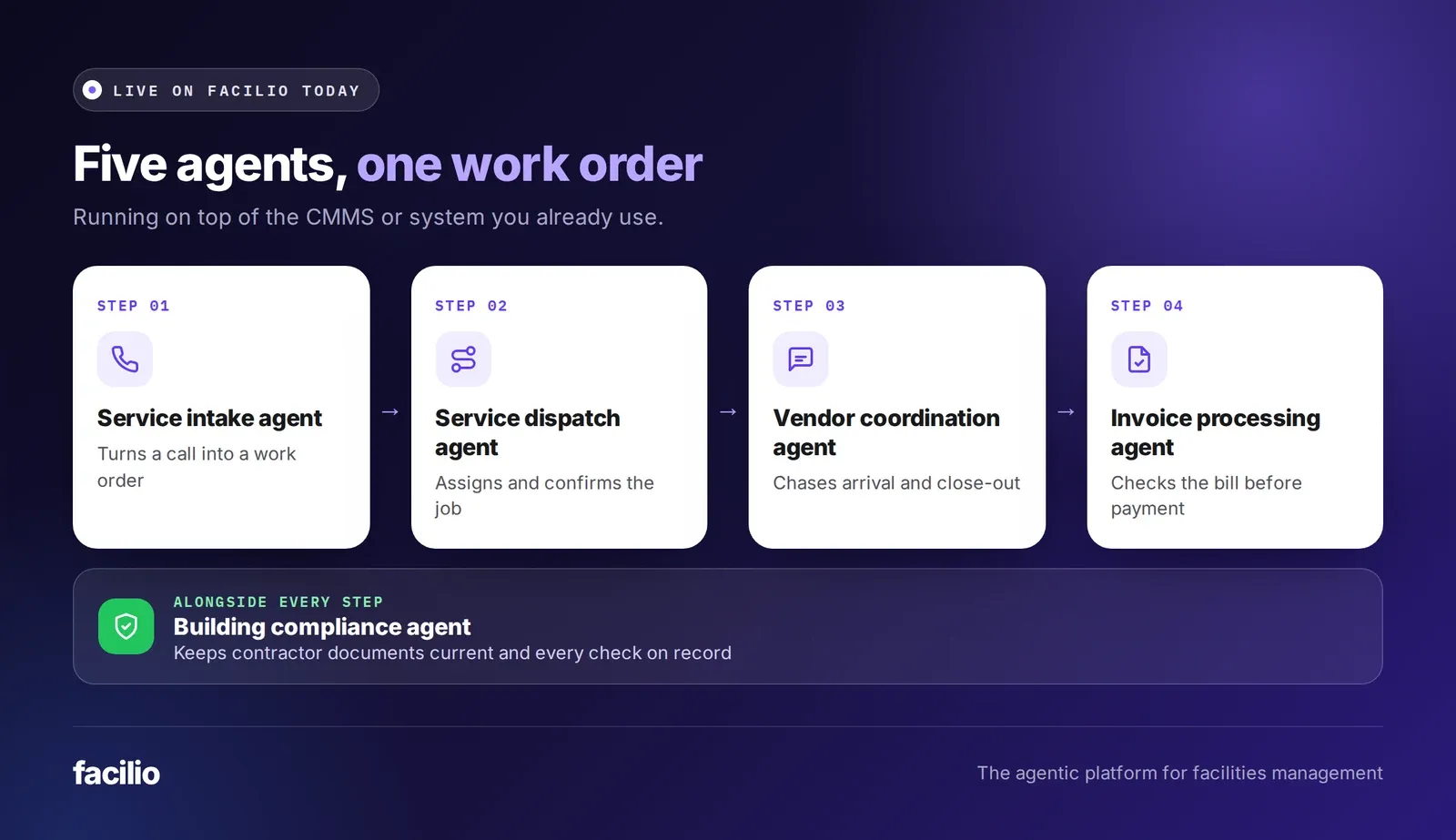
Take one example request, logged at 11:40 pm. A service intake agent logs it, a dispatch agent sends the right contractor, a vendor coordination agent chases the job to a close and an invoice processing agent checks the bill. The building compliance agent keeps the record up to date along the way. Every agent works on the same work order, and a person signs off where it matters.
Key takeaways
- One work order travels the whole way. Each agent adds to it and passes it on.
- Five agents cover the process: service intake, dispatch, vendor coordination, invoice processing and building compliance.
- A person signs off on quotes, spend above a cost gate, safety-critical work and invoice lines that do not match.
- The desk stops re-typing, chasing and checking by hand, and handles the exceptions instead.
- Every action is logged with a time and a reason.
What happens to a request when AI agents run the work order process?
It moves from agent to agent on one work order, without waiting for someone to type it up or chase it.
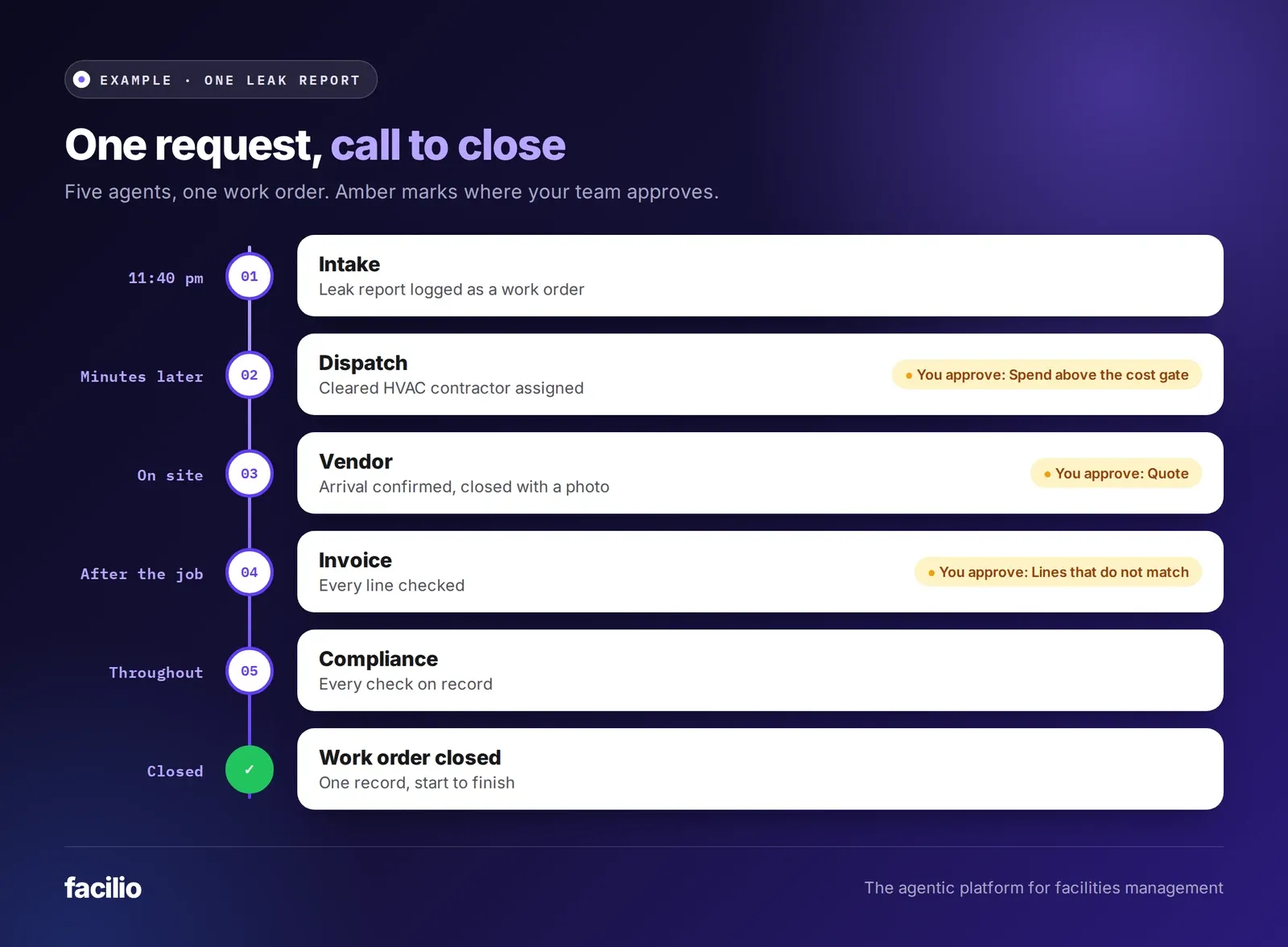
Here is an example. At 11:40 pm, a requestor reports water dripping from a ceiling unit in an office on level 4. The sections below show what each agent does with it, and where your team steps in, such as approving the contractor's quote.
What tasks can AI agents automate in the work order process?
Each agent automates one part of the job, finishes it and hands the work order on, step by step.
Step 1: The service intake agent turns the call into a work order
Requests can come in by phone, email, WhatsApp or a portal. In this example, it is a phone call. The agent answers, asks where the water is coming from and matches the requestor to the building and the unit. It sets the category and priority, and creates the work order in your CMMS or existing system. The requestor gets the ticket number straight away, here on WhatsApp.
Result: a complete work order, with the SLA clock already running.
Your desk no longer re-types the call into the system.
Step 2: The service dispatch agent sends the right contractor
The agent ranks every qualified option by SLA fit, skills, location, workload and past performance. Before anyone is sent, the building compliance agent checks that the contractor's insurance and certifications are current, and flags anyone who has lapsed. The HVAC contractor accepts on WhatsApp with an arrival time. If they go quiet, the agent moves to the next option and alerts the duty manager. This is how AI work order dispatch works.
Result: the assigned contractor, the accepted arrival time and the reason for the choice.
Your desk no longer phones round for an available contractor.
Step 3: The vendor coordination agent chases the job to a close
The agent confirms arrival, moves the job to in progress when the contractor is on site and asks for a work note and a completion photo.
The contractor uses WhatsApp, which they already have. If the job needs a quote, it goes to your team to approve. When the photo arrives, the job closes with evidence and the requestor is told. This is how AI vendor coordination works on every contractor job.
Result: a closed work order with work notes, photos and a timeline written by the agent.
Your desk no longer chases contractors for updates or re-types them.
Step 4: The invoice processing agent checks the bill
The agent checks every line against the work order, the contract and the rate card. Lines that match are approved. If the contractor bills six labour hours and the work order shows four, that line goes to a person with the reason. Duplicate invoices are held before payment. This is how AI invoice validation works.
Result: an approved invoice, or a short list of exceptions with reasons.
Your desk no longer checks every line by hand.
Step 5: The compliance record is kept up to date
Compliance runs alongside the whole job. The building compliance agent checked the contractor's documents before dispatch. It keeps reading every certificate and policy, chases renewals before they lapse, and stores every check against the vendor and the site. When the auditor asks about the contractor, the evidence is already there. See how AI vendor compliance tracking works.
Result: a timestamped record of every check, reminder and decision.
What does each agent hand to the next?
The hand-off is not a message between agents. It is the work order itself, updated at every step in your CMMS.
| Hand-off | What is passed on | What the next step uses it for |
|---|---|---|
| Intake to dispatch | Location, asset, category, priority, requestor contact and the SLA clock | Choose who goes, and by when |
| Compliance check to dispatch | Whether the contractor's documents are current or lapsed | Send only cleared contractors to site |
| Dispatch to vendor coordination | The assigned contractor, accepted arrival time and reason for the choice | Track arrival and chase silence |
| Vendor coordination to invoice | The closed job with work notes, photos and timeline | Check the bill against the work done |
| Invoice to your finance team | Approved lines, plus exceptions with reasons | Pay what matches and review what does not |
Anyone can open the work order and see what happened, when and why.
Where does a person sign off along the way?
A person signs off wherever human judgement is needed: on cost, on safety, or on anything the rules do not cover. Everything else runs inside the rules your team sets.
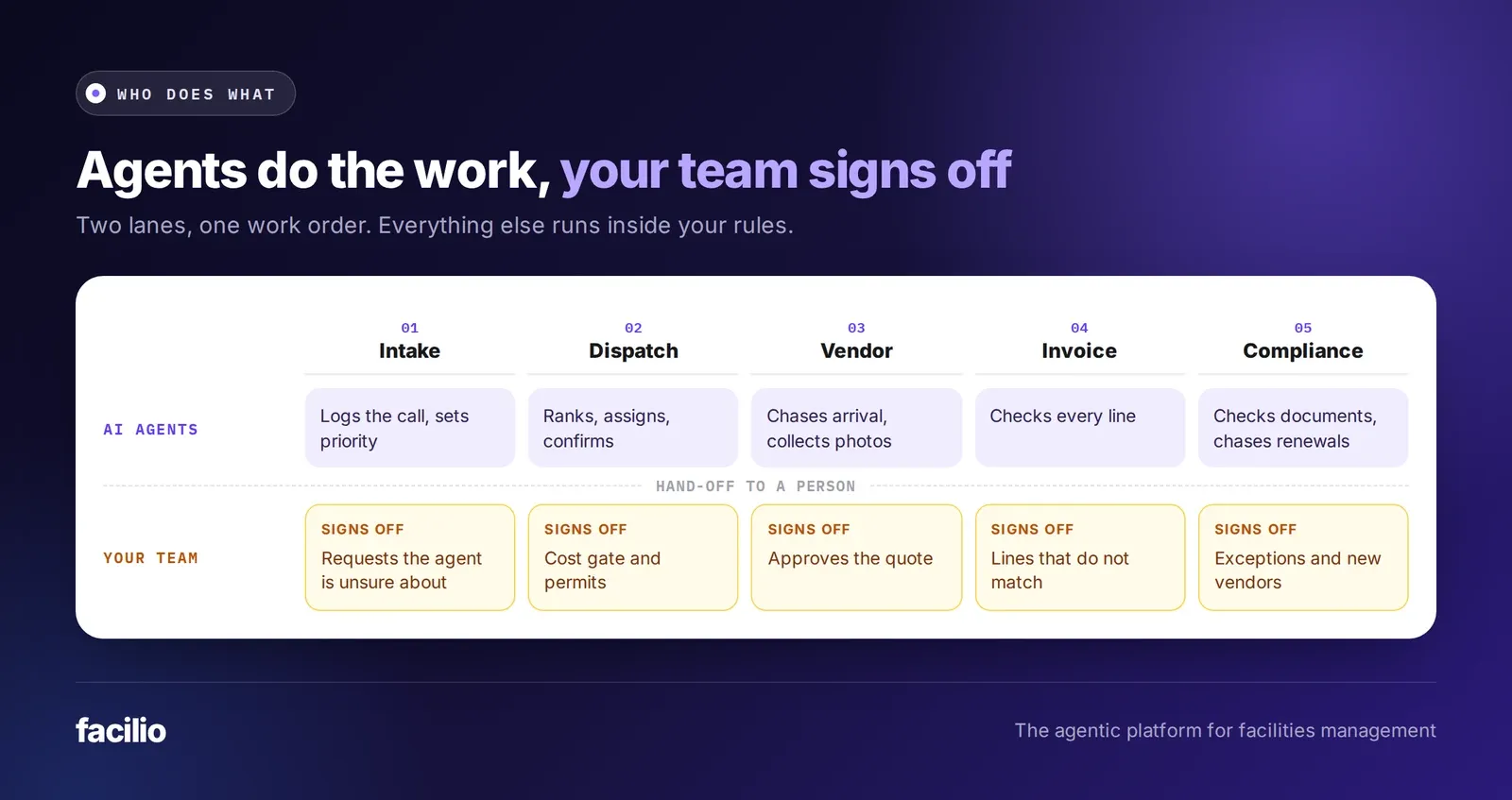
Anything outside those rules goes to a person by design, and every action the agents take is traced.
See your work orders run end to end.
From the first call to a closed job.
How does Facilio run the work order process with AI agents?
Facilio is the agentic platform for facilities management. Trusted by 150 customers across four regions, we run these five agents live at enterprise customers today, as part of our AI agents for facility operations. They work on top of the CMMS or system you already use, such as Maximo, Corrigo or Planon. Our FM Ops Engineers, Facilio's forward-deployed engineers for FM, set them up with your team, keep them running and measure how each agent performs against your own starting point.
Why it does more than the work order process you run today
What FM teams see on Facilio
The agents carry the job from step to step. Your team keeps the decisions that need judgement.
The bottom line: is it worth running the work order process with AI agents?
Yes, if your desk spends more time logging, chasing and checking than managing the work, or if requests arrive when nobody is there. It matters less if volume is low and one coordinator already handles every job.
Start small. Pick one request type, such as after-hours reactive calls, and note how much desk time each job takes today. Start with intake and dispatch, then add the next agent once the numbers hold.
See the AI agents live
Your work orders, raised to closed by AI agents
Our FM Ops Engineers set the agents up on your CMMS in weeks and run them with your team. You keep the decisions that matter.
Frequently asked questions about the work order process with AI agents
What tasks can be automated by AI in facility management?
Most desk work in the work order process: logging requests, assigning contractors, chasing them to a close, checking invoices and keeping contractor documents current. A person still approves quotes, spend above a cost gate, safety-critical work and anything that does not match.
What are the steps in the work order process with AI agents?
Intake logs the request, dispatch assigns the right contractor, vendor coordination chases the job to a close, and invoice processing checks the bill. Building compliance checks contractor documents and keeps the record up to date throughout.
Where does a person approve work when AI agents run it?
At the points that need judgement: quotes, jobs above a cost gate, safety-critical work that needs a permit, invoice lines that do not match and compliance exceptions. You set these rules, and anything outside them goes to a person.
Do I need to replace my CMMS to use AI agents?
No. Our agents run on our own CMMS or on the one you already use, such as Maximo, Corrigo or Planon.
About the Author

More from Facilio