Connected CMMS

 Connected Buildings
 Connected Refrigeration


 Download ebook

 Read case study


 Watch now


 Retail
 Healthcare
 FM Services
 Commercial Portfolios
 Corporate Facilities
 Education
 Data-driven Portfolio Ops
 Facility Management Software
 360° Asset Lifecycle
 Continuous Sustainability

 Blogs
Blogs
 Help docs
 Knowledge Hub
 ROI Calculator
 Ebooks & Guides
 Webinars
 Videos
 Case studies


 About us
 Newsroom
 Careers
 Contact us
 Partners
 Events



If you want to track vendor and contractor compliance with AI, you give a building compliance agent your vendor list, the documents each trade must hold and your site rules. It reads every certificate, policy and permit, checks expiry dates daily, chases renewals before they lapse and flags lapsed vendors before dispatch.
At five sites, someone catches the expired insurance. At 300, nobody does until the audit. In this guide, we have tried to show how the agent closes that gap.
Key takeaways
- Most compliance gaps in FM sit with vendors: expired insurance, lapsed certifications and missing permits.
- A building compliance agent reads every vendor document, checks expiry dates daily and chases renewals before they lapse.
- Vendors with lapsed documents are flagged before dispatch, and a person decides what happens next.
- Every check, reminder and decision is logged, so audit evidence builds as you go.
Where does vendor and contractor compliance risk hide in FM?
It hides in the gap between your systems. Vendor documents live in inboxes, shared drives and spreadsheets. The work those documents cover lives in the CMMS. In most contractor management setups, nobody connects the two until something goes wrong.
These are the five places we find gaps most often:
- Insurance: public and employer's liability policies expire, and the renewed copy never reaches you.
- Trade certifications: gas, electrical, fire and lift engineers need current tickets for the work they do. Checking the company is not enough.
- Permits to work: hot works, confined spaces and working at height need a permit before the job starts, usually tracked in separate permit to work software.
- Site inductions: a contractor can be insured and certified, and still not be inducted for that site.
- Statutory reports: fire alarm tests, legionella checks and lift inspections done by vendors, where the report is the proof.
Each one is easy to check once. The hard part is checking all of them, for every vendor, at every site, every day.
What does an AI compliance agent need to track vendor documents?
Three things: who your vendors are, what each one must hold, and what their documents actually say. Most teams already have all three. They just sit in different places.
| Input | What it tells the agent | Where it usually lives |
|---|---|---|
| Vendor and contractor list | Who works for you, on which sites and in which trades | Vendor module, ERP, spreadsheets |
| Compliance matrix | Which documents each trade and site needs, and the minimum cover | Contracts, client requirements, safety policy |
| Vendor documents | Policy numbers, cover, issue and expiry dates, named engineers | Email attachments, shared drives, vendor portal |
| Work orders and permits | Which vendor is booked for which job, and what permit it needs | CMMS, permit to work system |
The agent reads the documents themselves, not just the file name. It pulls out the expiry date, the cover amount and the named person, then checks each one against your matrix.
How does the agent check expiry dates and chase renewals?
It runs the same five steps for every vendor, every day. Nothing waits for a monthly review.
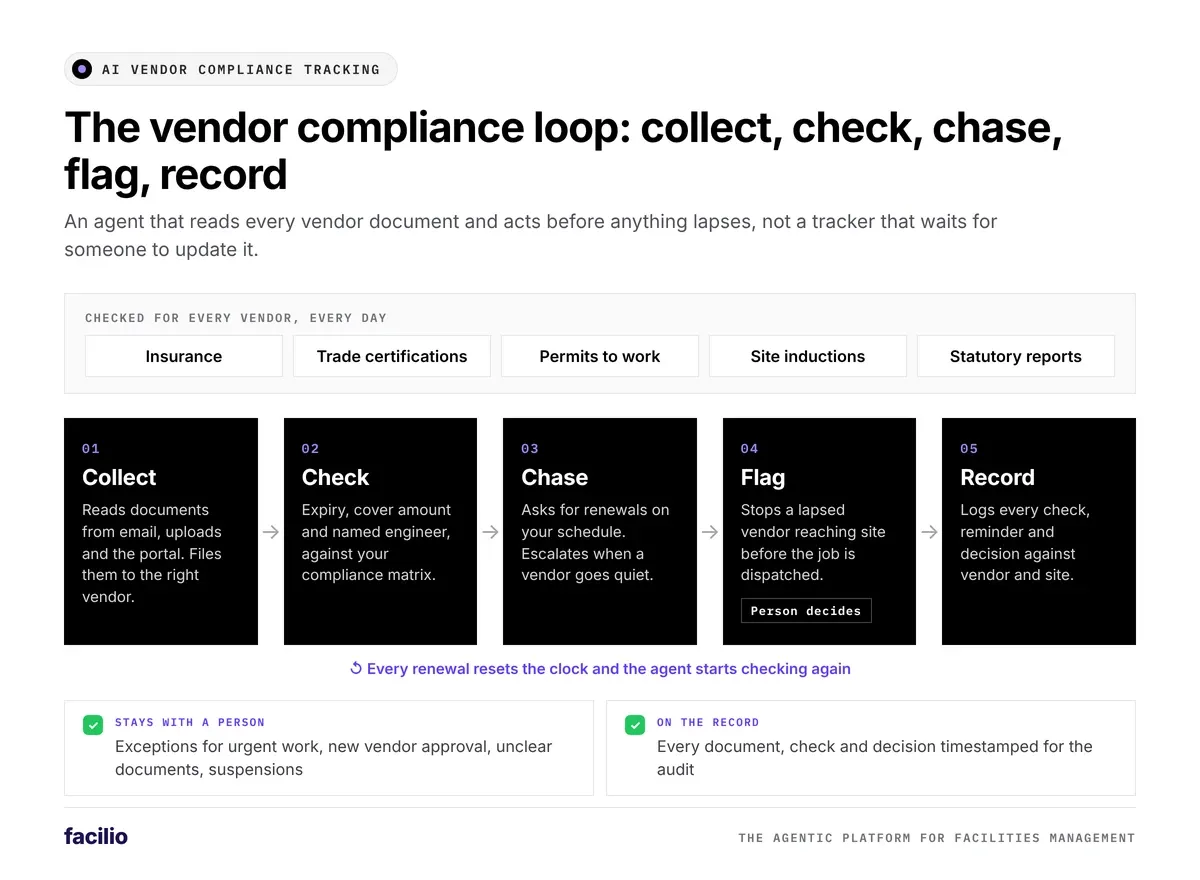
Step 1: It collects and reads every vendor document
New documents arrive by email, upload or the vendor portal. The agent reads each one, files it against the right vendor and flags anything your matrix needs that is still missing.
Step 2: It checks each document against your rules
Is it current? Does the cover meet the contract minimum? Is the named engineer the person booked for the job? Anything that fails gets a clear reason attached.
Step 3: It chases renewals before they lapse
On the schedule you set, for example 60, 30 and 7 days before expiry, the agent asks the vendor for the renewed document on email or WhatsApp. If the vendor goes quiet, it escalates to your vendor manager with the full history.
Step 4: It flags vendors with lapsed documents before they reach site
If a vendor's insurance or certification has lapsed, the agent flags them before the AI work order dispatch agent sends them to a job. A person then decides whether to hold the job, reassign it or approve a documented exception.
Step 5: It records every check for the audit
Every document, check, reminder and decision is timestamped and stored against the vendor and the site. That gives you audit-ready compliance evidence every day of the year, not just in the week before the audit.
Which compliance rules do you set, and which decisions stay with your team?
The agent only acts inside rules you define. You can set them per site, per client contract or per trade.
The rules the agent follows
- Compliance matrix: which documents each trade and site must hold, and the minimum cover for each.
- Reminder schedule: how far ahead of expiry the agent chases, and on which channels.
- Gate rules: which lapses stop a vendor being dispatched, and which only raise a warning.
- Escalation owners: who hears about a vendor that has not renewed, and when.
The decisions a person still makes
- Approving an exception for urgent work when a document has lapsed.
- Approving new vendors and the documents they submit.
- Judging any document the agent flags as unclear or unreadable.
- Suspending or removing a vendor in your vendor management software.
We built it this way on purpose. The agent does the checking. Your team keeps the judgement.
Catch the lapse before the audit does.
See our building compliance agent check vendor documents on your own contractor list.
How does AI compliance tracking compare with a manual tracker?
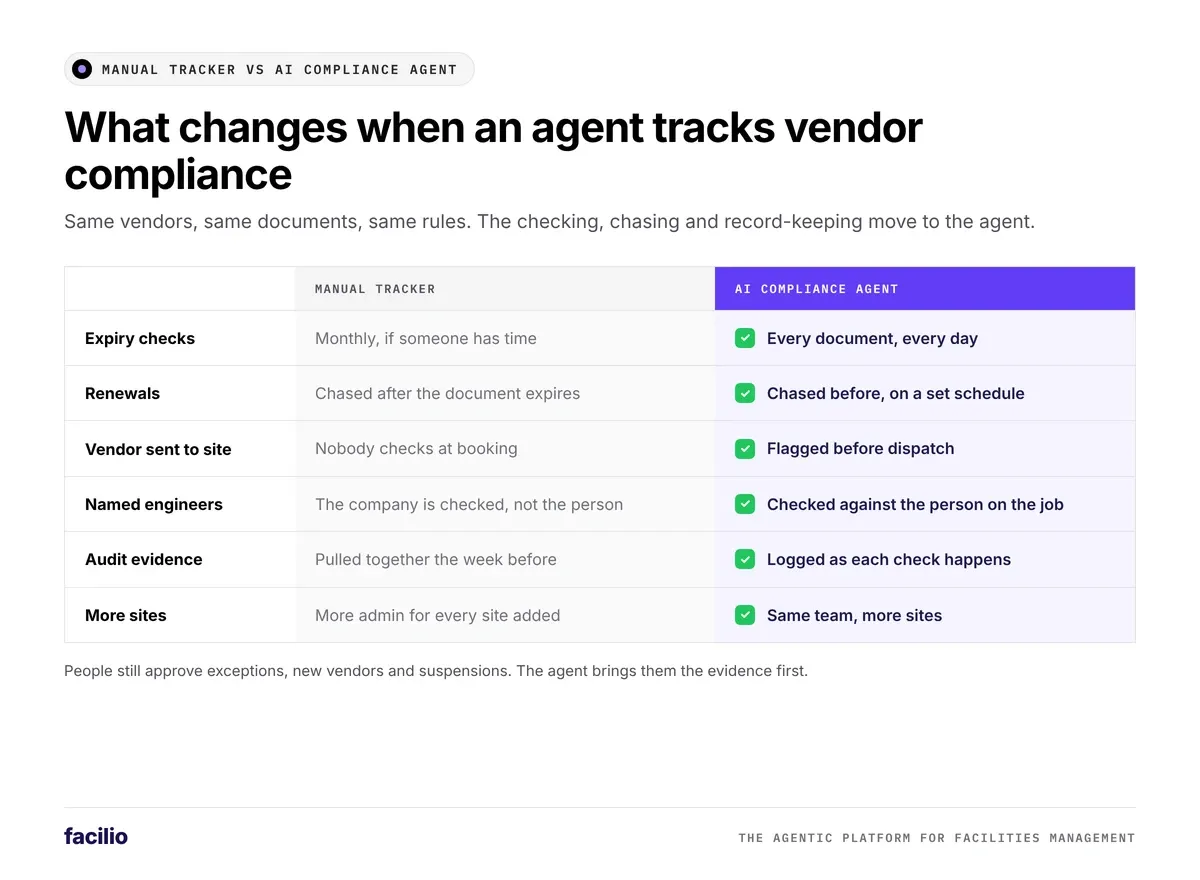
A spreadsheet tells you what was true the day someone last updated it. An agent tells you what is true today.
| Area | Manual tracker | AI compliance agent |
|---|---|---|
| Expiry checks | Monthly, if someone has time | Every document, every day |
| Renewals | Chased after the document expires | Chased before, on a set schedule |
| Vendor sent to site | Nobody checks at booking | Flagged before dispatch |
| Named engineers | The company is checked, not the person | Checked against the person on the job |
| Audit evidence | Pulled together the week before | Logged as each check happens |
| More sites | More admin for every site added | Same team, more sites |
How do you set up AI compliance tracking for your vendors?
Most teams we work with are live in weeks. This is the order we follow, because it shows you the gaps early and keeps risk low.
Step 1: Agree your compliance matrix
We turn your contracts, client requirements and safety policy into one matrix: trade, site, document and minimum cover. If you have been comparing contractor compliance software, this is the part most tools leave to you.
Step 2: Load the documents you already have
The agent reads the documents sitting in inboxes and shared drives, then gives you a first gap report. For many teams, it is the clearest view of their vendors they have ever had.
Step 3: Start with reminders, then switch on the gates
We begin with reminders and reports only. Once the data is clean, we switch on the gate rules that flag vendors at dispatch.
Step 4: Track the numbers every week
Three numbers tell you it is working:
- Fully compliant vendors: the share of active vendors with every required document current.
- Renewed before expiry: the share of documents renewed before they lapsed, not after.
- Flagged at dispatch: how many jobs were stopped from going to a vendor with a lapsed document.
We report them the same way we measure every AI agent we run: against the baseline you had before go-live.
How does Facilio track vendor compliance with AI agents?
We run vendor compliance as a live AI agent, not a folder of documents. Our building compliance agent is one of our AI agents for facility operations. It works on top of the CMMS and vendor records you already use. Our FM Ops Engineers set it up and run it with your team. It is live at enterprise customers today, working alongside the agent that turns compliance findings into work orders.
Why it does more than the compliance tracking you run today
What FM teams see on Facilio
Results our customers have reported on the platform.
Your vendors keep sending documents the way they do today. The agent reads them, checks them and chases them, so your team only sees the exceptions.
The bottom line: is AI vendor compliance tracking worth it?
Yes, if you work with more vendors than one person can check by hand. Every document needs the same checks, and that kind of repeat work is exactly what an agent does well. Your team still decides on exceptions, new vendors and suspensions.
Here is a simple first step. Pull your vendor list and check how many have a current insurance certificate on file today. If you cannot answer within an hour, that is where to start the agent.
See the AI agents live
Know which vendors are compliant today, not at the audit.
Our FM Ops Engineers build your compliance matrix, load your vendor documents and run the agent with your team.
Frequently asked questions about AI vendor compliance tracking
Can AI catch a contractor's licence or insurance expiry before it lapses?
Yes. Our agent reads the expiry date on every certificate and policy, checks it every day and chases the vendor for a renewal on the schedule you set. If the document still lapses, the vendor is flagged before they are sent to a job.
What vendor documents can an AI compliance agent track?
Insurance certificates, trade certifications, permits to work, site inductions and statutory service reports. You decide which documents each trade and site needs in your compliance matrix.
Does the agent stop non-compliant vendors from working?
It flags them before dispatch and holds the job for a person to decide, based on the gate rules you set. That person can hold the job, reassign it or approve a documented exception.
How does AI help with vendor compliance audits?
Every document, check, reminder and decision is logged with a timestamp against the vendor and the site. When the auditor asks, the evidence is already there.
Do I need a new system to track vendor compliance with AI?
No. Our agent runs on our own CMMS or alongside the CMMS and vendor records you already use. Vendors keep sending documents by email, WhatsApp or the portal.
About the Author

More from Facilio