Connected CMMS

 Connected Buildings
 Connected Refrigeration


 Download ebook

 Read case study


 Watch now


 Retail
 Healthcare
 FM Services
 Commercial Portfolios
 Corporate Facilities
 Education
 Data-driven Portfolio Ops
 Facility Management Software
 360° Asset Lifecycle
 Continuous Sustainability

 Blogs
Blogs
 Help docs
 Knowledge Hub
 ROI Calculator
 Ebooks & Guides
 Webinars
 Videos
 Case studies


 About us
 Newsroom
 Careers
 Contact us
 Partners
 Events



If you want to dispatch work orders with AI, you start by giving an AI dispatch agent four things: your SLA matrix, technician and vendor skills, service zones and past performance. From there, the agent assigns each job to the best-fit technician or vendor. It confirms they are on the way. If they go quiet, it escalates before the SLA slips, and it closes the work order once the job is done. Your team sets the rules and approves the exceptions.
We see the same pattern in almost every FM team we work with. A coordinator checks the SLA, works out who is certified for the asset, calls a vendor and then chases them. That works on a quiet Tuesday. It breaks when volume spikes, when the coordinator is on leave, or when a request lands at 11pm.
In this guide, we have tried to explain what AI dispatch is, the data it needs, how the dispatch loop runs, which rules you control and how to check accuracy in the first week.
Key takeaways
- AI dispatch assigns, confirms, escalates and closes. A rule that just picks a name is auto-assignment, not dispatch.
- The agent needs four inputs: your SLA matrix, skills and certifications, service zones and technician or vendor history.
- You set the thresholds, cost gates and escalation timers. You also decide which exceptions need a person.
- We always start with a shadow week, where every assignment is scored against your coordinators.
What is AI work order dispatch, and how is it different from auto-assignment?
AI work order dispatch is an agent that decides who attends a work order, then stays with the job until someone is on site. It reads the request and checks the SLA. It matches the skills the job needs, looks at who covers that location and weighs how each technician or vendor has performed before.
Most maintenance dispatch software stops at auto-assignment. A rule picks a name, and the job sits there. A dispatch agent keeps going. It waits for acceptance, chases silence, reassigns when it has to and records why it made each decision.
What data does an AI dispatch agent need before it can assign a job?
An agent is only as good as the data it reads. In our experience, four inputs do most of the work, and most FM teams already have them somewhere.
| Input | What it tells the agent | Where it usually lives |
|---|---|---|
| SLA matrix | Response and fix times by priority, asset class and client contract | CMMS, contract schedules |
| Skills and certifications | Who is qualified for HVAC, lifts, fire systems or electrical work | HR records, vendor files |
| Service zones | Which technicians and vendors cover which sites, and when | Rosters, vendor agreements |
| Technician and vendor history | Attendance, first-time fix, rework and response time | Work order history |
Live workload is the fifth input. It stops the nearest qualified technician from getting a fourth job while a colleague sits free.
How does the AI dispatch loop work, from assignment to a closed work order?
Every work order goes through the same four steps. It does not matter whether the job arrives at 2pm on a Tuesday or through multichannel service request intake at 11pm on a Sunday.
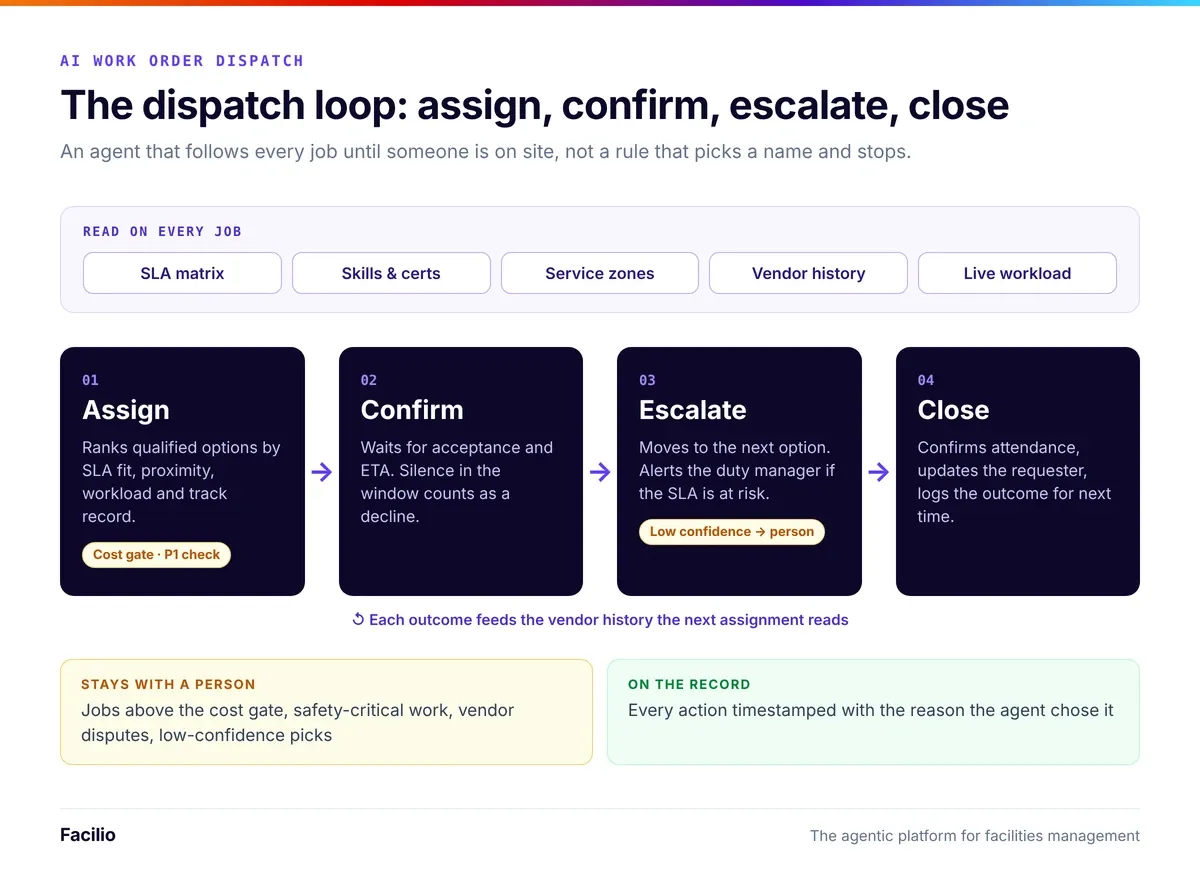
Step 1: The agent assigns the best-fit technician or vendor
It ranks every qualified option by SLA fit, distance, current workload and past performance. Then it assigns the top match and notifies them on the channel they already use.
Step 2: It waits for the technician or vendor to confirm
The agent asks for acceptance and an ETA. Silence counts as a no. So a job never sits unclaimed.
Step 3: It escalates before the SLA is breached
If the first choice declines or goes quiet, the agent moves to the next qualified option. If the SLA is at risk, it alerts the duty manager with the full history attached. This is the step where most teams miss SLA targets today, so it is the one we watch most closely.
Step 4: It confirms attendance and closes the job
When the technician checks in and finishes, the agent confirms attendance against the work order. It updates the requester and logs the outcome for next time. Every action gets a timestamp and a reason.
Which dispatch rules do you set, and which decisions stay with your team?
The agent only acts inside limits you define. You can set rules per site or per client contract, which matters if you are an FM service provider with different SLAs for each account.
The rules the agent follows
- Auto-assign threshold: routine jobs assign without review. P1 and safety-critical jobs can wait for a person to confirm.
- Cost gate: any job likely to go over a not-to-exceed amount goes to an approver first.
- Exception owners: you name who approves after-hours maintenance callouts, unfamiliar assets and vendors outside the preferred list.
- Escalation timers: you decide how long the agent waits for acceptance before it moves on.
The decisions a person still makes
- Approving jobs above the cost gate or outside contract scope.
- Releasing safety-critical work that needs a permit to work.
- Settling vendor disputes and removing vendors from the preferred list in your vendor management software.
- Reviewing any assignment the agent flags as low confidence.
We built it this way on purpose. The agent takes the volume. Your people keep the judgement.
Put dispatch on autopilot. Keep the judgement calls.
See our dispatch agent assign, confirm and escalate on your own SLA matrix.
How does AI dispatch compare with manual dispatch?
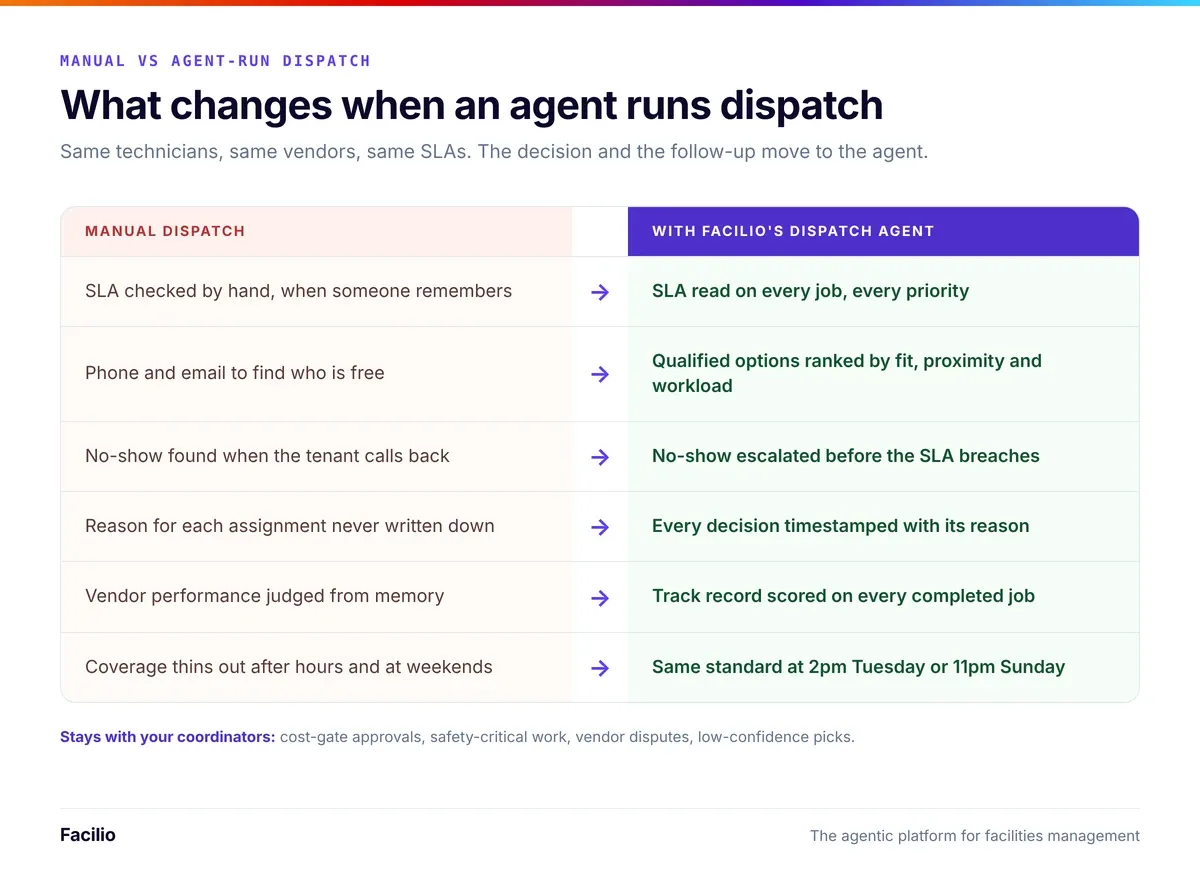
In one word: consistency. Every work order gets the same SLA check, skills match and follow-up, no matter who is on shift.
| Area | Manual dispatch | AI dispatch agent |
|---|---|---|
| How the assignee is chosen | Coordinator memory, a spreadsheet and phone calls | SLA, skills, zone, workload and history on every job |
| After-hours requests | Wait for the next shift or an on-call phone | Assigned the same way as daytime jobs |
| No-shows | Found when the requester complains | Escalated inside the acceptance window |
| SLA risk | Spotted after the breach | Flagged to the duty manager before it |
| Audit trail | Notes and call logs, if any | Timestamp and reason for every action |
| Growing volume | Needs more coordinators | Same team handles more jobs |
How do you set up AI dispatch and check its accuracy in the first week?
Most teams we work with go live in weeks, not months. This is the order we follow, because it keeps risk low and gives you real numbers to decide with.
Step 1: Map your SLA matrix and connect the data
We pull response and fix times, skills, zones and history into the agent's data model. Any gaps we find here are worth fixing anyway.
Step 2: Set the rules and exception owners
Together, we agree the auto-assign threshold, cost gates and escalation timers for each site or contract. Then we name who approves each exception.
Step 3: Run a shadow week alongside your coordinators
For one week, the agent proposes an assignment for every work order while your coordinators dispatch as usual. We compare the two every day on three numbers:
- Assignment accuracy: how often the agent picked what an experienced coordinator picked, or a better option.
- Reassignment rate: how often a job had to move to a second technician or vendor.
- Time to confirmed attendance: minutes from work order creation to an accepted job with an ETA.
Step 4: Go live one priority at a time
Once accuracy holds, we start with routine jobs and add higher priorities from there. The same three numbers keep getting reported every week, next to your wider work order analytics. Skipping the shadow week is one of the most common reasons AI projects in FM stall, so we never skip it.
How does Facilio run work order dispatch with AI agents?
We run dispatch as a live AI agent, not a rules engine. Our service dispatch agent is one of our AI agents for facility operations. It works on top of the CMMS you already use. Our FM Ops Engineers set it up and run it with your team. It is live at enterprise FM customers today, as one step in a chain of agents that carries a request from the first call to a paid invoice.
Why it does more than the dispatch you run today
What FM teams see on Facilio
Results our customers have reported, from published case studies.
Your coordinators keep the judgement calls. The agent takes the volume. And it runs the same checks at 2pm on a Tuesday as it does at 11pm on a Sunday.
The bottom line: is AI work order dispatch worth it?
Yes, if your coordinators spend more of their day finding, calling and chasing technicians than managing the work. Dispatch is the same set of checks on every job. An agent runs those checks every time, even at 11pm or in a volume spike. Your team still makes the calls that need judgement: spend above the cost gate, safety-critical work and vendor disputes.
Here is a simple first step. Pull last month's work orders and count how many needed a reassignment or missed the response SLA. Start the agent in shadow mode on the priority with the most misses. Track accuracy and time to confirmed attendance for a few weeks, then expand.
See the AI agents live
Dispatch that follows every job to the finish.
Our FM Ops Engineers map your SLAs, run the shadow week with you and take the agent live in weeks.
Frequently asked questions about AI work order dispatch
Can AI dispatch work orders without a coordinator?
Do I need to replace my CMMS to use an AI dispatch agent?
How long does it take to set up AI dispatch?
What happens when the agent assigns the wrong technician?
Is AI dispatch the same as auto-assignment in a CMMS?
About the Author

More from Facilio