






 Service intake

















FMX suits schools, campuses and public buildings that want work orders and room scheduling without dedicated IT, while IBM Maximo suits asset-heavy enterprises that need reliability engineering, whereas multi-site portfolios that want agents running intake and dispatch look beyond both.
The biggest difference between FMX and IBM Maximo is depth. FMX is a user-friendly cloud computerized maintenance management system (CMMS) built around the facility calendar. IBM Maximo is an enterprise asset management (EAM) suite built around the asset, with enterprise-grade depth in lifecycle, reliability and operational asset management.
That is why the two rarely share a shortlist. They meet only where one organization runs classrooms, offices and event spaces alongside central plants, fleets or utilities, such as a large school district, university, city or hospital system.
This guide compares FMX vs IBM Maximo on key features, pricing, pros and cons, AI, setup effort and verified reviews, then makes a clear call for each type of team. For a wider field, see the best cmms software roundup.
The FMX or Maximo call in three lines, decided by what you maintain and who runs the system, with the tables, profiles and pricing below backing each one up.
- FMX is the pick if your work is buildings, rooms and requests and no one on your team has time to administer an EAM system.
- IBM Maximo is the pick if you run central plants, fleets or utilities, need reliability-centered maintenance and can fund administrators and an IBM partner.
- If intake, dispatch, vendor follow-up and invoice checks eat the hours across many sites, look beyond both at Facilio, which can also run on top of either tool.
FMX vs Maximo at a glance: the master comparison
FMX vs Maximo on what a facilities lead compares first: key features, gated modules, add-ons, pricing, review scores and the buyer each one is built for.
| Platform | Key features | Hidden / gated features | Add-ons | Pricing | Reviews | Best for |
|---|---|---|---|---|---|---|
| FMX | Work Manager (requests, work orders, preventive maintenance), Event Manager (room, facility and equipment reservations), Warehouse Manager, Capital Planner, Utility Manager, FMX Iris | Sold as separate suites, so each module adds to the quote; Interactive Mapping is a paid add-on; the MCP server for outside AI tools is in early access | One-time implementation fee, in-person implementation at extra cost, facility condition assessment services | Quote only, based on users who manage work and the features enabled; public K-12 districts priced by student enrollment with unlimited users; requesters and vendors are free | G2 4.7 (47); Capterra 4.7 (455); TrustRadius 10 out of 10 (4) | K-12 districts, higher education, local government and non-profits that schedule spaces alongside maintenance |
| IBM Maximo | Maximo Manage (assets, work orders, preventive maintenance, inventory), Maximo Mobile, Health, Monitor, Predict, Visual Inspection, Space Management, Capital Planning | Predict, Monitor, industry solutions and ERP, HCM and SCM integrations need the Standard edition; AI Service consumes extra AppPoints; Space Management, Capital Planning, Lease and Inspection are separate packages | Extra users in blocks of 25, non-production environments, IBM Business Partner implementation | AppPoints; IBM estimates Essentials at USD 3,315.15 per month for up to 25 users; each Essentials package starts under US$ 40K per year | G2 4.4 (653); TrustRadius 7.9 out of 10 (219); PeerSpot 4.1 (33) | Asset-intensive enterprises in energy and utilities, oil and gas, transportation, manufacturing and government |
Sources: IBM Maximo pricing, FMX pricing, G2 comparison, TrustRadius comparison.
On FMX vs Maximo reviews, Maximo brings the far larger base, 653 G2 reviews against 47, while FMX scores higher on ease of use, setup and support from a smaller base that leans toward education and public buildings.
FMX vs Maximo feature-by-feature comparison
The FMX vs Maximo features that separate them, mapped module to module first, then grouped by area with Yes, Partial or No and one line of evidence for each.
Module-to-module map
Most FMX modules have a Maximo counterpart, but several sit in packages you buy separately, and one sits in a different IBM product altogether.
| What you need | FMX module | Maximo counterpart |
|---|---|---|
| Requests and work orders | Work Manager | Maximo Manage |
| Room, facility and event reservations | Event Manager | Space Management package; reservations in Maximo Real Estate and Facilities |
| Parts and stock | Warehouse Manager | Inventory in Maximo Manage, plus the Inventory Optimization package |
| Capital plans and condition assessments | Capital Planner | Capital Planning package |
| Facility inspections | Inspections and the Facility Inspection Tool | Inspection package |
| Utility bills and usage | Utility Manager | Not in Maximo; IBM sells its Envizi suite separately |
| IT assets | IT Asset Manager | Maximo IT |
| Field app | FMX Work List app | Maximo Mobile |
| Condition monitoring and prediction | None of its own; sensor partners such as SensorHubb | Maximo Monitor, Health and Predict |
| AI | FMX Iris | Maximo Assistant through AI Service |
Core maintenance
| Capability | FMX | IBM Maximo |
|---|---|---|
| Work order management | Yes (custom request forms, approval workflows, auto-assign by location, asset or skillset) | Yes (job plans, failure hierarchies, automated approval workflows) |
| Preventive maintenance | Yes (time, usage and inspection triggers) | Yes (time and meter based, plus reliability-centered maintenance) |
| Corrective and breakdown maintenance | Yes (reactive requests become work orders, with linked follow-up requests) | Yes (corrective work orders with failure codes) |
| Mobile app | Partial (requests and work orders; PM tasks and inventory records cannot be created in the app) | Yes (Maximo Mobile for field technicians) |
| Mobile offline mode | Not documented by FMX | Yes (online and offline synchronization) |
| Barcode and RFID scanning | Partial (QR codes) | Yes (barcode and RFID) |
| Inspections and checklists | Yes (facility inspections and checklists) | Yes (Inspection package) |
Asset and facility management
| Capability | FMX | IBM Maximo |
|---|---|---|
| Asset lifecycle management | Partial (service histories, warranties, downtime, repair-versus-replace reports) | Yes (acquisition to decommissioning, complex asset hierarchies) |
| Spare parts and inventory management | Yes (parts deducted on tickets, low-stock alerts, FIFO, LIFO or weighted average) | Yes (bins, stock levels, Inventory Optimization package) |
| Procurement | Partial (purchase orders sent to vendors; no ERP connector) | Yes (purchase requisitions, purchase orders and receiving) |
| Room and event reservations | Yes (approvals, conflict checks, rental invoicing, Occurrence Schedules) | Partial (Space Management package; full reservations in Real Estate and Facilities) |
| Capital planning | Yes (Capital Planner with inflation projections) | Yes (Capital Planning package) |
| Utility tracking | Yes (Utility Manager, new in 2026) | No (separate IBM product) |
| Lease management | No | Yes (Lease package) |
| Failure reporting and analysis | Partial (work order history and repair-versus-replace reports) | Yes (failure codes, failure hierarchies and failure history) |
| Reliability engineering | No | Yes (reliability-centered maintenance, Health risk scores) |
| Asset lifecycle costing | Partial (labor, parts and costs logged on work orders) | Yes (costs tracked across each asset's life, plus Capital Planning) |
Intelligence and integrations
| Capability | FMX | IBM Maximo |
|---|---|---|
| IoT and sensor data | Partial (sensor partners such as SensorHubb and iMonnit; no sensors of its own) | Yes (Maximo Monitor) |
| Predictive maintenance | No | Yes (Maximo Predict, Standard edition) |
| Computer vision | No | Yes (Maximo Visual Inspection) |
| AI | Yes (FMX Iris) | Yes (Maximo Assistant, through the AI Service add-on) |
| API and MCP | Yes (REST API; MCP server in early access) | Yes (REST APIs) |
| ERP integration | No (no ERP connector; built-in purchasing and invoicing) | Yes (ERP, HCM and SCM integrations on Standard) |
Deployment and support
| Capability | FMX | IBM Maximo |
|---|---|---|
| Deployment | Cloud only | SaaS or client-managed on Red Hat OpenShift, on premises or in AWS or Azure |
| Implementation | FMX-led onboarding with a dedicated account manager | IBM or IBM Business Partner, usually months |
| Ease of setup (G2) | 8.7 out of 10 | 7.5 out of 10 |
| Quality of support (G2) | 9.4 out of 10 | 8.5 out of 10 |
| Enterprise scalability | Partial (districts, campuses and multi-building organizations) | Yes (global, multi-site enterprises) |
The operational view
Beyond the feature list, the FMX vs Maximo gap shows up in how the work runs day to day: who can change a workflow, how deep the reports go and how much evidence an audit gets.
| Dimension | FMX | IBM Maximo |
|---|---|---|
| Audit trail | Yes (work order and request history) | Yes (regulatory audit trails across assets and work) |
| Real-time dashboards | Yes (backlog, completion times, reactive versus proactive work) | Yes (configurable KPIs, map views, scheduled reports) |
| Report flexibility | Partial (reviewers ask for more detail and exports) | Yes (deep, but custom reports usually need SQL or admin skills) |
| Asset hierarchies | Partial (buildings, locations and equipment) | Yes (multi-level hierarchies with failure codes) |
| Workflow customization | Yes (relatively simple; forms and workflows set up by facilities staff without IT) | Yes (highly configurable; changes usually sit with administrators) |
| Compliance evidence for regulated assets | Partial (inspections and attachments) | Yes (audit trails, RCM, validation for regulated industries) |
| Requester experience | Yes (request portal, public map reporting with Interactive Mapping) | Partial (self-service requests; occupant services sit in Real Estate and Facilities) |
Feature status from vendor pages and help documentation, checked November 2026.
FMX: the facilities CMMS built around requests and the calendar
What FMX does well, where it falls short and what its users say, from work orders and room bookings to its AI agent and its quote-based, suite-by-suite pricing.
FMX, short for Facilities Management eXpress, is a cloud CMMS and facility management platform based in Columbus, Ohio. It grew up in K-12 school districts, and the design still shows it: requests come from many non-technical people, and work orders share a screen with room bookings, events and capital plans.
Day to day, FMX is built around everyday facilities operations: maintenance requests, work order assignment, PM scheduling, facility and equipment records, inspection checklists and facility scheduling. It sells these as a set of suites, so you buy only the modules you need.
The tradeoff is depth. FMX does not try to model how assets fail the way an EAM suite does, and it leaves sensors and prediction to partners.
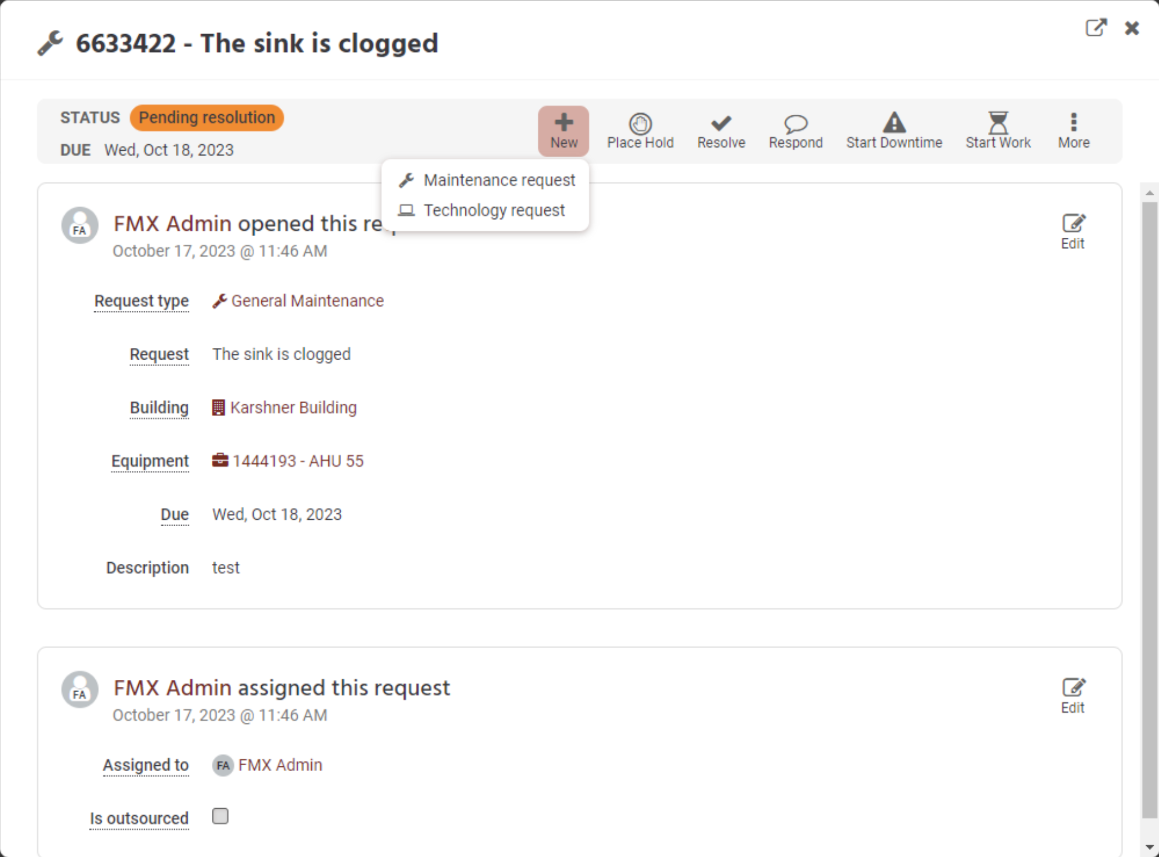
An FMX work request, with status, due date, building, equipment and assignee, and the New menu that adds a linked maintenance or technology request. Source: FMX help center.
Key industries: K-12 school districts, higher education, state and local government, non-profit and faith-based organizations, property management and light manufacturing. Districts weighing their options often start with this guide to cmms for schools.
Key features:
- Work Manager: requests arrive through customizable forms, move through approval workflows and are auto-assigned by location, asset or skillset, the same core that the best work order software tools compete on; Board View and SLA tracking arrived in 2026.
- Preventive and equipment maintenance: recurring tasks run on time, usage or inspection triggers, with service histories, warranties and downtime kept per asset, and technicians log labor and costs against each job.
- Event Manager: room, facility and equipment reservations on a drag-and-drop calendar, with approvals, conflict checks, rental invoicing and payments, which makes it a backbone of campus facility management at many FMX schools; Occurrence Schedules (2026) let one request hold several times and rooms.
- Custom requests: Project Requests, Key and Badge Management and facility inspections replace paper-based processes.
- Warehouse Manager: parts used on a ticket are deducted automatically, low-stock alerts fire, purchase orders go to vendors, and stock is valued by FIFO, LIFO or weighted average.
- Capital Planner: facility condition assessments, funding sources such as grants, bonds and levies, and inflation projections added in 2026.
- Utility Manager: new in 2026; bills entered by PDF upload, bulk import or email, with usage reporting across buildings.
- Interactive Mapping: visual location tracking and public map-based reporting portals for community or campus issues, sold as a paid add-on.
- FMX Iris and reports: a natural-language agent inside the work request module, plus reports on backlog, completion times, reactive versus proactive work and repair-versus-replace costs.
Pros:
- It is easy to learn and faster to deploy: non-technical staff pick it up quickly, and G2 users rate its ease of use 9.2 and ease of setup 8.7 out of 10, against 8.3 and 7.5 for the Maximo suite.
- Support stands out, at 9.4 out of 10 on G2 and 4.9 out of 5 for customer service on Capterra.
- Room, event and rental scheduling sits right next to maintenance, which few CMMS tools offer at this depth.
- Requesters, vendors and partners are not billable users, and public K-12 districts get unlimited users on enrollment-based pricing.
- Capital planning, utilities, fleet and IT assets can be added later as suites, without a change of system.
What reviewers say: FMX averages 4.7 out of 5 from 455 reviews on Capterra, with 4.9 for customer service, and 4.7 from 47 reviews on G2.
Brandi S., an office manager at an enterprise organization, wrote on G2 in November 2026 that technicians "can see their work orders in real time, prioritize them." The same review names the gap FMX users raise most: "the reports do not provide all the details we are looking for."
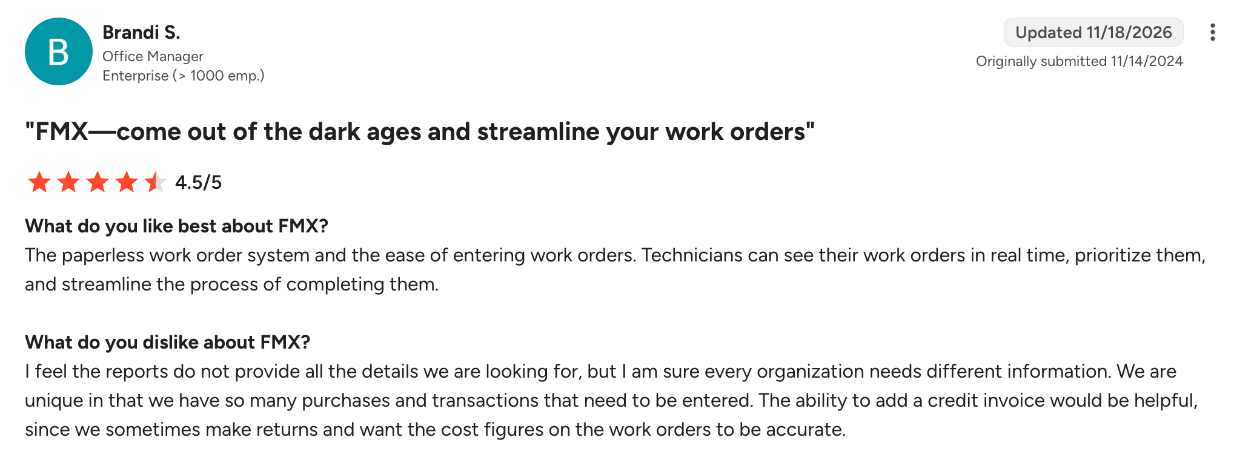
Brandi S. on G2, updated November 18, 2026.
Setup effort is the other recurring note. Jeremy F., a board member in government administration, wrote on Capterra in March 2026 that the only con is "all the work that goes into setting the system up." The fmx cmms review goes through the rest of the feedback.
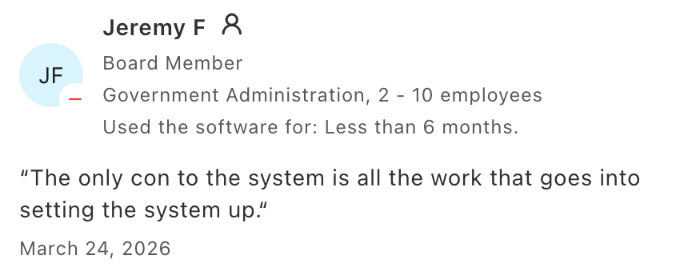
Jeremy F. on Capterra, March 24, 2026.
Cons:
- Reporting, analytics and enterprise integration are the thinner areas: built-in reports cover the basics, but teams with heavy purchasing or custom metrics end up exporting data, and there is no ERP connector.
- The FMX Work List app handles requests and work orders, but PM tasks and inventory records cannot be created in it, and it rates 3.6 from 22 App Store ratings and 3.1 on Google Play.
- There is no predictive maintenance, no reliability engineering toolset and no sensor hardware of its own, and asset hierarchies stay shallow, so complex plants with multi-level systems outgrow it.
- Pricing is quote-only and modular, so the first quote rarely shows the full bill once Event Manager, Capital Planner or mapping are added; the guide to fmx alternative options shows who prices differently.
IBM Maximo: the enterprise EAM suite built around the asset
What IBM Maximo does well, where it struggles and what its users say, from asset lifecycle depth and predictive tools to the admin effort and cost behind them.
IBM Maximo Application Suite (MAS) combines enterprise asset management, asset performance management (APM) and AI tools on one platform that tracks each asset from acquisition to decommissioning. It runs on Red Hat OpenShift, either as IBM-hosted SaaS or client-managed in your own data center, AWS or Azure.
Maximo is built for operations where a failed asset is expensive: power generation, grids, pipelines, rail fleets and factories. Day to day, it is built around the complete asset lifecycle: asset hierarchies and locations, preventive and predictive maintenance, work management, materials and inventory, failure reporting and analysis, and reliability and performance management.
That depth is real, and so is the effort of running it. Many customers keep dedicated administrators and an IBM Business Partner for setup and upgrades, and G2 reviewers tag "complexity" 25 times and "complex setup" 16 times.
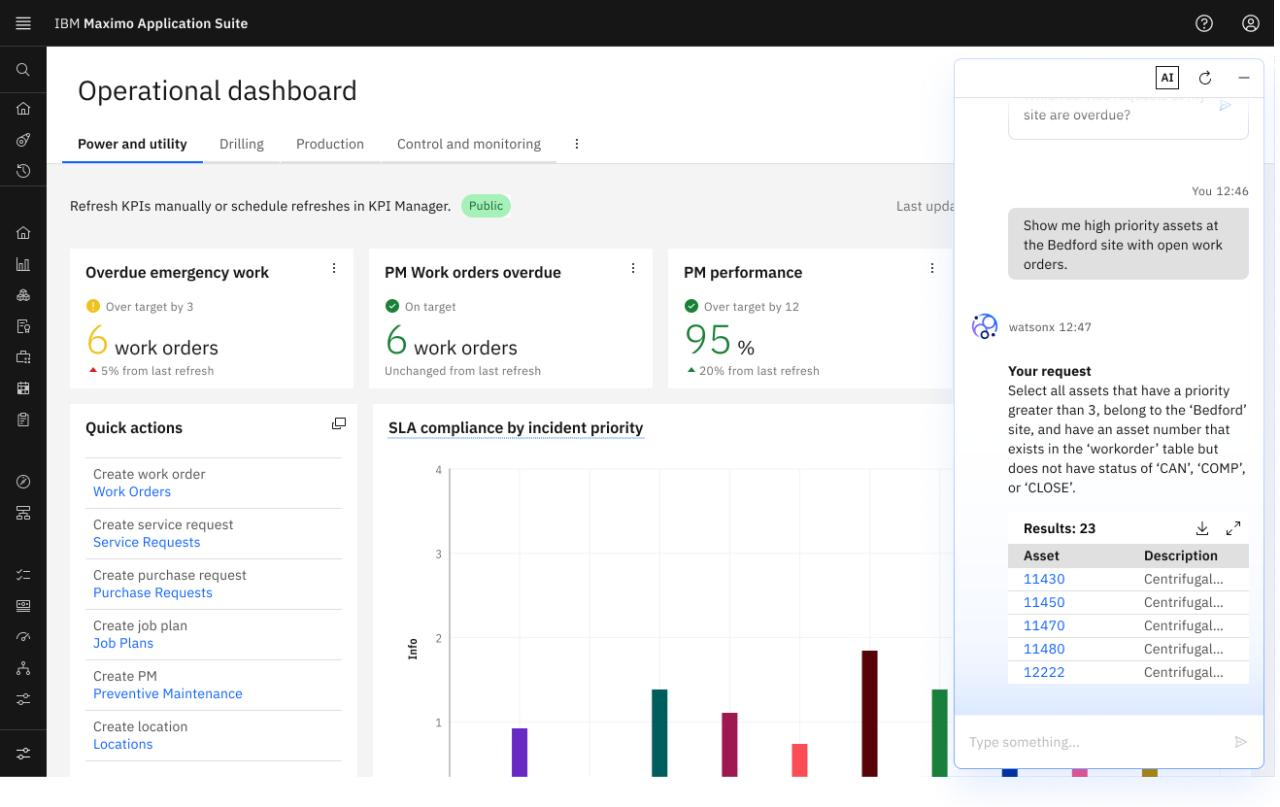
IBM Maximo Application Suite's operational dashboard, with the watsonx-based AI answering a plain-language question about high-priority assets with open work orders. Source: IBM.
Key industries: energy and utilities, oil and gas, travel and transportation, manufacturing and government.
Key features:
- Maximo Manage: the system of record for assets, locations, lifecycle histories, preventive and corrective maintenance and regulatory audit trails, and the reason Maximo is a fixture in best eam software comparisons.
- Work order management: job plans, failure hierarchies, failure reporting and automated approval workflows for planned, corrective and breakdown work, plus planning and scheduling for maintenance planners.
- Materials, inventory and procurement: spare parts, stock levels, bins, purchasing and receiving to cut carrying costs and stockouts, with Inventory Optimization as a separate package.
- Maximo Mobile: online and offline synchronization, barcode and RFID scanning, and remote task execution for field technicians.
- Maximo Health and Monitor: condition and risk scores built from asset history, inspections and near real-time IoT and sensor data.
- Maximo Predict and Visual Inspection: machine learning that forecasts failures and remaining useful life, and computer vision that spots defects in photos and video.
- Space Management, Capital Planning and Lease: facilities packages that IBM sells inside MAS Essentials, each priced on its own.
- Dashboards and reporting: configurable KPIs, map views and scheduled reports for maintenance and cost analysis.
Which Maximo is a facilities team actually buying?
IBM sells two products that facilities teams call "Maximo," and comparison sites mix them up: G2 pairs FMX with Maximo Real Estate and Facilities, while TrustRadius pairs it with the Maximo Application Suite.
| IBM product | What it covers | How it is priced |
|---|---|---|
| MAS Maintenance (Maximo Manage) | Assets, work orders, preventive maintenance, inventory, mobile | Essentials package, starting under US$ 40K per year |
| MAS Space Management and Capital Planning | Space, workplace and capital projects on the MAS platform | Separate Essentials packages, each starting under US$ 40K per year |
| Maximo Real Estate and Facilities (formerly IBM TRIRIGA) | An IWMS for leases, space, reservations, capital projects and facility work orders, with lease abstraction | Per module; G2 lists $42,000 flat per year per module |
Sources: IBM Maximo pricing, IBM Maximo Real Estate and Facilities, G2 listing.
If your main need is rooms, leases and capital projects rather than asset reliability, ask IBM which of the three you are being quoted before you compare prices.
Pros:
- Asset depth is unmatched in this pairing: hierarchies, failure codes, reliability-centered maintenance, condition scores and predictive models in one suite.
- It scales across complex, multi-site estates with one source of truth for asset health.
- Deployment is flexible, from SaaS to client-managed and on premises, which matters for regulated and security-sensitive sites.
- It is highly configurable, with extensive integration and customization options and a wide network of IBM Business Partners and industry solutions behind it.
What reviewers say: IBM Maximo Application Suite holds 4.4 out of 5 from 653 reviews on G2, and 86 percent of its 33 reviewers on PeerSpot would recommend it.
mostafa s., a senior network security engineer at an enterprise, gave Maximo 4 out of 5 on G2 in November 2026 for tracking "complete asset lifecycles across complex, multi-site infrastructure." The catch, in the same review: the containerized stack "requires specialized administrative expertise as well as substantial system resources." G2 marks the review as incentivized.
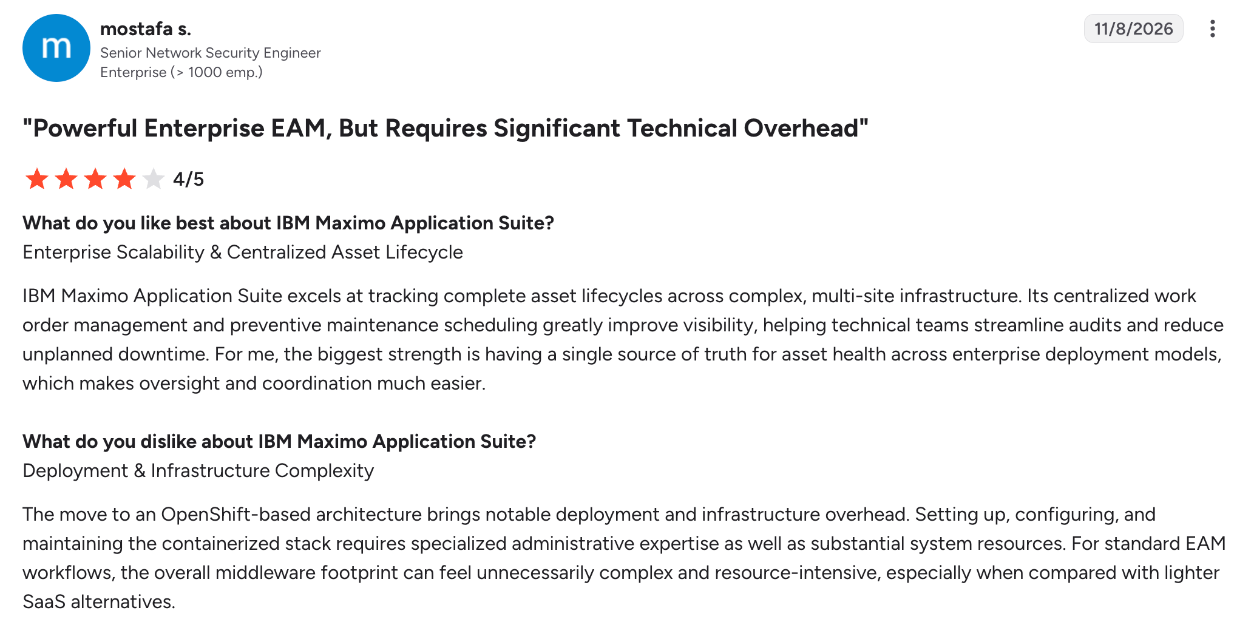
mostafa s. on G2, November 8, 2026.
On PeerSpot, Antony Mishra, a Java software engineer at GPA, credited Maximo in February 2026 with "moving away from pen and paper-based scheduling," then added that "the interface is not modern or particularly user-friendly." The ibm maximo cmms review covers more user feedback.
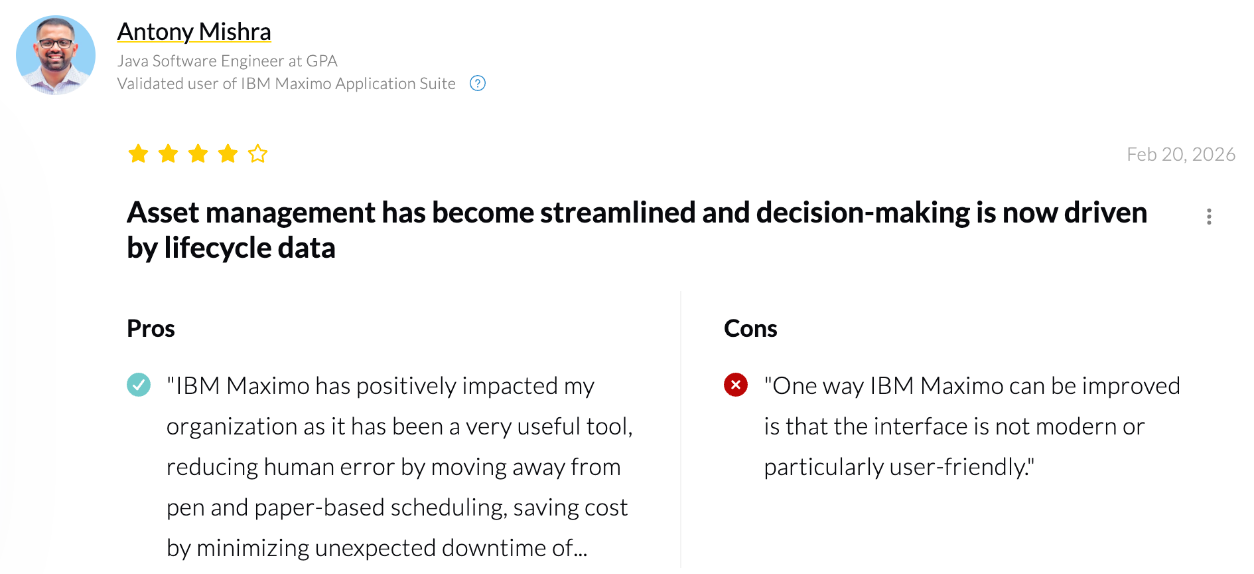
Antony Mishra on PeerSpot, February 20, 2026.
Cons:
- Expect a steep learning curve; G2 users rate its ease of use 8.3 out of 10, against 9.2 for FMX.
- Admin overhead is real: value depends on clean master data and a well-designed asset hierarchy, and the OpenShift-based stack, upgrades and custom reports tend to need dedicated administrators, SQL skills or consultants.
- The total cost of ownership is high, starting from IBM's own estimate of about USD 3,315 per month for Essentials before AI Service, extra environments or partner fees.
- Implementations are partner-led and run for months, and Maximo 7.6.1 sites have had to plan a move to MAS since base support ended in September 2025.
- The interface feels dated to many users, especially people who only submit requests or close simple work orders; teams that want something lighter can review the ibm maximo alternative options.
FMX vs Maximo pricing
FMX vs Maximo pricing works in two different ways: FMX quotes by users and modules, while IBM sells Maximo through AppPoints and per-package entitlements.
Neither tool publishes a simple per-user price list, and both quote the final number. What drives the quote is very different.
FMX: the price depends on the number of users who manage or close work and on the features and custom workflows you enable. Public K-12 schools get pricing based on student enrollment, with as many users as they need. Requesters, vendors and partners are not billable users. FMX adds a one-time implementation (setup) fee, with extra fees for in-person implementation, and offers a 14-day trial set up by its staff. The full breakdown sits in the guide to fmx cmms pricing.
IBM Maximo: IBM sells Maximo through AppPoints, a credit system that covers users and applications under one entitlement. Its own estimator puts MAS Essentials at USD 3,315.15 per month for up to 25 users and one production environment, with AI Service not included. Each Essentials package, such as Maintenance, Space Management or Capital Planning, starts under US$ 40K per year, and Inspection starts under US$ 47K. Standard and Premium are quoted, and line-item detail sits in the guide to ibm maximo pricing.
| Pricing factor | FMX | IBM Maximo |
|---|---|---|
| Pricing model | Users who manage work, plus features enabled | AppPoints by edition and package |
| Published price | No | Partial (IBM estimator and "starting under" package prices) |
| Starting figure | Quote | USD 3,315.15 per month (Essentials estimate, up to 25 users) |
| Free seats | Requesters, vendors and partners; unlimited users for public K-12 | None published |
| What bills separately | Each suite, Interactive Mapping, implementation | AI Service, extra users and environments, each package, partner services |
| Implementation | One-time fee; in-person work extra | Through IBM or a Business Partner, quoted separately |
Sources: FMX pricing, IBM Maximo pricing.
In practice, FMX lands as a departmental purchase, while Maximo is an enterprise contract that brings procurement, IT and a partner to the table.
FMX vs Maximo AI and add-ons
FMX vs Maximo AI, compared on what each tool can actually do today, how much it acts on its own, what is still in early access and how each one is licensed.
Both vendors shipped agent-style AI features in 2026, so this is a closer race than the rest of the comparison. The difference is scope and cost.
FMX Iris: FMX calls Iris "your AI agent for work management," and it lives in the work request module. It searches requests, equipment and buildings in plain language, runs bulk actions such as assign, respond, hold and resolve after you review them, and takes voice-to-text input. Admins control who can use it, and FMX states that customer data is not used to train its models. An MCP server, which lets outside AI tools read FMX data, is in early access. Teams that want agents doing more of the work on FMX can read about ai agents for fmx.
IBM Maximo AI Service: Maximo's AI sits in AI Service, built on IBM watsonx. Maximo Assistant answers natural-language questions, and MAS 9.2 gives it an agentic upgrade for multistep tasks. Work order intelligence clusters failures, spots duplicates and suggests similar past jobs, document extraction pulls data from manuals and leases, and Visual Inspection runs computer vision on photos and video. AI Service is an add-on that consumes AppPoints. For agents that run on top of an existing Maximo setup, see ai agents for ibm maximo.
| AI capability | FMX | IBM Maximo |
|---|---|---|
| Named AI | FMX Iris | Maximo Assistant (AI Service on watsonx) |
| Scope | Work requests, equipment and buildings | Work orders, assets, reliability, documents and inspection images |
| Autonomy | Acts on requests in bulk after you review the changes | Answers questions and, from MAS 9.2, runs multistep tasks |
| Release status | Live; MCP server in early access | AI Service 9.2.0 released December 2025; agentic features announced with MAS 9.2 |
| Licensing | Not priced separately on FMX's pricing page | Add-on that consumes AppPoints |
Sources: FMX Q1 2026 product updates, IBM MAS 9.2 announcement.
Neither one takes over whole jobs end to end yet; both help a person move faster inside the system.
Difference between FMX and Maximo on setup, admin and IT effort
The difference between FMX and Maximo shows most after signing: who runs the system, how long it takes to go live and which other systems it connects to.
FMX is built to be run by a facilities coordinator. Maximo assumes an administrator, and often a partner, behind it.
Implementation: FMX runs onboarding itself through a series of guided meetings over roughly two months, with a dedicated account manager. Maximo implementations go through IBM or a Business Partner and usually run for months, longer when you migrate from Maximo 7.6.
Day-to-day administration: in FMX, a coordinator adds users, edits request forms and builds workflows without IT. In Maximo, configuration, upgrades and custom reports sit with administrators who know the platform and, often, SQL.
Integrations: FMX connects to school and campus systems such as Google Admin Console, Veracross, Arbiter and Blackbaud, plus Samsara and sensor partners, but has no ERP connector. Maximo connects to ERP, HCM and SCM systems on the Standard edition, which is where large enterprises need it.
Deployment and technical architecture: FMX is cloud only. Maximo runs on Red Hat OpenShift as SaaS or client-managed, on premises or in AWS or Azure.
| G2 rating (out of 10) | FMX | IBM Maximo Application Suite |
|---|---|---|
| Ease of use | 9.2 | 8.3 |
| Ease of setup | 8.7 | 7.5 |
| Ease of admin | 8.4 | 7.9 |
| Quality of support | 9.4 | 8.5 |
| Meets requirements | 9.3 | 9.0 |
Source: G2 comparison, November 2026.
Maximo still meets requirements almost as well as FMX on G2. The capability is there; it simply takes more people to run.
Mid-page CTA: Running facilities across many sites? See how Facilio's agents take on intake, dispatch and vendor work.
FMX or Maximo by industry
FMX or Maximo by industry: where each one fits best, from school districts, campuses and office buildings to utilities, oil and gas, power plants and rail.
| Industry or setting | Better fit | Why |
|---|---|---|
| K-12 school districts | FMX | Room and event scheduling, staff requests and enrollment-based pricing |
| Colleges and universities | FMX, or Maximo for central plants | FMX for buildings, rooms and events; Maximo when the campus also runs power, utilities or research assets |
| Local government and public buildings | FMX | Requester portals and public map reporting; agencies that run water, transit or roads lean toward Maximo |
| Office buildings and commercial facilities | FMX | Requests, preventive maintenance and room booking for an in-house team; lease-heavy portfolios look at Maximo Real Estate and Facilities |
| Manufacturing plants | Maximo | Asset hierarchies, failure analysis and predictive maintenance on production equipment |
| Oil and gas | Maximo | Regulated assets, audit trails and condition monitoring |
| Power generation and utilities | Maximo | Networked and linear assets, reliability-centered maintenance |
| Rail and transportation | Maximo | Fleet and linear-asset depth, with IBM industry solutions |
| Large industrial and asset-intensive sites | Maximo | Health, Monitor and Predict at enterprise scale |
Fit based on each vendor's industry focus and the capabilities compared above. In short: schools and universities, public buildings and offices lean FMX; heavy industry leans Maximo.
When to choose FMX over Maximo
Choose FMX over Maximo when your facilities work is mostly buildings, rooms and requests, and nobody on your team has the time to administer an EAM suite.
- Most of your work starts as a request from a teacher, an office or a tenant, not as an alarm from a machine.
- Room, event and rental scheduling matters as much as the work order, for example community use of school buildings.
- Your team has coordinators and technicians but no system administrator, and you want changes made without IT.
- You want to start with work orders and add capital planning, utilities or fleet later, on a departmental budget.
When to choose Maximo over FMX
Choose Maximo over FMX when your whole operation depends on asset reliability, and you already have, or can fund, the people and partners an EAM suite needs.
- You maintain central plants, fleets, utilities, linear assets or production equipment where a failure is expensive.
- Reliability-centered maintenance, condition monitoring and predictive maintenance are part of the plan, not a future wish.
- Regulators or insurers expect a full audit trail on critical assets.
- Maximo has to exchange data with SAP, Oracle or another ERP, HCM or supply chain system.
- Security or policy rules require a client-managed or on-premises deployment.
FMX vs Maximo vs Facilio: the option for building portfolios
FMX vs Maximo vs Facilio, side by side, for teams that run a large multi-site building portfolio and want agents to take on the work around the work order.
FMX runs the calendar and Maximo runs the asset. Facilio comes at the problem from a third side: agents that take on the facilities jobs around the work order, on Facilio's own CMMS or on the one you already use. If FMX is the one you are weighing against Facilio, the fmx vs facilio comparison covers that pairing in full.
| Capability | FMX | IBM Maximo | Facilio |
|---|---|---|---|
| Built for | Schools, campuses and public buildings | Asset-intensive enterprises | Multi-site building portfolios |
| Core record | Cloud CMMS | EAM and APM suite | Its own CMMS, or the CMMS you already run |
| Asset depth | Work orders, PM, warranties | Full lifecycle, RCM, predictive | Asset lifecycle, PPM and live building data; no RCM or linear-asset modeling |
| Room and event scheduling | Yes, with rentals and payments | Partial (Space Management; Real Estate and Facilities) | Partial (rooms, desks and spaces; no event rentals) |
| Building systems and energy | Partial (sensor partners, utility bills) | Partial (Monitor for IoT; energy data through a separate IBM product) | Yes (BMS data, fault detection and energy analytics) |
| Vendor and contractor work | Vendors added free | Purchasing and contracts | Vendor coordination agent plus contractor compliance tracking |
| AI | Iris acts on requests you review | Maximo Assistant, an add-on | Agents that run intake, dispatch, vendor follow-up and invoice checks |
| Deployment | Cloud | SaaS, client-managed or on premises | SaaS or behind your firewall |
| Pricing | Quote by users and suites | AppPoints, enterprise contract | Quote by portfolio size, users and scope |
| Right for a single site | Yes | Rarely | No, built for large portfolios |
Facilio capabilities from its product pages.
Teams already weighing Maximo against Facilio can go deeper in the maximo vs facilio comparison.
Choose Facilio when
Facilio is worth a look when the hours go into the jobs around the work order, such as intake, dispatch, vendor follow-up and invoice checks, at many sites.
Where FMX runs the calendar and Maximo runs the asset, Facilio puts agents to work on the facilities jobs around the work order. Choose Facilio when:
- You run a multi-site portfolio, and desk hours go into taking requests, dispatching technicians, chasing vendors and checking invoices rather than into the repairs themselves.
- You want those jobs handled by agents for service intake, service dispatch, vendor coordination, invoice processing and building compliance, with a person approving anything outside the limits you set.
- You want building systems and energy data in the same record as your work orders, on a cmms software core that also works offline on a technician's phone.
- You already run FMX or Maximo and do not want to replace it, since Facilio's agents can work on top of either system.
FM Ops Engineers, Facilio's own facilities and AI specialists, build the agents with your team and stay on to run them, so you do not need to hire for it.
If you run one district, one campus or one plant, FMX or Maximo will serve you well on its own. Facilio is built for large, multi-site portfolios, and a single site rarely needs that much platform.
What industry leaders say about their transition to Facilio
Three education and property operators moved their facilities work onto Facilio, and each linked case study below carries figures you can check for yourself.
- Purdue University Fort Wayne (higher education, Indiana): replaced a 16-year-old CMMS across 55 buildings and 3 million square feet, digitizing 1,100-plus assets and 400-plus PPM schedules in a 10-week implementation.
- Breck School (PreK to 12, Golden Valley, Minnesota): a 500,000 square foot campus with no formal CMMS moved onto one platform and put more than 150 safety assets on a digital inspection schedule.
- Investa (commercial office, Australia): brought 150-plus vendors that sat in three separate databases, for payments, on-site safety and work orders, onto one platform.
Figures from each linked Facilio case study, checked November 2026. More campus examples sit on the Facilio education software page.
Verdict: FMX or Maximo for your team
The FMX or Maximo decision comes down to what you maintain and who will run the system day to day, so here is the call for each kind of facilities team.
- Choose FMX if your work is buildings, rooms and requests, run by coordinators and technicians rather than system administrators. It is easier to learn, faster to set up and priced for a department.
- Choose IBM Maximo if your operation depends on asset reliability, you need condition monitoring and predictive maintenance, and you can staff the administrators and partners it needs.
Still torn? Run both demos against the same three scenarios: a room booking with a work order attached, a failed pump with its full history, and the month-end report your director asks for.
And if the real cost is the hours your team spends on intake, dispatch, vendors and invoices across many sites, we would be glad to show you how Facilio's agents take that work on. Book a demo.
Want the work done for you?
Our FM Ops Engineers scope your first AI agent on your own sites, then build it, run it and stay with you.
Frequently asked questions about FMX vs Maximo
Short answers to the questions buyers ask most when they compare FMX vs Maximo, from what each one is to price, setup time and fit for schools and campuses.
What is the difference between FMX and Maximo?
FMX is a cloud CMMS and facility management platform built for ease of use, room scheduling and requests from non-technical staff. IBM Maximo is an enterprise asset management suite built for asset-intensive operations that need reliability engineering, condition monitoring and deep audit trails.
What does FMX stand for?
FMX stands for Facilities Management eXpress. It is a cloud facilities and maintenance platform based in Columbus, Ohio, used most by K-12 districts, colleges, municipalities and non-profits.
Is Maximo owned by IBM, and is it the same as TRIRIGA?
Yes, IBM owns Maximo. TRIRIGA is a separate IBM product that now ships as Maximo Real Estate and Facilities, an IWMS for leases, space and capital projects, while the Maximo Application Suite covers enterprise asset management.
Is Maximo a CMMS or an EAM?
Maximo is an EAM suite. It includes everything a CMMS does, such as work orders, preventive maintenance and inventory, then adds asset lifecycle, reliability, condition monitoring and predictive tools that a typical CMMS like FMX does not.
What is Maximo similar to, and is it like SAP?
Maximo competes most often with SAP's asset management tools, Hexagon EAM and Oracle's EAM. It is similar to SAP in scale and depth, but SAP's maintenance tools live inside its ERP, while Maximo is a standalone suite that connects to an ERP.
Is FMX or Maximo cheaper?
FMX is usually cheaper. It is quoted by users and modules, with free requesters and enrollment-based pricing for public K-12. Maximo uses AppPoints, and IBM's own estimate for its entry Essentials edition is about USD 3,315 per month for up to 25 users.
Which is better for K-12 schools and campuses, FMX or Maximo?
FMX is the better fit for most K-12 districts and campuses, since room and event scheduling, requester portals and enrollment-based pricing are built in. Maximo makes sense for a university that also runs a central plant, utilities or research assets.
How long does each take to implement?
FMX runs its own guided onboarding, typically over about two months. Maximo implementations go through IBM or a partner and usually take several months, longer when you migrate from an older Maximo version or connect an ERP.
Can you migrate from FMX to Maximo?
Yes, but plan it as a project rather than an export. FMX lets you export records and offers a REST API, and Maximo loads data through its integration tools. Most of the effort goes into designing the asset hierarchy, locations and failure codes and cleaning master data first.
What is a modern alternative to FMX and Maximo for multi-site portfolios?
For multi-site building portfolios, look at platforms that pair a CMMS with agents that handle intake, dispatch, vendor coordination and invoice checks. Facilio is one example, and its agents can also run on top of FMX or Maximo instead of replacing them.
About the Author

More from Facilio