






 Service intake
















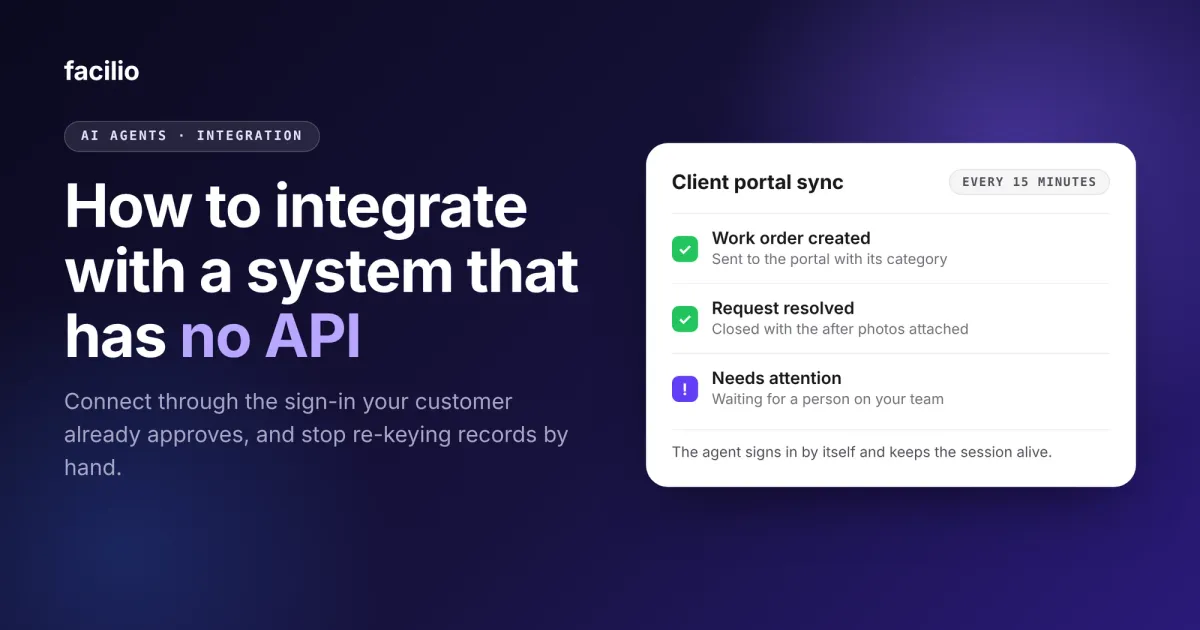

You can integrate with a system that has no API by connecting the way a person does: through the sign-in and screens the vendor already provides, using access the system's owner has approved. A software agent then reads and writes on a schedule, so your team stops re-keying the same records by hand.
Many systems facilities teams rely on were never built to be connected. A client's FM portal, a landlord's tenant portal or an older property platform may take data only through its own screens. At five work orders a day, that is an irritation. At multi-site volume, it becomes a daily batch that someone has to finish.
Key takeaways
- A system with no API is not a dead end: an agent can sign in with the customer's own approved account and use the same screens a person does.
- Before you connect, confirm the owner has approved the access, the terms allow automated use, and you have listed the exact records to send and read.
- A reliable connection needs more than a script: sign-in handling, retries, health checks and an alert when a failure repeats.
- AI handles the judgment steps, such as choosing a category, while your team keeps access, exceptions and credential changes.
- Facilio connects to systems like this today. A UAE facilities provider uses it to send work orders into a client portal with no API.
What is a system with no API, and where do facilities teams run into one?
A system with no API accepts and shows data only through its own screens. There is no supported way for another program to read or write its records.
The most common case is a client or landlord portal that a service provider must use to receive and close work. Others are older property and finance platforms, and tools where the vendor sells API access only through extra licensing or partner approval.
In each case the customer owns the data and holds a login. Nothing lets another system use that data directly.
What are your options when a system has no API?
There are five realistic options. The right one depends on how often the data changes, whether you must write back, and who has approved access.
| Option | What it involves | When it fits | What to watch |
|---|---|---|---|
| Ask the vendor for an API or export | You request API access, a scheduled report or a data export. | The vendor offers it at a cost and timeline you accept. | Licensing and approvals can take months, and some vendors never offer access. |
| Scheduled file exports and imports | Someone exports a file on a schedule and loads it elsewhere. | You only read data and a day's delay is fine. | The file is a snapshot, and it rarely helps when you must write back. |
| Keying records by hand | A person copies each record in through the screens. | Volume is very low. | Time grows with every record, errors creep in, and it is usually a once-a-day batch. |
| Recorded automation scripts | A script replays clicks and keystrokes. | A narrow, stable task. | Scripts stop when a screen or sign-in prompt changes, and someone has to repair them. |
| An agent using the customer's approved sign-in | The agent signs in with the customer's own account, reads and writes through the screens and keeps running. | Records must move both ways within minutes and the owner has approved access. | It needs agreed access, a defined record list, monitoring and a named credential owner. |
This guide covers the fifth option, because it removes the daily re-keying while the other system stays exactly as it is.
What should you check before you connect to a system with no API?
Six checks keep the connection safe for the customer and reliable for your team. Work through them before anyone builds anything.
- Owner approval: The organisation that owns the system approves the connection in writing. The agent signs in as a named user with only the permissions that role needs, never a shared system account.
- Terms of use: Confirm that automated access is allowed. If the terms are unclear, ask the vendor or the customer's IT team first.
- Sign-in method: Find out whether the system uses single sign-on, an authenticator code or a network security gateway, because each changes how the session stays alive.
- Records and fields: List the records, the fields on each and the allowed values, such as the portal's own category lists, so nothing is guessed.
- Permissions: Give the agent only what a person in that role would have. For the wider principles, see what a facilities AI agent can access.
- Credential owner: Name one person who is told when a password changes or a one-time code secret is reset. That is the most common reason a connection needs a human.
Not sure which system to connect first?
Tell us the portal your team keys into every day and we will map what a connection would involve.
Try this week: find your first candidate
List every system your team keys data into by hand. Next to each, write the records per day and the minutes per record.
The system with the largest daily total is your first candidate for a connection.
How does an agent connect to a system with no API, step by step?
A dependable connection follows five steps. They are the same whether the system is a client portal or an older platform.
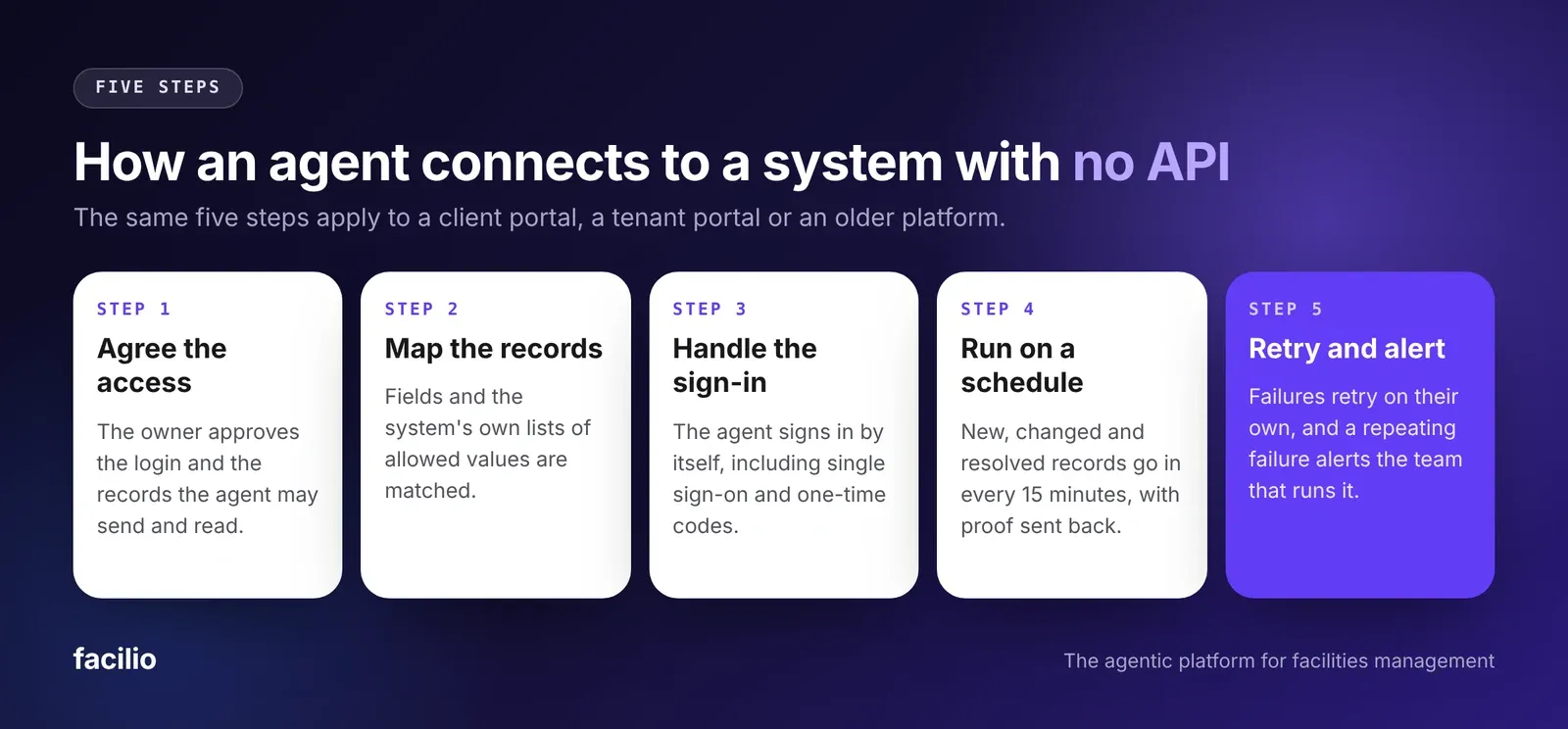
Step 1: Agree the access and the scope
The owner approves the login the agent will use, a named user's access with only that role's permissions, and the records it may send and read.
Writing this down at the start prevents arguments later about what the connection was allowed to do.
Step 2: Map the records and the allowed values
Each field in your system is matched to its counterpart in the other one. The other system's own lists, such as categories, buildings and floors, are loaded so the agent can only choose values it will accept.
Step 3: Handle the sign-in the way the system requires
The agent signs in by itself, including any single sign-on page, security gateway or authenticator code, and keeps the session alive between runs.
No person has to sign in and type a one-time code before each run.
Step 4: Run on a schedule and send proof back
Every 15 minutes, the agent picks up records that are new, changed or resolved and sends them through the screens. When the work is done, it moves the record through the system's workflow and attaches proof, such as the after photos.
Step 5: Retry failures and raise an alert
Temporary failures are retried automatically. Records that need a person go to a needs-attention queue.
If a failure keeps repeating, an alert reaches the team that runs the connection.
What does the agent decide, and what does your team decide?
Connecting a system does not hand over control of it. The agent does the repeated, rule-based work. Your team keeps every decision that carries risk.
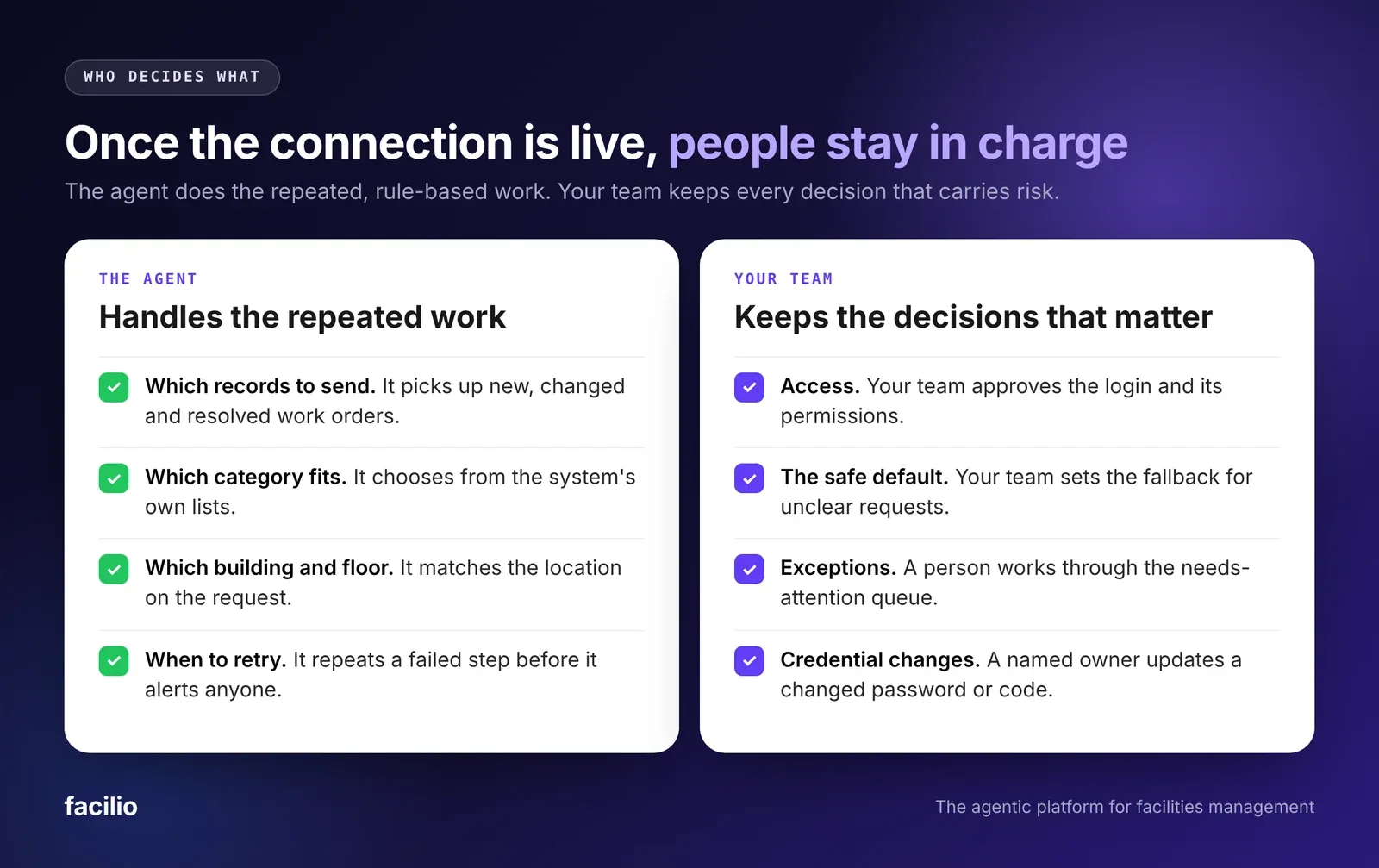
The same governance rules apply as for every Facilio AI agent. Human checkpoints and thresholds are agreed before go-live, every action is traced and can be replayed, and the agent acts as the user, with only that user's permissions and never a shared system account.
Accuracy is measured against a baseline agreed up front. To see how, read how to measure whether an AI agent is working.
How does a connected agent compare with keying records by hand?
Here is how the usual way of handling a portal with no API compares with a connected agent, on the five points that change a team's day.
How does Facilio connect to systems that have no API?
Facilio builds the connection on Facilio Build (formerly Facilio Vibe), using the customer's own approved access. Our FM Ops Engineers, Facilio's forward-deployed engineers, build it with your team, run it and keep improving it.
Your team needs no technical staff or training. Facilio's CMMS stays the system of record, and the other system stays as it is.
Once live, the connection opens up four things:
- AI agents on top of the system: a helpdesk agent, a payment validation agent or a custom one can work on the other system as well as on Facilio. See our AI agents for facility operations.
- Data in both directions: work orders, assets and invoices can flow into Facilio and back out.
- Purpose-built apps: an app for one use case can be delivered in days to a few weeks, as in how Facilio builds custom facilities apps.
- Automation and dashboards across tools: reports and workflows can span systems that never shared data before.
The same connections are available through Facilio MCP. The guide to using a CMMS from ChatGPT or Claude explains how.
What does this look like at Berkeley Services?
One of Berkeley Services' clients runs a work order portal with no API, behind single sign-on. Berkeley's team used to key work orders in by hand, once a day, and someone read each request to choose its categories.
Since the connection went live in October, each reactive work order reaches the portal within 15 minutes of being raised in Facilio. An AI agent picks both sub-category levels, and the building and floor are matched automatically.
When the work is done, the request moves through the portal's workflow and closes with the after photos. The connection signs itself in, and Berkeley is emailed only if a password or one-time code secret changes.
Berkeley Services, client portal connection. Read the full Berkeley Services story.
What does your team see on Facilio?
The connection has its own Sync view. It shows the queue waiting for the next run, items needing attention, items completed and the time of the last run.
Your team can open the Mappings and Classification tabs to see how locations and categories are matched, add one work order to test it, or run the queue on demand.
When is connecting to a system with no API not worth it?
Connecting through the screens is not right every time. Four situations call for another route.
- A reasonably priced API exists: use it, because a supported API is more stable than a connection built on screens.
- The terms do not allow it: if the terms prohibit automated access and the owner will not approve it, do not connect.
- The volume is very low: if only a few records a week go in, keying by hand may cost less than building and monitoring a connection.
- The screens change often: a connection built on screens needs an update after each redesign, so a system that changes without notice is a poor candidate.
The bottom line: is it worth connecting a system that has no API?
It is worth it when your team keys records in every day, the owner has approved access, and the volume is high enough that a daily batch leaves records waiting.
Then a connected agent sends each record within minutes, makes the category call, closes the record with proof and tells the right person when something needs attention.
Your first step is the list from the earlier checklist: find the system with the largest daily total.
Connect your first system
Stop re-keying records into a portal with no API.
Our FM Ops Engineers build the connection, test it on your records and stay to run it with your team.
Frequently asked questions about integrating with a system that has no API
Can you integrate with a system that has no API?
Yes. You can integrate with a system that has no API by using an agent that signs in with the customer's own approved account and works through the system's screens. It can read records, send new ones and close them on a schedule, so your team does not re-key anything by hand.
Is connecting to a system without an API secure?
It is secure when it uses an account the system's owner has approved, limited to the permissions a person in that role would have. Facilio's agents act as the user whose login they use, with only that user's permissions. Every action is traced and can be replayed, and the credential owner is told if a password or one-time code secret changes.
What happens when the system changes its screens?
The connection may stop working until it is updated. Failed steps are retried automatically, and if a failure keeps repeating, an alert reaches the Facilio team that runs the connection, so the problem can be fixed before it interrupts your team's work.
How long does it take to build a connection to a system with no API?
It takes days rather than months on Facilio, because our FM Ops Engineers build on the Facilio platform instead of starting from scratch. The exact time depends on the sign-in method and on how many record types the connection needs to handle.
Do you need to replace your CMMS or the other system to connect them?
No. Facilio's CMMS can be the core system of record, and Facilio's agents also run on a customer's existing CMMS, ERP and finance systems, so the connection adds to what you already run.
About the Author

More from Facilio