Connected CMMS

 Connected Buildings
 Connected Refrigeration


 Download ebook

 Read case study


 Watch now


 Retail
 Healthcare
 FM Services
 Commercial Portfolios
 Corporate Facilities
 Education
 Data-driven Portfolio Ops
 Facility Management Software
 360° Asset Lifecycle
 Continuous Sustainability

 Blogs
Blogs
 Help docs
 Knowledge Hub
 ROI Calculator
 Ebooks & Guides
 Webinars
 Videos
 Case studies


 About us
 Newsroom
 Careers
 Contact us
 Partners
 Events



Enterprise facilities teams manage far more than work orders. They collect site feedback, allocate rooms, record incidents, coordinate visitors, and capture data that has to reach finance or operations.
When each task sits in its own spreadsheet, form or single-purpose app, the work does not stop at completing the task. Teams still have to move information between tools, reconcile duplicate records, chase missing details, and work out who owns the next step.
A custom facilities management app is a focused application built for one recurring facilities task, such as room booking, visitor check-in, incident reporting or time capture, that runs on the facilities platform's own records and permissions rather than as a separate product with its own database and login.
Why disconnected tools add work to enterprise facilities teams
The cost is felt in the handoffs: Another login for site staff, another place to maintain room or vendor data, and another workflow that may not connect to the records used for decisions. A custom facilities app can bring a recurring process closer to the data and actions the operation already relies on.
- Less duplicate entry when an app can use existing site, space, asset, vendor or work-order records.
- Clearer ownership when each request or response routes to a defined person or queue.
- Faster follow-up when a submission can trigger the next action instead of waiting in a separate inbox.
- Better visibility when activity is recorded with the operational context needed for reporting.
That does not mean every local process needs its own app. The best candidates are repeatable workflows where the current workaround creates friction and the right users, records and decisions can be clearly defined.
Have a workflow that still runs on spreadsheets and handoffs?
Request an AI agent demo →What a custom facilities app does, and how Facilio builds one
A custom facilities app is a focused interface for a specific job the standard product does not quite cover. It could help a visitor check in, a technician log time against a work order, or a facilities team allocate rooms from live availability.
With Facilio, FM Ops Engineers work with your team to take that workflow from idea to a working app. Facilio Build supplies the app environment; the platform's records, identity controls, integrations and agent capabilities can then support the process around it.
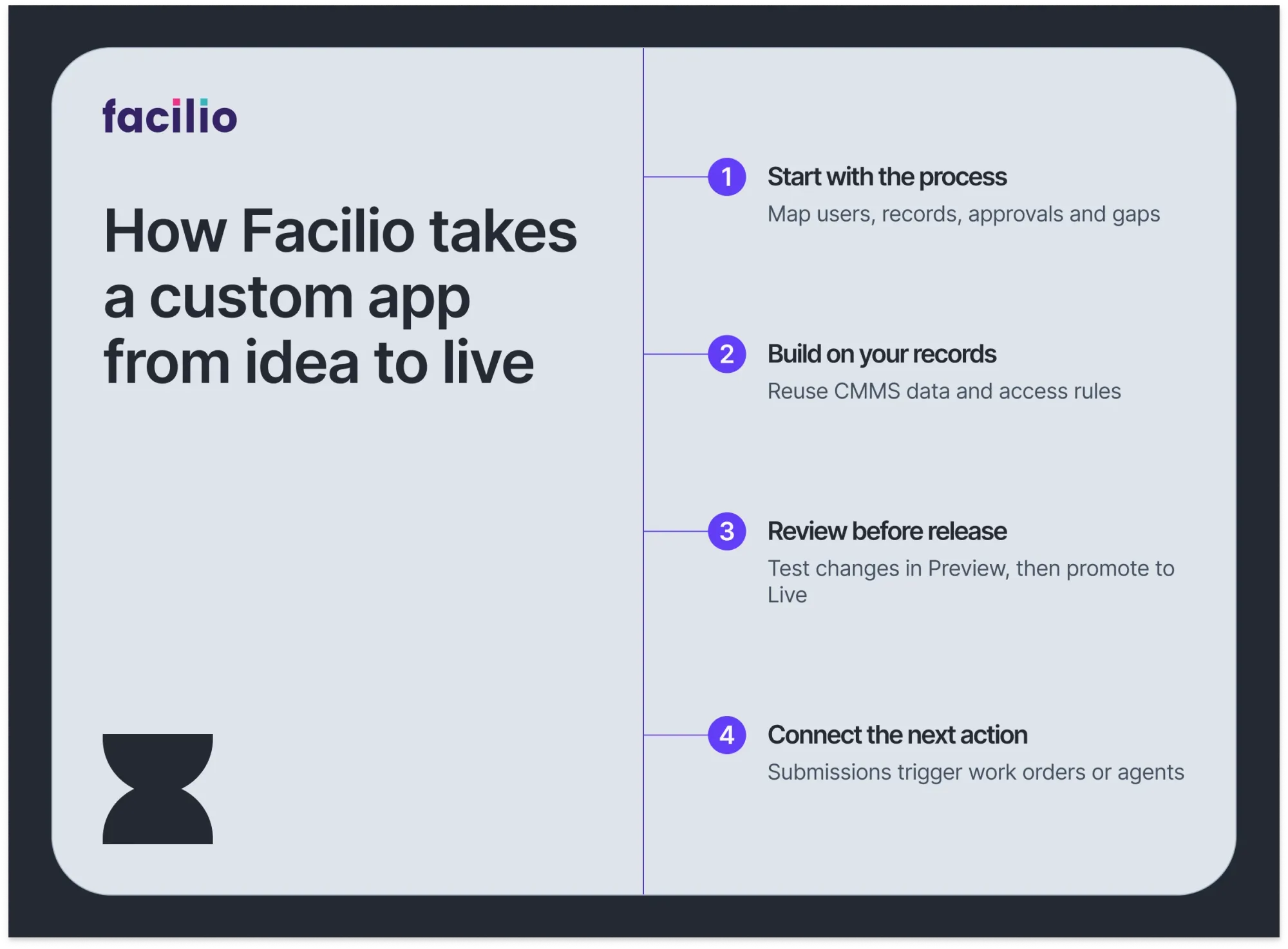
1. Start with the process, not the screen
The team maps who starts the workflow, what information they need, which records the process should read or update, where approvals belong, and what should happen when something is incomplete. A clear scope keeps the app focused on the job it needs to do.
2. Build around the operation's data and access rules
Where appropriate, the app can work with the sites, spaces, assets, vendors and work orders already held in the enterprise CMMS, so nothing is re-entered. Facilio Bespoke DB can hold workflow-specific data that does not belong in the CMMS. Facilio Connections provides a governed way for apps and agents to take authorised actions in connected systems.
Access is configured for the app's users and actions. Server-side functions run in an isolated environment, and external calls use Connections rather than exposing credentials in the browser. The same security controls and certifications that govern the CMMS, including regional data residency and per-customer isolation, apply to every app built on it, because the app is part of the Facilio Atom agentic platform rather than a separate system.
3. Review the workflow before updates reach users
A working version gives the team something concrete to review against its process and data. After an app has a live version, subsequent changes can be tested in Preview and deliberately promoted to Live. The first deployment follows a different path: Facilio's platform notes that it goes live directly so there is a working app to show. Plan initial testing with that in mind.
4. Connect the app to the next useful action
A form is more valuable when the information it captures does not stop there. A facilities incident can create a work order; a utility bill parser can make data ready for validation; a request portal can send a booking into a shared queue. Where it helps, apps can also call Facilio agents to continue the workflow.
The customer team brings process knowledge and user feedback. FM Ops Engineers build and refine the app with them. Support, change ownership and service arrangements should be agreed as part of each deployment.
Custom apps Facilio has built for facilities teams
These project examples show how a focused app can make a small but frequent job easier to complete, and easier to connect to the rest of the operation.
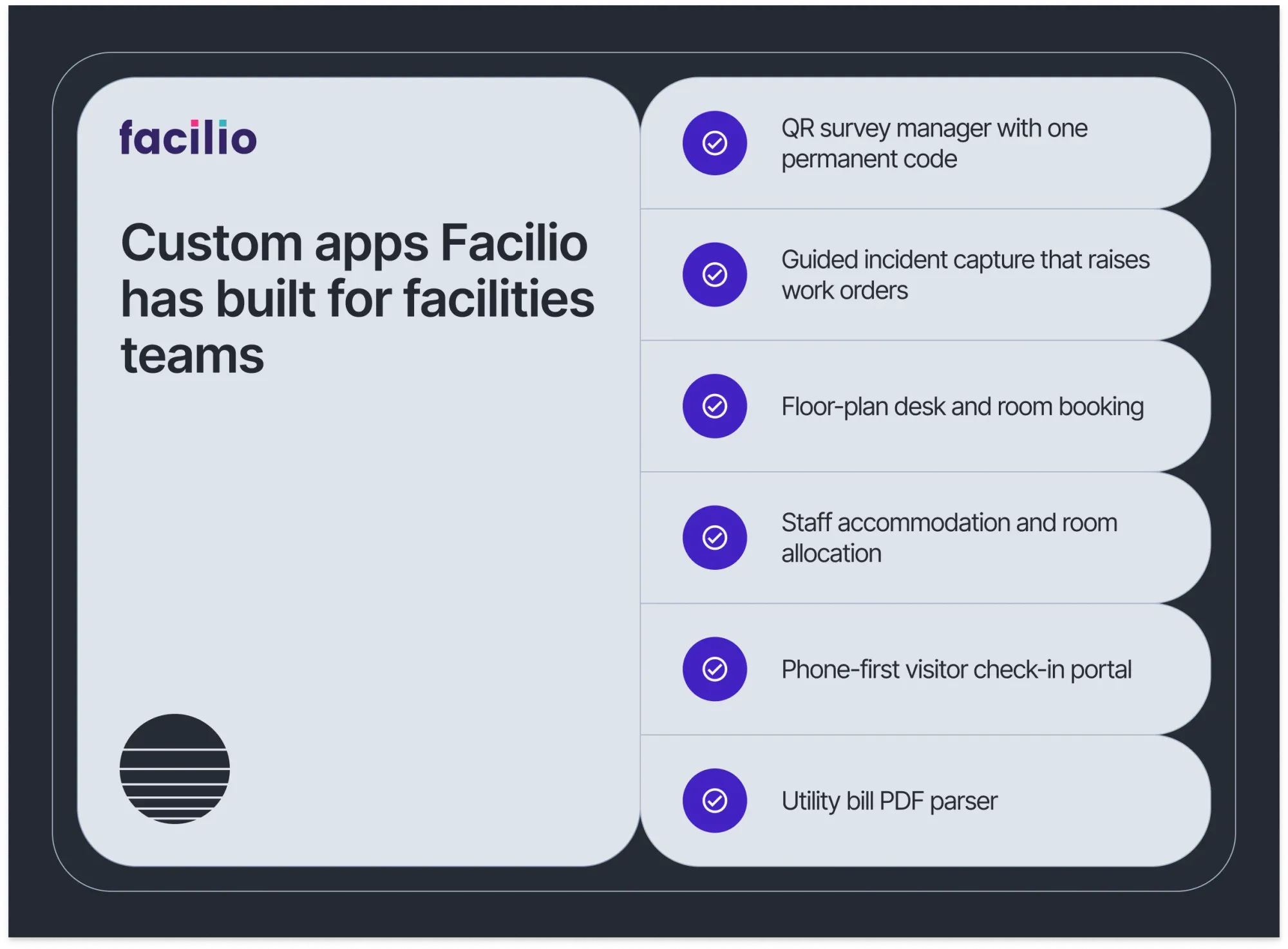
A. Keep every location's survey current with one QR code
A nuclear-energy operator needed to update site feedback surveys without replacing QR codes posted around its locations. Facilio built a survey manager with one permanent code per location. The team can update the survey behind the code, and each scan opens the current version. That means no outdated forms left in circulation and no reprinting each time questions change.
Survey updates moved from days to minutes. For another portfolio, the measure to track is the time required to change a survey, distribute it, and route responses to the right owner.
B. Capture incidents once, then start the response
An Australian facilities operation used to record incident details across different modules. Facilio built a guided reporting form for the notification, the incident description, injured people and witnesses. Notifications and escalation can fire automatically, and the workflow raises a work order before approval.
For the team, the value is a more complete incident record and a clearer path from report to response. It also closes the gap that paper-based safety compliance leaves open, where a report waits in one module while the corrective action sits in another. A useful measure is the time from initial report to work-order creation and escalation.
C. Let teams book from the floor plan
A floor-plan booking app lets users reserve desks and rooms from a calendar view built around the spaces they already recognise. The project also includes hotel-style room booking, blocking and reservation handling, which is useful when a site has to manage both day-to-day spaces and longer stays. The booking reads the same space management records that drive the floor plan, so a room blocked for maintenance disappears from the booking view automatically.
These apps were delivered in days against a conventional estimate of one to three months. Treat that as a project comparison, not a guaranteed timeline; data readiness, integration scope and stakeholder review affect each build.
D. Manage accommodation and room allocation in one flow
A staff-accommodation app brings buildings, floors, rooms, beds and occupants into one occupancy view. Teams can check people in and out, block rooms for cleaning or repair, and make a room unavailable while a work order remains open.
A related booking workflow routes guest requests from the client portal and staff requests from the maintenance app into one front-office queue, with availability by site, building and floor. That booking app was built in about 11 hours against an estimate of 15 to 23 developer days. A related public self-sign-up flow took about 7 hours against a 7 to 11 developer-day estimate. These are build-time comparisons from the project materials, not promised delivery times for every app.
Energy · Middle East
Nuclear-energy operator
What was built
A dynamic QR survey manager: one permanent code per location, with the survey template editable at any time and every response tagged to its form version.
Outcomes
- Survey updates moved from days to minutes
- Reprinting and redistribution of codes ended
- Responses always collected against the current form
Facilities services · Middle East
Staff accommodation provider
What was built
Buildings, floors, rooms and beds in one occupancy view, with check-in and check-out per occupant and a shared front-office booking queue across sites.
Outcomes
- Allocation from live availability, with no double bookings
- Rooms blocked for cleaning or repair automatically
- Booking app built in about 11 hours against a 15 to 23 developer-day estimate
E. Make visitor check-in work from a phone
A mobile visitor portal supports check-in by QR code or link, one-time-code verification, site-induction acknowledgement, and autofill for returning visitors. This portal was built and delivered in one day. It extends the host, site and induction records that touchless visitor management already keeps, into a public, phone-first flow that needs no reception desk.
That gives visitors a shorter path through check-in and gives site teams a consistent record of who arrived and completed induction. Before launch, confirm how the visitor record connects to the host, the site, and any required safety process.
F. Turn utility bill PDFs into structured records
A utility bill parser extracts account, meter and charge fields from a PDF so the details can be reviewed and entered into Facilio without starting from a blank record. It can also retain corrections made for a building and apply them to later bills.
Extraction is the first half of the job. The second half is validating each utility bill against meter, tariff and prior-bill records before finance pays it, so the parsed data becomes a decision rather than a document.
Other concepts in the project materials include contractor self-onboarding and parts search linked to procurement. The pattern repeats across the facilities teams Facilio works with: A small, frequent task, built on the records the operation already trusts.
See a custom app running on live facilities data
Bring one recurring task. Our FM Ops Engineers scope it with your team and show how it would run on your records.
Should you build a custom app, integrate a tool, or keep the process?
A custom app is not automatically the right answer. If an existing product already fits the workflow and connects cleanly to your systems, integration may be simpler. If the process is rare or still changing, keep it lightweight until the requirements are clearer.
Consider a custom app when the task happens often, the current workaround creates repeat effort, and the outcome needs to link to facilities records or follow-up actions. Before build begins, agree on the user, the owner, the access rules, the integration scope, and the measures that will show whether the app helped.
How to measure whether the app helped
For surveys, track update time and response routing. For incident reporting, track time to escalation and work-order creation. For bookings, track allocation time and conflicts. For check-in, track completion and induction records. Set the baseline first, then report observed results separately from expected benefits.
Start with the workflow your team repeats
A custom facilities management app can remove repeat entry and handoffs when it fits the actual process and connects to the records people need. Facilio's examples range from QR surveys and incident reporting to accommodation booking, visitor check-in and bill parsing.
Pick one recurring task. Map its users, data, approvals and next action. Then compare the value of building a focused app with integrating an existing tool or keeping the current process.
Frequently asked questions
What is a custom facilities management app?
A custom facilities management app is an application designed around a specific facilities task, such as room booking, visitor check-in, incident reporting or time capture. It is most useful when it can work with the right operational records and connect the task to what happens next.
How does Facilio build a custom facilities app?
FM Ops Engineers scope the workflow with the customer team, build a working version in Facilio Build, review it with users, and refine it for the agreed process. Connections, existing records and Bespoke DB can support the integrations and data the app needs.
How quickly can a custom app go live?
Project examples range from a day to a few weeks. The right estimate depends on the workflow, the data, the access model, the integrations, and the review needed. Those examples are reference points, not a universal service-level commitment.
Can a custom app work with our CMMS and other systems?
An app can be designed around records available on the Facilio platform. Connections can support actions in external systems when the required integration, authorisation and configuration are in place. Confirm the specific system and access model during discovery.
Who supports the app after launch?
Facilio's FM Ops Engineers work with the customer team through build and refinement. Confirm the ongoing support and change-ownership model during scoping so every app has a clear owner after it goes live.
About the Author

More from Facilio