







 Service intake















Maintenance Care suits facility teams that want one flat monthly price with unlimited users, while Limble suits maintenance crews that need deeper PMs, offline mobile and ERP links, whereas large multi-site portfolios look beyond both.
Maintenance Care vs Limble is a choice between one flat price and per-user depth. Maintenance Care is a simple CMMS with unlimited users for one monthly price, aimed at schools, senior care, healthcare, hotels and properties. Limble is a mobile-first CMMS priced per user, built for plant and multi-site crews that need offline access, meter-based PMs and parts control.
If most of your people only submit requests and a small crew closes the work, Maintenance Care's flat price likely decides it. If technicians live in the app all day, Limble's depth does.
Below you get a side-by-side table, key features, pros and cons, verified reviews and current pricing. For a wider shortlist, see the roundup of the best CMMS software.
Maintenance Care or Limble comes down to who needs a login and how deep your maintenance planning goes. Here is the short answer before the detail below.
- Choose Maintenance Care if: many people need full access, from staff to vendors, and you want one predictable bill. $250 a month covers unlimited users.
- Choose Limble if: a focused technician crew needs offline mobile, meter-based PMs, spare parts and ERP links, and you are fine paying per user.
- Look beyond both if: you run a large multi-site portfolio and want the intake, vendor, invoice and compliance work done for your team, not only tracked. Facilio fits that case.
Maintenance Care vs Limble at a glance
This Maintenance Care vs Limble table lines up what buyers compare first: key features, what each plan holds back, add-ons, price, reviews and best fit.
Ratings were checked on Capterra and G2 in November 2026.
| Platform | Key features | Hidden or gated features | Add-ons | Pricing | Reviews | Best for |
|---|---|---|---|---|---|---|
| Maintenance Care | Work orders with a request page, PM scheduling and library, asset lifecycle with depreciation and warranty, vendors, iMCare mobile app | Free plan caps at 2 users, 3 PMs, 5 assets and 3 vendors; parts, barcode scanning, custom forms and reporting need the paid plan; API and Tableau only on Enterprise Elite | GetSensored wireless sensors (sold as a separate product), room booking, housekeeping | Free plan; $250 a month with unlimited users; Enterprise Elite quoted | Capterra 4.7 (111), G2 4.6 (111) | Schools, senior care, healthcare, hospitality and property teams with many users |
| Limble | Work orders with QR code requests, PMs with AI PM Builder, asset and downtime tracking, mobile app, custom dashboards | Standard caps attached procedures and advanced analytics at 3 a month; offline mode, spare parts, vendors, POs, API and ERP or IoT links (costs may apply) start at Premium+; SSO is an add-on on Premium+ and included on Enterprise; multi-location reporting on Enterprise | SSO add-on on Premium+; ERP and IoT integrations where "additional costs may apply" | Per user, quoted through a calculator; reported at about $28 to $35 (Standard) and $55 to $69 (Premium+) per user per month | Capterra 4.8 (764), G2 4.8 (703) | Plant, food and beverage, and multi-site maintenance teams with a focused technician crew |
Capterra's side-by-side scores break the ratings down further:
| Capterra score | Maintenance Care | Limble |
|---|---|---|
| Overall | 4.7 | 4.8 |
| Value for money | 4.8 | 4.7 |
| Functionality | 4.5 | 4.6 |
| Ease of use | 4.7 | 4.8 |
| Customer service | 4.8 | 4.9 |
Sources: Capterra Maintenance Care vs Limble, Maintenance Care pricing, Limble pricing, Maintenance Care on Capterra, Limble on Capterra, Maintenance Care on G2, Limble on G2.
Maintenance Care vs Limble feature-by-feature comparison
The Maintenance Care vs Limble matrix below shows where each tool says Yes, Partial or No, with the plan each feature needs, so the tier gating is clear.
| Capability | Maintenance Care | Limble |
|---|---|---|
| Core maintenance | ||
| Work order management | Yes: online request page and task assignment; duplicate checker on the paid plan | Yes: QR code work requests; unlimited requesters on every tier |
| Priorities and urgent work | Yes: task priority settings (paid plan), alerts for urgent requests, past-due work orders flagged | Yes: priority sorting of work orders; custom escalation notifications on Enterprise |
| Requester updates | Yes: automatic work order status updates | Not detailed; request review and approval from Premium+ |
| Preventive maintenance | Yes: scheduling and a PM library on every plan; calendar planner on the paid plan | Yes: calendar PMs on every tier; meter and threshold triggers from Premium+ |
| Mobile app (iOS and Android) | Yes: iMCare; a Lite version on the free plan | Yes: on every tier |
| Mobile offline mode | Not documented | Partial: Premium+ and Enterprise only |
| Custom forms and checklists | Partial: custom fillable forms on the paid plan | Yes: procedures on every tier (Standard capped at 3 a month); signature capture from Premium+ |
| Workflow automation | Partial: rules automation on the paid plan | Yes: workflow automations on every tier; custom approval workflows on Enterprise |
| Asset and facility management | ||
| Asset lifecycle | Yes: make, model, serial number, location, depreciation, warranty and life expectancy | Yes: unlimited asset hierarchies, asset QR codes, automatic downtime reporting and Asset Snap nameplate capture |
| Parts and inventory | Partial: paid plan; reorder minimum alerts, parts linked to work orders, parts across locations | Partial: min/max thresholds with automatic reorder tasks from Premium+; transfers and cycle counts on Enterprise |
| Purchase orders | Not listed on the pricing page | Partial: from Premium+ |
| Vendor management | Yes: assign work to vendors and message contractors on every plan (3 vendors on free) | Partial: share work orders with vendors and track insurance certificates from Premium+ |
| Labor and time tracking | Yes: task duration monitoring on every plan | Partial: time and cost tracking from Premium+; custom labor categories on Enterprise |
| Multi-site management | Partial: multiple facilities on the paid plan; Tableau for multi-location data on Enterprise Elite | Partial: multiple locations and regions on Enterprise |
| Space and room booking | Partial: 3D space on Enterprise Elite; room booking module | No |
| Intelligence and integrations | ||
| Sensors and IoT | Partial: its own GetSensored temperature and humidity sensors; sensor integration on the paid plan | Partial: partner sensors such as Augury and Monnit from Premium+ |
| Anomaly detection | No | Partial: from Premium+ |
| AI features | Partial: listed on paid plans; the homepage still marks AI as coming soon | Yes: Practical AI features, gated by tier |
| API access | Partial: Enterprise Elite only | Partial: REST API from Premium+ |
| Deployment and support | ||
| Free plan | Yes: 2 users | No |
| Single sign-on | Not listed | Partial: add-on on Premium+, included on Enterprise |
| Onboarding and support | Data entry team sets you up; enhanced onboarding on Enterprise Elite | Customer success manager listed on its plans; paid migration services |
| Uptime SLA | Not published | Yes: 99.99 percent on every tier |
Sources: Maintenance Care pricing, Limble pricing, Limble Practical AI.
The operational view below goes one level deeper, into how each tool handles daily accountability, reporting, asset data, workflows and audits.
| Operational dimension | Maintenance Care | Limble |
|---|---|---|
| Duplicate request control | Yes: duplication checker on the paid plan | Partial: AI duplicate request prevention on Enterprise |
| Requests from non-users | Yes: customizable request page on the paid plan | Yes: unlimited free work requesters on every tier |
| Dashboards | Partial: basic and advanced reporting on the paid plan; Tableau dashboards on Enterprise Elite | Yes: unlimited custom dashboards on every tier; advanced analytics capped at 3 a month on Standard |
| Cost and capital planning | Yes: expense tracking, depreciation and capital planning | Partial: downtime reporting on every tier; capital depreciation tracking on Enterprise |
| Bulk asset capture | Partial: barcode scanning on the paid plan | Yes: bulk data importing and Asset Snap nameplate capture |
| Approval steps | Partial: rules automation | Partial: custom roles and approval workflows on Enterprise |
| Audit trail | Yes: audit logs on the paid plan | Partial: 21 CFR compliance tools on Enterprise |
| Team messaging | Yes: direct messages on every plan; internal email client on the paid plan | Partial: real-time communication from Premium+ |
Preventive maintenance for building systems
Most facility PM work falls on the same equipment. Both tools can schedule it by calendar; Limble adds runtime and meter triggers from Premium+.
| Equipment | Typical PM task | Maintenance Care | Limble |
|---|---|---|---|
| HVAC, chillers and air handlers | Filter changes, coil cleaning, belt checks | Calendar PMs from the PM library | Calendar or runtime-hour PMs (meter from Premium+) |
| Fire pumps and fire alarm systems | Weekly runs, annual inspections | Calendar PMs with custom forms (paid plan) | Calendar PMs with procedures and sign-off (Premium+) |
| Elevators | Monthly service by a contractor | Assign the PM to a vendor | Share the work order with the vendor (Premium+) |
| Emergency generators | Load tests, runtime-based service | Calendar PMs | Meter and threshold PMs from Premium+ |
| Electrical panels | Annual infrared scans | Calendar PMs, documents on the asset | Calendar PMs, procedures on the asset |
| Domestic water pumps and boilers | Seasonal checks | Calendar PMs | Calendar PMs; partner sensors flag anomalies (Premium+) |
Maintenance Care: the flat-priced CMMS for facility teams
Maintenance Care is a simple facility CMMS from Gnxcor, sold since 2003 from offices in Cambridge, Ontario and Davenport, Florida, at one flat monthly price.
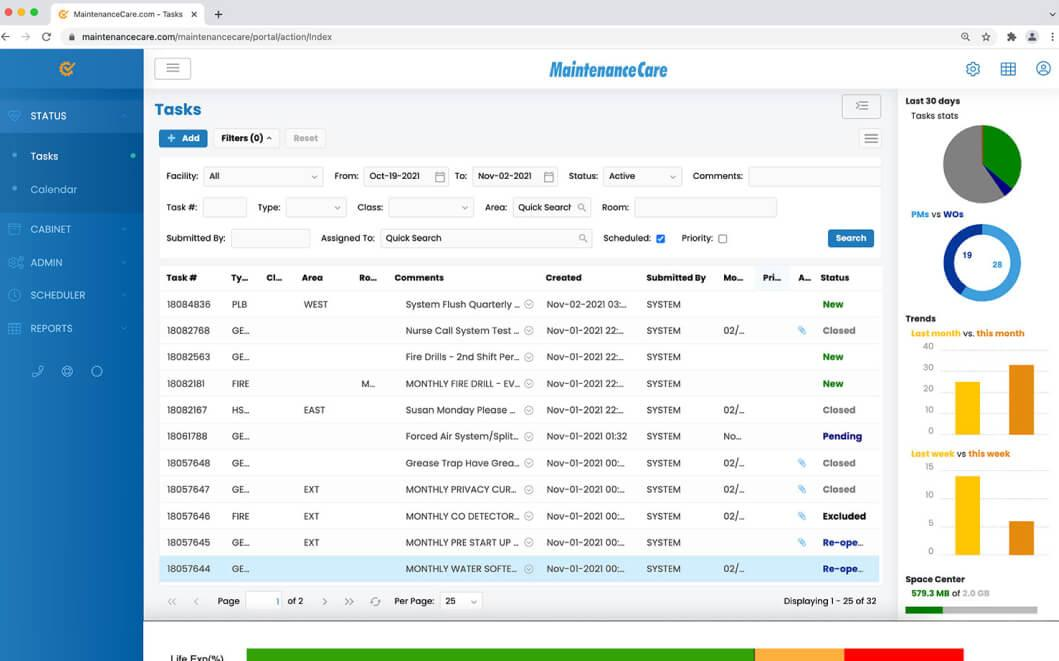
Its pitch is plain: easy software and one price for everyone on your team. The free plan gets a small team started, and the paid plan removes the caps without charging per seat.
You trade depth for simplicity. Reviewers credit its simplicity and low cost, while lower scores point to a less intuitive interface and thin support.
Key industries: education (including churches and parishes), senior care, healthcare, hospitality, property management, government, recreation, manufacturing and small business.
Key features
- Work order management: an online work order page, notes history and task assignment on every plan. The paid plan adds unlimited task types, a customizable request page, priority settings, notifications by task type and a duplicate checker. For the wider category, see the list of the best work order software.
- Preventive maintenance: PM scheduling and a ready PM library on every plan. Custom fillable forms, a calendar planner and custom fields need the paid plan.
- Asset lifecycle: an asset list with expense tracking, forecasting, depreciation, warranty and life expectancy on every plan, which supports budgeting and capital planning.
- Parts and inventory: a parts list, inventory tracking and barcode scanning on the paid plan, with reorder minimum alerts and parts linked to work orders.
- Vendors: assign work to vendors and message contractors on every plan, capped at 3 vendors on the free plan.
- Multiple facilities: manage several facilities on the paid plan, with Tableau for multi-location data on Enterprise Elite.
- Mobile app: iMCare for iOS and Android, with iMCare Lite on the free plan, at no extra cost on any plan.
- Reporting: basic and advanced reporting, audit logs, capital planning and transaction reports on the paid plan; Tableau dashboards and customized reporting on Enterprise Elite.
- Add-on modules: GetSensored wireless temperature and humidity sensors (a separate product), room booking, virtual spaces and housekeeping tracking.
Pros
- One flat price covers unlimited users, so you can give every staff member, supervisor and vendor a login without per-seat math.
- The free plan lets a very small team start at $0 and move up without switching tools.
- Asset depreciation, warranty and life expectancy tracking come on every plan, which suits capital planning.
- Work order basics, PM scheduling, task duration monitoring and vendor assignment come on every plan, including the free one.
What reviewers say
Maintenance Care holds 4.7 out of 5 on Capterra (111 reviews) and 4.6 out of 5 on G2 (111 reviews) as of November 2026. The strongest praise comes from a multi-home care operator.
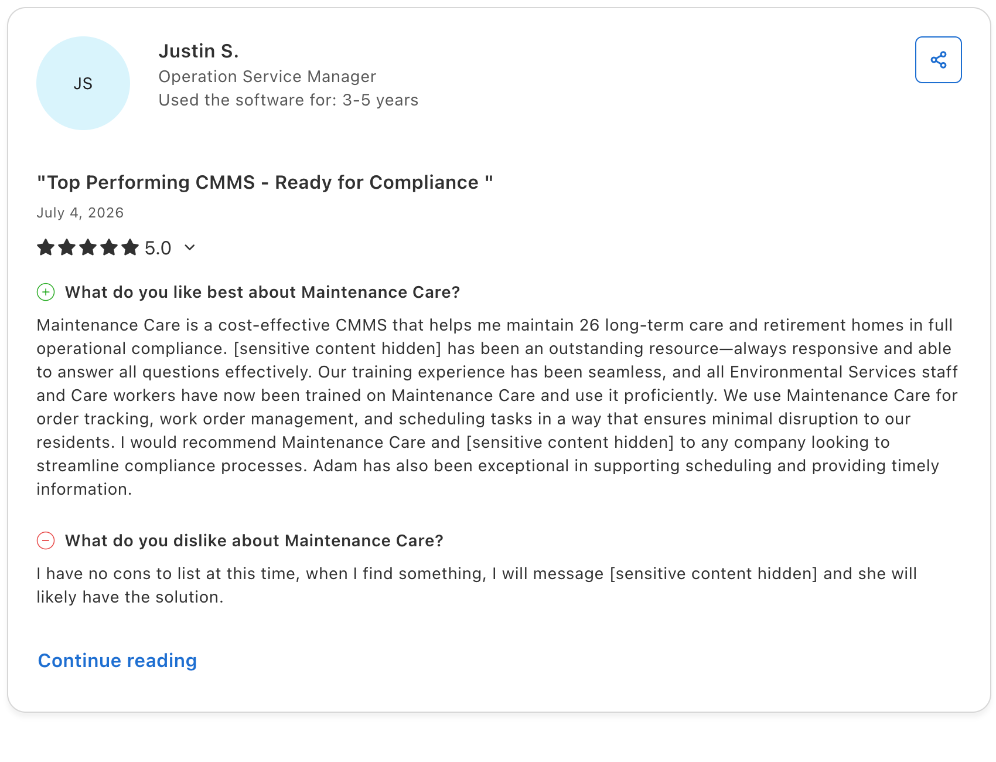
Justin S. is an Operation Service Manager who has used it for 3 to 5 years. He called it "a cost-effective CMMS that helps me maintain 26 long-term care and retirement homes" (Capterra, July 4, 2026). He adds that all Environmental Services staff and care workers were trained and use it.
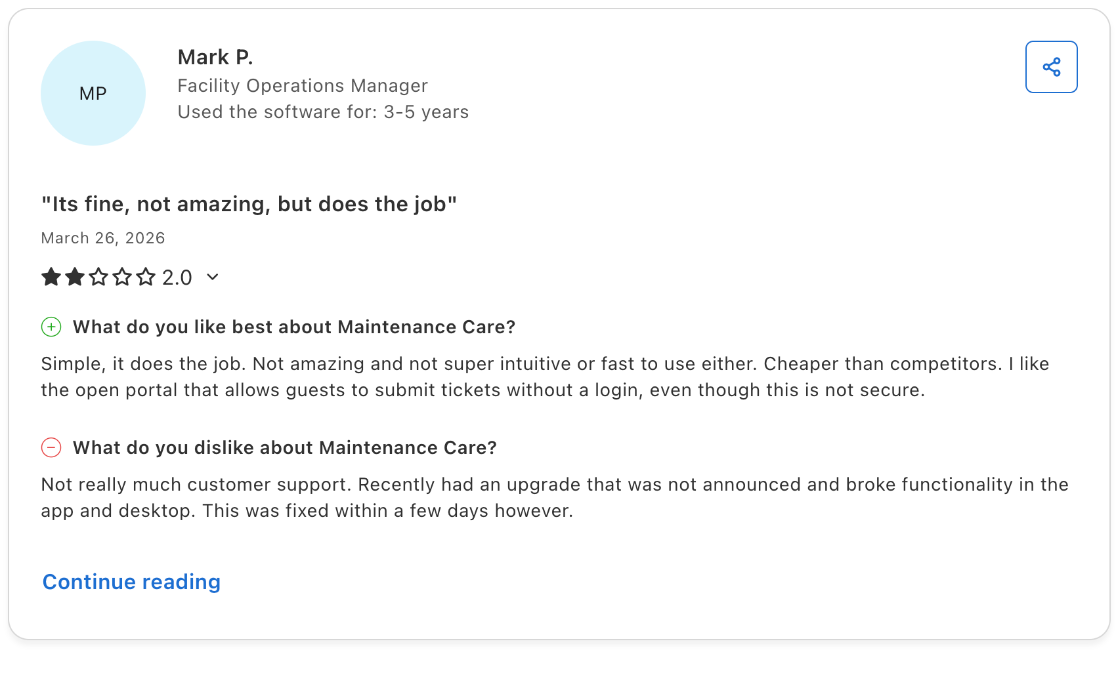
Not every long-term user is that warm. Mark P., a Facility Operations Manager with 3 to 5 years on the product, gave it 2 out of 5.
He wrote that it is "Not amazing and not super intuitive or fast to use either" (Capterra, March 26, 2026).
Cons
- The free plan is tight: 2 users, 3 PMs, 5 assets and 3 vendors, so most teams outgrow it fast.
- Offline mode is not mentioned anywhere in Maintenance Care's mobile, pricing or feature pages, which matters if your technicians work in basements or plant rooms.
- The API, Tableau dashboards and customized reporting sit only on Enterprise Elite, which is quote-based.
- Its own pages disagree on AI: the pricing table lists AI on paid plans, while the homepage still marks it as coming soon.
- One long-term reviewer reports thin customer support and an unannounced upgrade that broke app and desktop functions for a few days.
Limble: the configurable CMMS for plant and multi-site maintenance
Limble, founded in 2015, is a mobile-first CMMS built around preventive maintenance and downtime, sold in three tiers with every price behind a calculator.
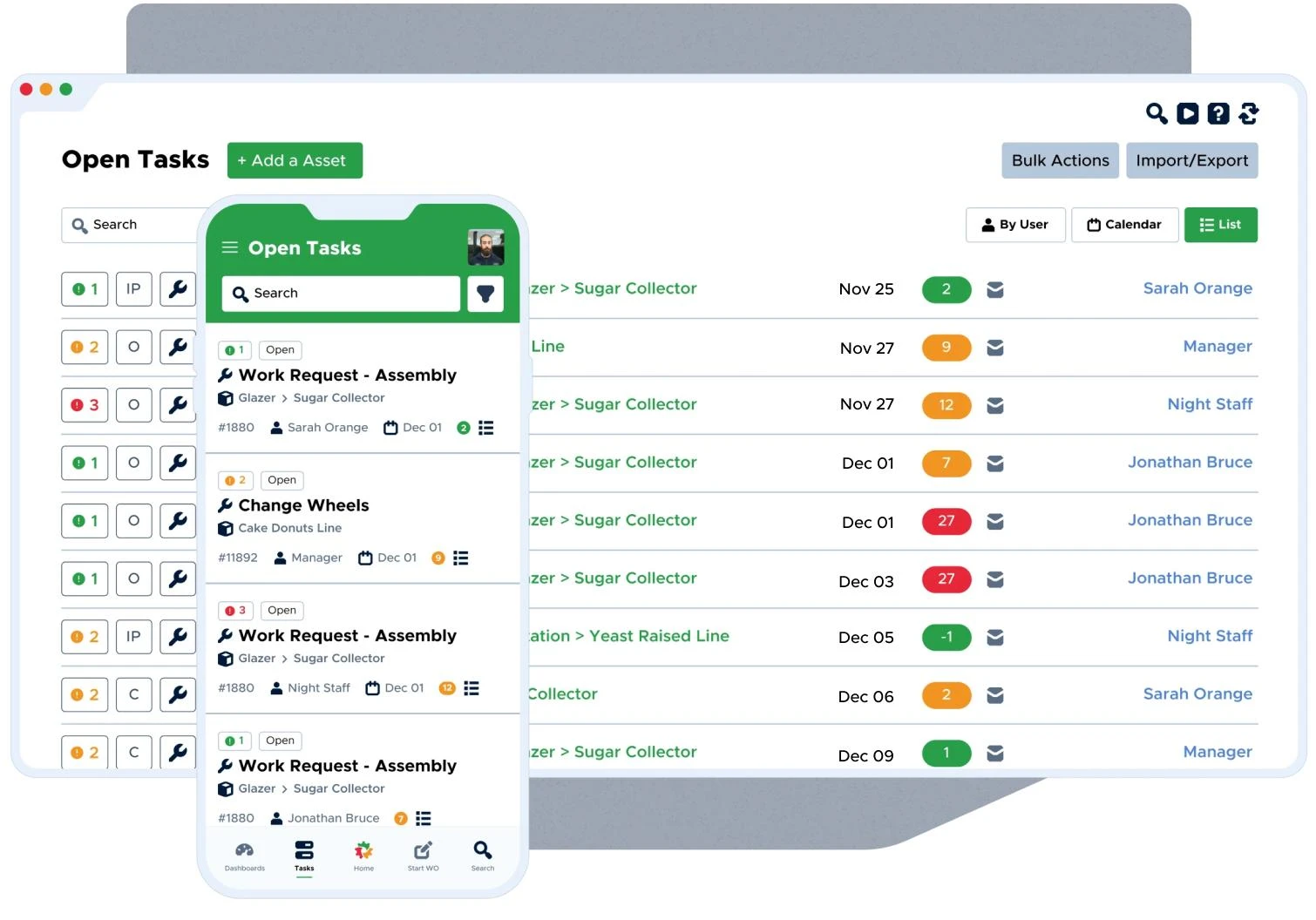
Its homepage says it is rated #1 by 50,000+ maintenance professionals and names customers such as Unilever, McDonald's and General Mills. Of its Standard, Premium+ and Enterprise plans, most of the features that set it apart, such as offline mode, spare parts and the API, start at Premium+.
Key industries: manufacturing, food and beverage, facility management, healthcare, education, hospitality, energy and utilities, warehousing, fleet and property maintenance.
Key features
- Work orders and requests: work orders with checklists, photos and QR code work requests, plus unlimited work requesters on every tier. Standard caps work orders with attached procedures at 3 a month, and time and cost tracking starts at Premium+.
- Preventive maintenance: calendar PMs on every tier, with meter and threshold-based scheduling from Premium+. Limble's AI PM Builder turns service manuals and asset data into PM schedules on every tier. For more PM-first tools, see the best preventive maintenance software.
- Assets and downtime: unlimited asset hierarchies, asset QR codes, service history and manuals, plus automatic downtime reporting on every tier.
- Spare parts, purchasing and vendors: unlimited spare parts with min/max thresholds that create reorder tasks automatically, purchase orders, and vendor tools that share work orders and track insurance certificates, all from Premium+. Transfers between locations and cycle counts are Enterprise-only.
- Mobile app with offline mode: the app is on every tier; offline mode, which syncs work once a device reconnects, starts at Premium+.
- AI features: anomaly detection flags unusual readings and an MCP server links Limble to outside AI tools, both from Premium+. Asset Snap reads equipment nameplates; Limble's pricing table lists it on every tier, while its AI page says Premium+. AI scheduling suggestions and smart time estimates are Enterprise-only.
- Dashboards and multi-site reporting: unlimited custom dashboards on every tier; multi-location tools and reporting on Enterprise.
- Integrations and access: REST API and ERP links (NetSuite, SAP S/4HANA, Dynamics 365 Business Central, QuickBooks Online) from Premium+, where costs may apply; SSO (Okta, Azure AD, Google) as a Premium+ add-on or included on Enterprise.
- Compliance: 21 CFR compliance tools on Enterprise for regulated manufacturing.
Pros
- Deep PM tools, from meter and threshold triggers to AI drafting of PM schedules from manuals.
- Free, unlimited work requesters, so you pay only for the people who do the work.
- Strong integration list across ERP, SSO and condition-monitoring sensors.
- Unlimited custom dashboards and automatic downtime reporting come on every tier, including Standard.
- Support scores run high (4.9 for customer service on Capterra), and Limble lists a customer success manager on its plans.
What reviewers say
Limble holds 4.8 out of 5 on both Capterra (764 reviews) and G2 (703 reviews) as of November 2026, one of the larger review bases in the category. For a fuller read of the feedback, see the Limble CMMS review.
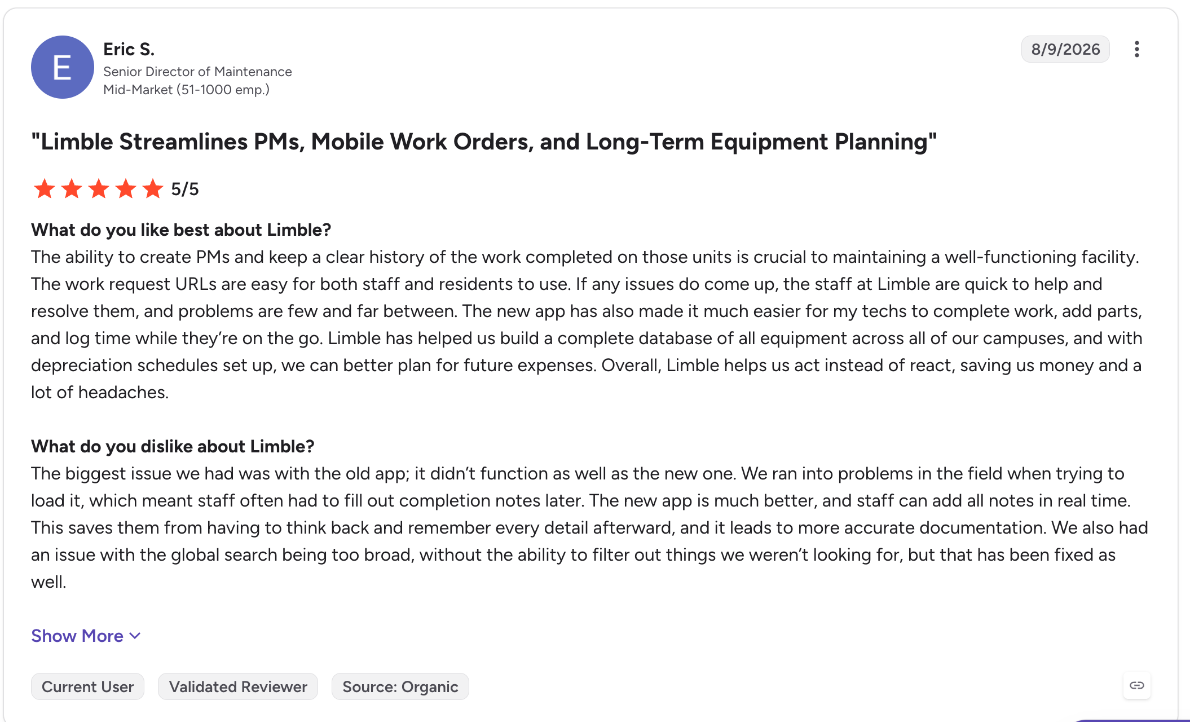
Eric S., a Senior Director of Maintenance at a mid-market organization, gave it 5 out of 5. He wrote: "The work request URLs are easy for both staff and residents to use." (G2, August 9, 2026).
His biggest complaint was the old mobile app, which his team struggled to load in the field until the new app fixed it.
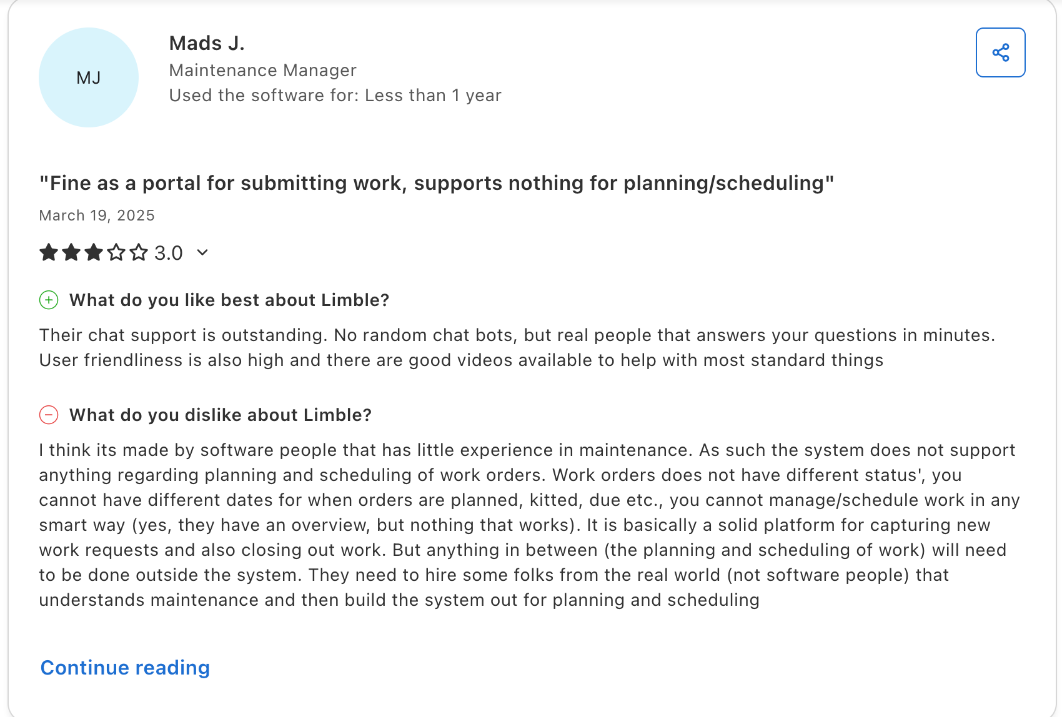
The sharpest criticism is about planning depth. Mads J., a Maintenance Manager, scored it 3 out of 5, writing that "the system does not support anything regarding planning and scheduling of work orders" (Capterra, March 19, 2025).
He praised the chat support in the same review. Limble now offers drag-and-drop scheduling and AI scheduling suggestions, but only on Enterprise.
Cons
- No public pricing: every plan goes through a calculator or a sales call, so budgeting takes longer.
- Standard caps work orders with attached procedures and advanced analytics at 3 a month each.
- Offline mode, spare parts, vendors and purchase orders all start at Premium+, reported at roughly double the Standard rate.
- Multi-location reporting and included SSO sit on Enterprise, and Limble notes that additional costs may apply to SSO, ERP and IoT integrations.
- Planning and scheduling depth below Enterprise drew criticism from a maintenance manager. If that is a dealbreaker, the guide to Limble CMMS alternatives lists other options.
Maintenance Care vs Limble pricing
Maintenance Care vs Limble pricing is flat against per user: Maintenance Care publishes $250 a month for unlimited users, while Limble quotes per seat.
| Pricing factor | Maintenance Care | Limble |
|---|---|---|
| Pricing model | Flat monthly price per account | Per user per month |
| Published prices | Yes: $0 free plan, $250 a month paid plan | No: calculator and sales quote |
| Free plan | Yes: 2 users, 3 PMs, 5 assets, 3 vendors | No |
| Entry paid plan includes | Unlimited users, work orders, PMs, assets, vendors and parts, mobile app, reporting | Unlimited assets, work orders, PMs, requesters and dashboards, mobile app |
| Sits on a higher plan or bills separately | Enterprise Elite for API, Tableau and enhanced AI; GetSensored sensors sold as a standalone product | Premium+ for offline mode, parts, vendors, API and ERP or IoT links; Enterprise for multi-location and included SSO; some integrations may cost extra |
| Third-party price listings | Capterra still lists $225 a month (Capterra comparison), and older editions circulate on other sites | Reported at about $28 to $35 (Standard) and $55 to $69 (Premium+) per user per month, billed annually |
Sources: Maintenance Care pricing, Limble pricing. Limble figures are third-party reported; confirm with Limble's calculator.
Maintenance Care's pricing page adds a footnote that its pricing is based on yearly terms. Limble's reported figures are annual-billing rates, and the deep dive on Limble CMMS pricing explains how quotes change with seat count and term.
What you pay at your team size
The table counts paid users only. Limble's work requesters are free, so count the technicians and admins who close work, not everyone who submits a request.
| Paid users | Maintenance Care (per month) | Limble Standard (reported, per month) | Limble Premium+ (reported, per month) |
|---|---|---|---|
| 5 | $250 | $140 to $175 | $275 to $345 |
| 15 | $250 | $420 to $525 | $825 to $1,035 |
| 40 | $250 | $1,120 to $1,400 | $2,200 to $2,760 |
A five-person crew can spend less on Limble Standard than on Maintenance Care, but Standard has no offline mode, spare parts or vendor tools. For a like-for-like setup with parts and offline mobile, compare Maintenance Care with Limble Premium+, where the gap widens with every user.
Total cost beyond the subscription
The monthly fee is only part of the bill. Ask both vendors to price these items in writing before you compare.
- Setup and data import: Maintenance Care's data entry team sets up your PM schedules and inventory, with enhanced onboarding on Enterprise Elite. Limble includes bulk importing on every plan and sells full migration, data import and partner integration services for an additional fee.
- Training: ask what is included for supervisors, technicians and requesters, and whether onsite sessions cost extra.
- Integrations: Limble notes that ERP and IoT links may cost extra; Maintenance Care's API needs Enterprise Elite.
- Hardware: tablets, QR or barcode labels and any sensors you add are bought separately, so ask each vendor for the full list.
- Exit: ask how you export work order history, assets and PM schedules if you leave.
Sources: Maintenance Care implementation, Limble implementation.
Maintenance Care vs Limble AI and automation
Maintenance Care vs Limble AI is uneven: Limble ships named AI features by tier, while Maintenance Care lists AI on paid plans but still says coming soon.
| AI capability | Maintenance Care | Limble |
|---|---|---|
| PM schedule drafting | Not documented | AI PM Builder drafts PM schedules from manuals and asset data (every tier) |
| Asset capture from a photo | No | Asset Snap reads equipment nameplates (every tier on the pricing page, Premium+ on the AI page) |
| Unusual reading alerts | No | Anomaly detection flags unusual readings (Premium+ and Enterprise) |
| Scheduling help | No | AI scheduling suggestions and smart time estimates (Enterprise) |
| Duplicate requests | Duplication checker (paid plan) | AI duplicate work request prevention (Enterprise) |
| Link to outside AI tools | No | MCP server for tools such as Claude and Cursor (Premium+ and Enterprise) |
| Does it act or assist? | "AI" listed on paid plans and "Enhanced AI" on Elite; the homepage says coming soon | Assists people; Limble says it is "Made to work with your team, not instead of it." |
Sources: Limble Practical AI, Maintenance Care pricing, Maintenance Care homepage.
Both tools keep a person in the loop: the software suggests, drafts and flags, and your team still raises, dispatches and closes the work. Maintenance Care offers rules automation on the paid plan. For how agentic tools can work alongside Limble, see agentic AI for Limble CMMS.
Maintenance Care vs Limble reporting and maintenance KPIs
Maintenance Care vs Limble reporting differs in depth: Limble names MTTR, MTBF and planned versus unplanned work, while Maintenance Care centers on costs.
| Report or KPI | Maintenance Care | Limble |
|---|---|---|
| Work order and maintenance reports | Yes: paid plan, export to PDF or Excel | Yes: unlimited custom dashboards on every tier |
| Past-due work orders | Yes: flags past-due work | Partial: escalation notifications on Enterprise |
| Maintenance costs | Yes: costs and expenses, asset expense tracking | Yes: time, parts and money spent by asset (time and cost tracking from Premium+) |
| Team performance | Yes: team performance reports | Yes: technician time and cost from Premium+ |
| MTTR and MTBF | Not listed | Yes: named on its reporting page |
| Planned vs unplanned work | Not listed | Yes: shown on its dashboards |
| Downtime | Not listed | Yes: automatic downtime reporting on every tier |
| Multi-site roll-up | Tableau dashboards on Enterprise Elite | Multi-location reporting on Enterprise |
Sources: Maintenance Care reports, Limble reports and dashboards, Limble pricing.
If your leadership reviews MTTR, MTBF or PM compliance every month, ask Maintenance Care to show those numbers in a demo, since its pages do not name them.
Maintenance Care vs Limble mobile app and offline mode
Maintenance Care vs Limble on mobile hinges on offline work: both apps run on iOS and Android, but only Limble documents an offline mode, from Premium+.
- Maintenance Care: iMCare runs on iOS and Android at no extra cost on every plan, with iMCare Lite on the free plan. Its mobile app page covers work orders, photos and attachments but does not mention offline use.
- Limble: the mobile app is on every tier. Offline mode, which lets technicians keep working without a signal and syncs once back online, starts at Premium+.
If your technicians work in basements, plant rooms, parking structures or rural sites, test both apps with the signal off before you sign. On Limble, make sure the quote is for Premium+ or higher.
Limble vs Maintenance Care integrations that matter
Limble vs Maintenance Care integrations split on one line: Limble names ERP, SSO and sensor partners, while Maintenance Care leans on Zapier and its sensors.
| Integration need | Maintenance Care | Limble |
|---|---|---|
| Accounting and ERP | Zapier connections on the paid plan; no ERP connector named on its integrations page | NetSuite, SAP S/4HANA, Dynamics 365 Business Central, QuickBooks Online |
| Single sign-on | Not listed | Okta, Azure AD, Google SSO |
| Sensors and condition monitoring | GetSensored temperature and humidity sensors | Augury, AssetWatch, Monnit, VibeCloud, AVEVA |
| Calendar and messaging | Google Calendar, RingCentral SMS, Amazon Alexa | Google Calendar, Microsoft 365 Calendar, Slack |
| Fleet and mapping | None listed | Samsara, ArcGIS Online |
| API | Enterprise Elite only | REST API from Premium+ |
| Other | SurveyMonkey and Excel; 5,000+ integrations advertised | MCP server for outside AI tools |
Sources: Maintenance Care integrations, Maintenance Care wireless sensors, Limble integrations.
Maintenance Care or Limble by company size and industry
Maintenance Care or Limble also depends on what you run and how many people need a full login. These scenarios match common team shapes to the right tool.
- Single-site team on a tight budget: start on Maintenance Care's free plan if you fit within 2 users and 5 assets. Past that, a 3 to 5 person crew may pay less on Limble Standard, as long as you can live without offline mode and parts.
- Schools, churches and community buildings: Maintenance Care lists education and parishes as core markets, and its flat price suits teams where office staff, custodians and coaches all need logins.
- Senior living, long-term care and healthcare: Maintenance Care lists senior care and healthcare as core markets, and a 26-home care operator rates it highly. For the wider category, see healthcare maintenance management software.
- Multi-building property portfolios: both work for a handful of buildings. Limble's multi-location reporting needs Enterprise, and the roundup of property management maintenance software covers tools built for tenants and owners.
- Manufacturing and food plants: Limble is the clearer pick, with downtime tracking, meter-based PMs, anomaly detection and condition-monitoring partners.
When to choose Maintenance Care over Limble
Choose Maintenance Care over Limble when access for many people and one predictable bill matter more than depth. These are the conditions where it wins.
- You need full logins for a large or changing group, and $250 a month for unlimited users beats per-seat pricing.
- You run senior care, healthcare, education, hospitality or property sites, the markets Maintenance Care is built around.
- You want asset depreciation, warranty and life expectancy tracking without paying for a higher tier.
- You want to start free and upgrade only when you outgrow 2 users or 5 assets.
When to choose Limble over Maintenance Care
Choose Limble over Maintenance Care when your technicians need offline mobile, deeper PM triggers and system links, and you can budget for Premium+ or higher.
- Your technicians work where the signal drops, and you need a documented offline mode.
- You schedule PMs by meter readings and thresholds, not only by calendar.
- You manage spare parts, reorder points and purchase orders inside the CMMS.
- You need ERP, SSO or condition-monitoring sensors connected, and an API from Premium+.
- You run several plants or sites and want multi-location reporting on Enterprise.
Common mistakes when choosing between Maintenance Care and Limble
Most mistakes in a Maintenance Care and Limble decision come from stale prices and tier gating. Check these five points before you sign either contract.
- Budgeting from old listings: third-party sites still show older Maintenance Care editions and prices, and Limble's old published rates. Use the vendor page or a written quote.
- Outgrowing the free plan in week one: Maintenance Care's free plan stops at 2 users, 3 PMs and 5 assets, so a pilot on it rarely reflects the real product.
- Assuming Limble Standard is the full product: offline mode, spare parts, vendors, purchase orders and the API all start at Premium+.
- Paying for requesters: Limble's work requesters are free, so a quote should count only the people who close work.
- Forgetting add-ons: Maintenance Care's Enterprise Elite features and any sensor hardware, and Limble's SSO add-on and integration fees, sit outside the headline price.
How to run a fair Maintenance Care vs Limble demo and pilot
A fair Maintenance Care vs Limble test gives both vendors the same scenarios, the same data and the same people, then scores what each tool actually does live.
- Script the demo: send both vendors the same six jobs. Use an emergency leak, a monthly chiller PM, a part used on a work order, an elevator contractor job, a requester asking for an update and a monthly manager report.
- Test the mobile app with the signal off: close a work order with photos and a QR scan in a basement or plant room.
- Check your integrations: confirm ERP or accounting links, SSO and data export to your BI tool, and get any fees in writing.
- Pilot one building first: load its critical assets, PMs and technicians for four to six weeks before you roll out across sites.
- Score both on the same sheet: work orders, PMs, assets, parts, reporting, mobile, integrations and total cost.
Maintenance Care vs Limble vs Facilio: when your portfolio has outgrown both
Maintenance Care vs Limble is a choice between two CMMS tools your team runs. Some multi-site portfolios hit a different limit: the work around the work order.
Maintenance Care and Limble give your team a better place to log and track work. Facilio puts agents on the jobs around it: taking requests on any channel, dispatching, chasing vendors, checking invoices and tracking compliance. Facilio's own CMMS software is the core those agents run on, with a mobile app built to work offline.
Maintenance Care vs Limble vs Facilio at a glance
| Factor | Maintenance Care | Limble | Facilio |
|---|---|---|---|
| What it is | Flat-priced CMMS for facility teams | Configurable CMMS for maintenance teams | Agents that run facility operations and maintenance, with a CMMS at the core |
| Pricing | $0 free plan; $250 a month for unlimited users | Per user, quoted | Quoted by portfolio size, users and scope |
| Mobile offline | Not documented | From Premium+ | Yes: offline-first mobile app |
| Vendor coordination | Assign work to vendors | Share work orders with vendors from Premium+ | Vendor coordination agent chases quotes, attendance and reports |
| Invoice checking | No | No | Invoice processing agent checks each line against the work order and contract |
| Compliance tracking | Audit logs on the paid plan | 21 CFR tools on Enterprise | Building compliance agent tracks certificates and inspections |
| Building systems and energy | Own temperature sensors | Partner condition sensors | BMS alarms to work orders, utility and energy analytics |
| Who sets it up and runs it | Your team, after Maintenance Care's data entry setup | Your team, with a Limble CSM | FM Ops Engineers build it, run it and stay |
| Best for | Single sites to mid-size care, school and property portfolios | Plants and multi-site maintenance teams | Large multi-site portfolios |
Choose Facilio when
- You run dozens of buildings, campuses or care homes, and the bottleneck is coordination, not logging work.
- Your team loses hours to intake calls, vendor follow-ups, invoice checks and certificate tracking.
- You want BMS alarms and utility data to raise work orders on their own.
- You do not want to staff a software project: Facilio's FM Ops Engineers build and run the agents with your team.
Facilio is not the right fit for a single-site team that only needs work orders and PMs. It is built for large multi-site portfolios and is quote-only, so a small team would pay for more platform than it uses. For head-to-head detail, see Maintenance Care vs Facilio and Limble vs Facilio.
What industry leaders say about their transition to Facilio
Schools and healthcare operators are core Maintenance Care markets. Here is how three such teams run on Facilio today.
- Purdue University Fort Wayne (higher education, Indiana): replaced a 16-year-old CMMS and brought 55 buildings and 3M sq ft onto one platform. It runs 400+ PPM schedules and went live 10 weeks after kickoff. Read the Purdue University Fort Wayne case study.
- Breck School (PreK to 12, Minnesota): put a 500,000 sq ft campus under centralized FM, with 150+ safety assets on a digital inspection schedule. Read the Breck School case study.
- A US integrated healthcare FM provider: went from kickoff to full go-live in 46 days across 3M+ sq ft of healthcare facilities, with 2,500+ asset records structured. Read the US integrated healthcare FM provider case study.
Verdict: Maintenance Care or Limble for your team
The Maintenance Care or Limble verdict depends on your team: flat-price simplicity for facility teams with many users, or per-user depth for maintenance crews.
| Area | Edge | Why |
|---|---|---|
| Price at 10 or more paid users | Maintenance Care | $250 a month flat for unlimited users |
| Ease of rollout | Maintenance Care | Simpler setup; its data entry team loads your PMs |
| Asset lifecycle and capital planning | Maintenance Care | Depreciation, warranty and life expectancy on every plan |
| Preventive maintenance depth | Limble | Meter and threshold PMs, AI PM Builder |
| Parts and purchasing | Limble | Min/max thresholds, automatic reorder and POs from Premium+ |
| Mobile offline | Limble | Documented offline mode from Premium+ |
| Reporting and KPIs | Limble | MTTR, MTBF and downtime reporting |
| Integrations and SSO | Limble | Named ERP, SSO and sensor partners |
| Multi-site enterprise controls | Limble | Multi-location, custom roles and approvals on Enterprise |
Pick Maintenance Care if you run schools, care homes, healthcare sites or properties and want every staff member and vendor on the system. It suits teams that value a single fixed bill over deep configuration.
Pick Limble if your technicians need offline mobile, meter-based PMs, spare parts and ERP or SSO links, and you can budget for Premium+ or Enterprise.
If your portfolio has outgrown both, the real work is often the coordination around each job. We would be glad to show you how Facilio's agents and FM Ops Engineers run it with your team. Request a demo.
Want the work done for you?
Our FM Ops Engineers scope your first AI agent on your own sites, then build it, run it and stay with you.
Frequently asked questions about Maintenance Care vs Limble
These answers cover what buyers ask most when comparing Maintenance Care and Limble, from pricing and free plans to offline use and best-fit industries.
What is the difference between Maintenance Care and Limble?
Both are cloud CMMS tools for work orders, preventive maintenance and assets. Maintenance Care charges one flat price for unlimited users and suits facility teams in care, education and property. Limble charges per user and goes deeper on PM triggers, offline mobile, parts and ERP links for maintenance crews.
Is Maintenance Care free?
Yes, for very small teams. The free plan covers 2 users, 3 PMs, 5 assets and 3 vendors with the iMCare Lite app. The paid plan is $250 a month with unlimited users, and Enterprise Elite is quoted.
How much does Limble CMMS cost?
Limble does not publish prices; every plan is quoted through its calculator. Third-party listings report about $28 to $35 per user per month for Standard and $55 to $69 for Premium+, billed annually, with Enterprise on custom quote.
Who uses Limble?
Maintenance teams in manufacturing, food and beverage, facilities, healthcare, education, hospitality and energy. Limble names customers such as Unilever, McDonald's and General Mills on its site.
Which is easier to use, Maintenance Care or Limble?
Both score high. On Capterra, Limble rates 4.8 for ease of use and Maintenance Care 4.7 as of November 2026. Maintenance Care is simpler to roll out to non-technical staff, while Limble offers more settings to learn.
Does Maintenance Care or Limble work offline?
Limble has an offline mode that syncs once you reconnect, from the Premium+ plan up. Maintenance Care does not document an offline mode for its iMCare app, so test it with the signal off before you commit.
Which is better for senior living and healthcare facilities?
Maintenance Care is built for senior living, long-term care and healthcare facilities, with one reviewer running 26 care homes on it. Limble fits regulated manufacturing better, with 21 CFR compliance tools on Enterprise.
Maintenance Care vs Limble for facilities work orders and preventive maintenance: which has better features and ease of use?
For facilities work orders and PMs, Maintenance Care is easier to roll out and cheaper as headcount grows. Limble has the deeper PM features, including meter triggers and AI PM drafting, but most of that depth sits on Premium+ or Enterprise.
Which CMMS software is the best?
There is no single best CMMS for every team. Maintenance Care fits facility teams that want a flat price, Limble fits maintenance crews that need depth, and larger portfolios often look at broader platforms.
What is a modern alternative to Maintenance Care and Limble for multi-site facility teams?
Facilio is the agentic platform for facilities management, built for large multi-site portfolios. Its agents handle intake, dispatch, vendor coordination, invoice checks and compliance tracking on top of a full CMMS, and FM Ops Engineers build and run them with your team.
About the Author