Connected CMMS

 Connected Buildings
 Connected Refrigeration


 Download ebook

 Read case study


 Watch now


 Retail
 Healthcare
 FM Services
 Commercial Portfolios
 Corporate Facilities
 Education
 Data-driven Portfolio Ops
 Facility Management Software
 360° Asset Lifecycle
 Continuous Sustainability

 Blogs
Blogs
 Help docs
 Knowledge Hub
 ROI Calculator
 Ebooks & Guides
 Webinars
 Videos
 Case studies


 About us
 Newsroom
 Careers
 Contact us
 Partners
 Events




Asset condition monitoring software collects and analyzes real-time operational health data from sensors attached to your equipment to prevent unexpected breakdowns, and for a commercial real estate portfolio that means catching a failing chiller or air handler before it takes a floor offline.
Your job here is to pick a platform that turns raw sensor streams into work orders your team can act on, not another dashboard nobody reads.
This guide reviews the eight best tools for facilities teams, with verified ratings, pricing, and real reviewer feedback, and it pairs with the wider Facilio guide to predictive maintenance software so you can see where condition monitoring ends and prediction begins.
Quick verdict: the best asset condition monitoring software at a glance
Short on time? Here is the fast answer, the best overall pick plus the right asset condition monitoring software for each facilities use case.
- Facilio: best for commercial real estate and multi-building portfolios that need real-time IoT condition monitoring with closed-loop work orders.
- Fracttal One: best for a 360-degree, asset-centric view with IoT sensor integration and strong mobile access.
- eMaint (Fluke Reliability): best for teams standardizing on Fluke vibration and thermal sensors alongside a CMMS.
- MaintainX: best for frontline-heavy operations that need fast mobile adoption and structured asset hierarchies.
- UpKeep: best for maintenance teams pairing a mobile CMMS with UpKeep Edge sensors.
- Limble CMMS: best for mid-market facilities that want condition-based maintenance without a heavy rollout.
- SafetyCulture (Mitti): best for inspection-led condition monitoring with custom digital checklists.
- Brightly Asset Essentials: best for public sector, education, and CRE teams managing long asset lifecycles.
Asset condition monitoring software compared at a glance
This comparison covers deployment, sensing, AI, CMMS integration, pricing, and ratings so you can shortlist in one pass. Data is verified as of September 2026.
| Tool | Best for | Starting price | Key strength | Rating | Free trial |
|---|---|---|---|---|---|
| Facilio | CRE / multi-building portfolios | From 10,000 dollars per year (quote-based) | IoT + AI condition monitoring plus work-order execution | 4.0 (Capterra) | Yes |
| Fracttal One | 360-degree asset visibility | Quote | Asset-centric monitoring with strong mobile | 4.6 (Capterra) | Yes |
| eMaint (Fluke) | Fluke sensor ecosystems | Quote (annual, min 3 users) | Fluke vibration and thermal hardware plus CMMS | 4.5 (Software Advice) | Yes |
| MaintainX | Frontline mobile adoption | Free; paid from 20 dollars per user per month | Fast adoption, structured asset hierarchies | 4.8 (Capterra) | Yes |
| UpKeep | Mobile CMMS + Edge sensors | From 24 dollars per user per month | UpKeep Edge sensor-based monitoring | 4.6 (Capterra) | Yes |
| Limble CMMS | Mid-market condition-based maintenance | Quote (calculator); free plan | Fast setup, sensor alerting | 4.8 (Software Advice) | Yes |
| SafetyCulture (Mitti) | Inspection-led monitoring | Free; paid from 24 dollars per user per month | Digital inspections plus condition alerts | 4.6 (Capterra) | Yes |
| Brightly Asset Essentials | Public sector / education / CRE | Quote | Long-lifecycle asset management | 4.4 (Capterra) | No |
How we evaluate asset condition monitoring software
Our scoring method: four weighted criteria that decide how each tool ranks for a commercial real estate portfolio, from sensor compatibility through total cost of ownership.
We evaluate asset condition monitoring software by analyzing sensor compatibility, diagnostic capabilities, integration options, and total cost of ownership, the same criteria facilities teams weigh when a shortlist has to survive procurement.
We score each platform from one to five on every criterion, weight the scores as shown below, and rank the tools on the weighted total.
Our ratings draw on verified data from G2, Capterra, TrustRadius, Gartner Peer Insights, and Software Advice, plus vendor pricing pages and how each platform behaves for a real estate portfolio rather than an industrial plant, all verified as of September 2026.
| Criterion | Weight | What earns a top score |
|---|---|---|
| Diagnostics and AI insight | 30 percent | Automated fault detection, failure-mode classification (bearing wear, misalignment, looseness), and clear asset health indices, not raw dashboards |
| Data acquisition and sensor compatibility | 25 percent | Ingests vibration, temperature, RPM, and runtime, and works with existing hardware rather than forcing proprietary sensors |
| Integration and workflow automation | 25 percent | Condition alerts flow into your CMMS or EAM and auto-generate prioritized work orders when thresholds are crossed |
| Total cost of ownership | 20 percent | Low hidden cost in analyst hours, integration fees, and training behind the subscription price |
The 8 best asset condition monitoring software, reviewed
Every asset condition monitoring platform below follows the same profile, so you can weigh features, sensing, pricing, and verified reviews side by side.
1. Facilio
Best for: commercial real estate and multi-building portfolios that need real-time IoT condition monitoring, AI-powered fault detection, and closed-loop work orders on one platform. Why it ranks number one: it is the only platform on this list built for portfolio-wide facility operations, uniting real-time condition monitoring, IoT building data, and maintenance execution where the others cover a single slice.
| Snapshot | Detail |
|---|---|
| Best for | CRE / multi-building portfolios |
| Starting price | From 10,000 dollars per year, quote-based |
| Key strength | IoT and AI condition monitoring plus work-order execution on one platform |
| Rating | 4.0 out of 5 (Capterra) |
| Free trial | Yes |
Facilio is a cloud-based operations and maintenance platform that uses IoT and machine learning to give facility teams a real-time, 360-degree view of equipment health and performance trends. It pulls live data from building systems and sensors, scores asset health, and turns developing anomalies into prioritized work orders before a breakdown reaches your tenants.
For a portfolio manager, the difference is that condition monitoring does not live in a separate tool. Alerts, enterprise asset management software records, and technician dispatch share one system, so the chiller flagged this morning is a scheduled job by the afternoon.
Key features:
- Real-time IoT data collection: ingests streaming vibration, temperature, energy, and runtime data from building sensors and BMS points across every site.
- AI-powered fault detection: identifies degradation patterns and flags anomalies against learned baselines before failures happen.
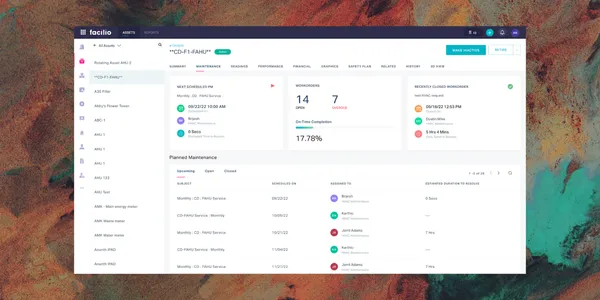
- Unified asset health dashboards: surfaces green, yellow, and red health statuses across the portfolio so teams triage by criticality.
- Closed-loop CMMS integration: converts diagnostic alerts directly into prioritized work orders without manual data entry or platform switching.
- Connected buildings and edge data: captures device-level telemetry through iot edge for assets that legacy systems cannot reach.
- Prescriptive maintenance recommendations: pairs each alert with likely cause and next action so technicians spend less time diagnosing.
- Energy and fault analytics: correlates energy drift with equipment condition to catch efficiency loss that precedes failure.
- Portfolio rollups and reporting: aggregates asset health, downtime, and compliance across buildings for owner and asset-manager reporting.
- Mobile technician app: puts work orders, asset history, and alerts in the field across every property.
Strengths:
- It is the rare platform that covers condition monitoring, asset management, and work execution for an entire real estate portfolio, not a single building.
- It unifies condition monitoring, energy analytics, and maintenance execution on one platform, so you are not stitching together separate point tools.
- It is purpose-built for commercial real estate operations, so the data model matches how portfolio and FM teams actually work.
Limitations:
- Public pricing is quote-based, so you cannot self-serve a number before talking to sales.
- Its Capterra review base is small (25 reviews) compared with SMB-heavy CMMS tools, reflecting an enterprise customer profile.
- The breadth of the platform means smaller single-site teams may use only a fraction of what they buy.
Pricing: Pricing is quote-based.
What reviewers say: 4.0 out of 5 from 25 reviews on Capterra. David B., General Manager of Safety and Facilities in New South Wales, wrote on July 24 2025: "Very positive and a great team that support their customers" (source).
Customer proof
Facilio helped British Land gain portfolio-wide visibility into asset condition and performance across its property estate.
Monitor smarter and maximize asset lifespan. See how Facilio predicts and prevents equipment failure across your portfolio
Book a demo →Verdict: the strongest choice when condition monitoring has to serve a whole real estate portfolio, not just one plant room.
2. Fracttal One
Best for: facilities teams that want a 360-degree, asset-centric view with IoT sensor integration, predictive workflows, and strong mobile access across distributed sites. Why it ranks here: it is the most asset-centric pure-play on the list, with a large, well-rated review base and full field functionality for scattered buildings.
| Snapshot | Detail |
|---|---|
| Best for | 360-degree asset visibility |
| Starting price | Quote-based |
| Key strength | Asset-centric condition monitoring with strong mobile |
| Rating | 4.6 out of 5 (Capterra) |
| Free trial | Yes |
Fracttal One centers everything on the asset, giving teams a consolidated view of condition, history, and cost that helps them get more value from each piece of equipment. It suits facilities groups that want deep asset records without committing to a full enterprise suite.
For a portfolio team, the appeal is depth of record on each asset without the weight of an enterprise suite. You can bridge building-systems data through integrations, then let Fracttal own the asset condition history, cost, and reliability reporting.
Key features:
- Asset-centric monitoring: organizes condition data, work history, and cost around each asset for a single source of truth.
- IoT sensor integration: connects to sensors for real-time condition and performance tracking.
- Predictive and preventive workflows: schedules maintenance from condition triggers to reduce unplanned downtime.
- Automated alerts: notifies teams when readings move outside set ranges.
- Mobile-first access: gives technicians full functionality in the field, useful across scattered buildings.
- Analytics and KPIs: tracks availability, MTBF, cost, and reliability metrics for management reporting.
- Work order management: turns alerts into assigned, tracked jobs.
- Spare parts and inventory: links condition events to parts availability.
Strengths:
- A large review base (over 1,700 Capterra reviews) at a 4.6 rating signals proven, broad adoption.
- Its asset-first data model is a natural fit for teams whose priority is asset health rather than space or projects.
- Reviewers point to measurable downtime reduction and better asset value.
- Mobile depth suits multi-site facilities with technicians spread across buildings.
Limitations:
- Pricing is quote-only, so budgeting requires a sales conversation.
- It is a maintenance and asset tool rather than a full buildings-operations platform, so building-systems data may need integration.
- Depth of configuration can lengthen initial setup for smaller teams.
Pricing: quote-based; the vendor pricing page routes to a request-a-quote form (source).
What reviewers say: 4.6 out of 5 from 1,785 reviews on Capterra. Jennifer W., a Regional CEO in Hospital and Health Care, wrote on October 19 2024: "It increases performance and reduce unplanned downtime helping us get the most value out of our assets" (source).
Verdict: a strong asset-first pick when your priority is equipment health and you can bridge building-systems data separately.
3. eMaint (Fluke Reliability)
Best for: teams standardizing on Fluke vibration and thermal sensors that want condition-based maintenance triggers, BMS integration, and configurable dashboards inside a CMMS. Why it ranks here: it is the CMMS with the tightest link to real condition-monitoring hardware, backed by Fluke's sensor ecosystem.
| Snapshot | Detail |
|---|---|
| Best for | Fluke sensor ecosystems |
| Starting price | Quote-based, annual, minimum 3 users |
| Key strength | Fluke vibration and thermal hardware plus CMMS |
| Rating | 4.5 out of 5 (Software Advice) |
| Free trial | Yes |
eMaint is a computerized maintenance management system that offers condition monitoring and integrates with building management systems to auto-trigger work orders from real-time asset data. Because it belongs to Fluke Reliability, it pairs naturally with Fluke vibration and thermal imaging tools, which appeals to teams that want proven sensing hardware behind the software.
For a facilities team, the draw is that the sensing hardware and the maintenance software come from one vendor. That removes the integration guesswork of bolting third-party sensors onto a CMMS, at the cost of leaning into the Fluke ecosystem.
Key features:
- Fluke sensor integration: connects vibration, thermal, and other Fluke condition-monitoring devices directly to the CMMS.
- Condition-based maintenance triggers: generates work orders automatically when readings cross set thresholds.
- BMS integration: links to building management systems to act on real-time asset data.
- Configurable dashboards: builds custom views for asset health, backlog, and compliance.
- Preventive maintenance scheduling: balances condition-based and calendar-based tasks in one plan.
- Work order management: assigns, tracks, and closes jobs against each asset.
- Inventory and parts control: ties condition events to spares and reorder points.
- Reporting and compliance: documents audit trails for regulated facilities.
Strengths:
- The Fluke hardware pedigree gives teams a credible, supported sensing layer, not just software.
- Reviewers consistently rate configurability and support highly across a mature review base.
- It scales from a single site to multi-facility programs on an annual commitment.
Limitations:
- Per-user pricing is not published, so costs require a quote.
- The interface can feel dense for casual users compared with newer mobile-first tools.
- Best value depends on buying into the Fluke ecosystem.
- Onboarding is heavier than lightweight mid-market CMMS tools.
Pricing: quote-based, prepaid annual commitment; Professional (minimum 3 users) and Enterprise (minimum 5 users) tiers, per-user prices not shown on the live page (source).
What reviewers say: 4.5 out of 5 from 429 reviews on Software Advice. Wayne M., in the Oil and Energy industry, wrote in June 2026: "Compared to Maximo, which we used for 13+ years the associated cost is way more affordable" (source).
Verdict: the pick when you want condition-monitoring hardware and CMMS from one reliability-focused vendor.
4. MaintainX
Best for: frontline-heavy operations that need mobile-first condition monitoring, structured asset hierarchies, sensor and meter alerts, and automated work orders across complex facility systems. Why it ranks here: it is the highest-rated tool on the list and the easiest to roll out to technicians, with condition monitoring layered onto a modern CMMS.
| Snapshot | Detail |
|---|---|
| Best for | Frontline mobile adoption |
| Starting price | Free; paid from 20 dollars per user per month |
| Key strength | Fast adoption and structured asset hierarchies |
| Rating | 4.8 out of 5 (Capterra) |
| Free trial | Yes |
MaintainX is a mobile-first CMMS focused on frontline team adoption, structured asset hierarchies, and reliable work-order tracking across complex facility systems. It adds sensor-based condition monitoring and automated alerts on top of a workflow app that technicians actually open.
For a multi-site operation, the value is adoption. Condition monitoring only pays off if technicians act on alerts, and MaintainX wins because the mobile app is the one they already open for every work order.
Key features:
- Mobile-first workflows: puts work orders, procedures, and asset data on every technician's phone.
- Sensor and meter monitoring: tracks readings and triggers alerts when assets drift out of range.
- Structured asset hierarchies: models complex facility systems for accurate condition context.
- Automated work orders: converts alerts into assigned tasks without manual entry.
- Procedure and safety library: standardizes how condition issues get resolved.
- Reporting and analytics: surfaces downtime, MTTR, and reliability trends.
- Parts and inventory: links condition events to stock levels.
- Free tier: lets small teams start monitoring at no cost.
Strengths:
- A 4.8 rating across more than 1,000 Capterra reviews reflects unusually strong user satisfaction.
- Adoption is fast because the mobile app is genuinely simple, which reviewers cite repeatedly.
- A free plan and transparent per-user pricing make it easy to pilot.
- Structured asset hierarchies keep condition data organized as you scale sites.
Limitations:
- Deep, sensor-grade condition analytics are lighter than in dedicated reliability platforms.
- Costs rise as you add premium features across a large technician base.
- It is maintenance-led, so portfolio-level building analytics need other tools.
Pricing: Basic free; Essential 20 dollars per user per month billed annually (25 dollars monthly); Premium 65 dollars per user per month billed annually (75 dollars monthly); Enterprise custom (source).
What reviewers say: 4.8 out of 5 from 1,066 reviews on Capterra. Steve T., a Facilities and Maintenance Manager in Biotechnology, wrote on March 4 2026: "The ease of use and how quickly our team was able to begin using the program" (source).
Verdict: the best choice when technician adoption is your biggest risk and condition monitoring must ride on a tool people use.
5. UpKeep
Best for: maintenance teams pairing a mobile CMMS with UpKeep Edge sensors for temperature and vibration monitoring, threshold-based alerts, and automatic work orders. Why it ranks here: UpKeep Edge gives it a native sensor layer, making condition monitoring a first-party capability rather than an add-on.
| Snapshot | Detail |
|---|---|
| Best for | Mobile CMMS + Edge sensors |
| Starting price | From 24 dollars per user per month |
| Key strength | UpKeep Edge sensor-based monitoring |
| Rating | 4.6 out of 5 (Capterra) |
| Free trial | Yes |
UpKeep pairs a widely adopted mobile maintenance app with UpKeep Edge sensors, so teams can monitor temperature, vibration, and other conditions and route alerts straight into work orders. It builds a solid foundation of maintenance records and historical tracking for asset-heavy sites.
For asset-heavy sites, the Edge sensors turn UpKeep from a work-order app into a condition monitoring system. Temperature and vibration readings flow straight into the same maintenance record your team already lives in.
Key features:
- UpKeep Edge sensors: first-party hardware for temperature, vibration, and runtime monitoring.
- Threshold-based alerts: notifies teams and creates work orders when readings breach limits.
- Mobile CMMS core: manages work orders, PMs, and asset history from any device.
- Asset history and analytics: builds the record needed for repair-or-replace decisions.
- Parts and inventory tracking: ties condition events to spares availability.
- Work request portal: lets non-technicians report issues that route to the right asset.
- Reporting dashboards: tracks downtime, cost, and reliability KPIs.
Strengths:
- Native Edge sensors mean condition monitoring is supported end to end, hardware included.
- A large, 4.6-rated review base shows durable adoption across maintenance teams.
- Transparent per-user pricing makes it easy to scope.
- A work request portal extends reporting beyond the maintenance team.
Limitations:
- The freshest named reviews surfaced were older, so recent sentiment needs a manual check.
- Advanced diagnostics are lighter than in reliability-first platforms.
- Building-systems and portfolio analytics are outside its core.
Pricing: Essential 24 dollars per user per month; Premium 55 dollars per user per month; Professional and Enterprise custom (source).
What reviewers say: 4.6 out of 5 from 1,331 reviews on Capterra. Dirk K., a Director of Operations in Real Estate, wrote: "This creates the foundation for extensive maintenance records, historical tracking" (source).
Verdict: a practical pick when you want CMMS and sensors from one vendor and value a proven mobile app.
6. Limble CMMS
Best for: mid-market facilities that want condition-based maintenance, sensor alerting, and preventive scheduling with the fastest, lightest setup on the list. Why it ranks here: it delivers sensor alerting and condition-based maintenance with minimal rollout effort, at a top-tier satisfaction score.
| Snapshot | Detail |
|---|---|
| Best for | Mid-market condition-based maintenance |
| Starting price | Quote via calculator; free plan available |
| Key strength | Fast setup and sensor alerting |
| Rating | 4.8 out of 5 (Software Advice) |
| Free trial | Yes |
Limble CMMS is known for a clean interface and quick time to value, which is why reviewers compare writing work orders in it to using a consumer app. It supports condition-based maintenance through sensor integrations and threshold alerts, making it a low-friction entry point for teams new to monitoring.
For a mid-market facilities team without a dedicated implementation crew, the speed matters. You can stand up condition-based maintenance in days, connect sensors, and tune alerts without a long services engagement.
Key features:
- Sensor integrations and alerts: triggers condition-based work orders from connected sensors.
- Fast, intuitive setup: gets teams live quickly with minimal training.
- Preventive and condition-based scheduling: blends both strategies in one plan.
- Automated PM optimization: tunes schedules from asset history to cut over-maintenance.
- Dashboards and reporting: tracks downtime, costs, and asset health.
- Mobile app: supports field technicians across sites.
- Asset hierarchy and QR codes: organizes and identifies equipment quickly.
- Work order management: assigns and tracks jobs from alert to close.
Strengths:
- A 4.8 rating reflects exceptional ease of use, the attribute reviewers mention most.
- Fast rollout suits mid-market facilities without a dedicated implementation team.
- A free plan and free trial lower the barrier to piloting condition monitoring.
- Automated PM optimization helps teams avoid unnecessary maintenance spend.
Limitations:
- Per-user pricing is calculator and quote-based, so there is no single public number.
- Sensor-grade diagnostics are lighter than in reliability-first platforms.
- It is maintenance-led rather than a buildings-operations suite.
Pricing: quote via an online calculator; Standard, Premium+, and Enterprise tiers plus a free Basic plan and free trial (source).
What reviewers say: 4.8 out of 5 from 757 reviews on Software Advice. Kerie R., in Industrial Automation, wrote in December 2025: "Writing and managing work orders in Limble is as simple as using something like Instagram" (source).
Verdict: the easiest on-ramp to condition-based maintenance for a mid-market facilities team.
7. SafetyCulture (Mitti)
Best for: inspection-led condition monitoring where custom digital checklists, mobile capture, automated alerts, and corrective actions drive your asset condition data. Why it ranks here: it is the strongest fit when human inspections, not just sensors, feed your condition program, and it is a recognized name in facility inspection workflows.
| Snapshot | Detail |
|---|---|
| Best for | Inspection-led monitoring |
| Starting price | Free; paid from 24 dollars per user per month |
| Key strength | Digital inspections plus condition alerts |
| Rating | 4.6 out of 5 (Capterra) |
| Free trial | Yes |
SafetyCulture, now rebranding to Mitti, is a mobile-first platform ideal for operations and facility teams needing agile condition monitoring, automated alerts, and custom digital inspection checklists. It shines where condition data comes from structured human inspections combined with sensor readings.
For portfolios where routine inspections already drive maintenance, SafetyCulture formalizes that data. Checklists capture condition consistently across buildings, and failed items become tracked corrective actions rather than notes that get lost.
Key features:
- Custom digital inspections: builds checklists that capture asset condition consistently across sites.
- Sensor and alert integration: adds automated alerts to human-collected data.
- Mobile-first capture: lets teams log condition issues from anywhere, online or offline.
- Corrective actions: turns failed inspection items into tracked tasks.
- Scheduled inspections: routes recurring condition checks to the right people.
- Analytics and trends: aggregates inspection and condition data for reporting.
- Issue reporting: captures problems with photos and location in the field.
Strengths:
- It is the best tool on the list for inspection-driven monitoring programs.
- A generous free tier (up to 10 users) makes it easy to start.
- Reviewers praise speed and simplicity for audits and inspections.
Limitations:
- It is inspection-led, so continuous sensor-grade diagnostics are secondary.
- The brand and pricing are migrating from SafetyCulture to Mitti, which can cause confusion.
- Deep asset-reliability analytics need a dedicated platform.
Pricing: Free for up to 10 users; Premium 24 dollars per user per month billed annually (29 dollars monthly); Enterprise custom (source).
What reviewers say: 4.6 out of 5 from 355 reviews on Capterra (listed under the iAuditor and Mitti product record). Robbie S., an EEHA Project Manager in Construction, wrote on April 26 2026: "It is easy to use, saves time during inspections and audits" (source).
Verdict: the right choice when structured inspections are the backbone of your condition-monitoring program.
8. Brightly Asset Essentials
Best for: public sector, education, and CRE portfolios managing long asset lifecycles, capital planning, and condition tracking for capital-intensive equipment. Why it ranks here: backed by Siemens, it brings mature, lifecycle-focused asset management to facilities with long-lived, capital-intensive equipment.
| Snapshot | Detail |
|---|---|
| Best for | Public sector / education / CRE |
| Starting price | Quote-based |
| Key strength | Long-lifecycle asset management |
| Rating | 4.4 out of 5 (Capterra) |
| Free trial | No |
Brightly Asset Essentials, now part of Siemens, is a cloud maintenance and asset management platform with deep roots in education, government, and property portfolios. It emphasizes the full asset lifecycle, capital planning, and condition tracking for equipment that has to last decades.
For public sector and CRE portfolios with decades-long assets, the lifecycle and capital-planning depth is the point. Brightly is less about real-time sensor diagnostics and more about tracking condition and cost to inform repair-or-replace decisions.
Key features:
- Asset lifecycle tracking: manages condition, cost, and replacement planning over long horizons.
- Preventive and condition-based maintenance: schedules work from both calendar and condition triggers.
- Capital planning tools: supports repair-or-replace and budgeting decisions.
- Predictive analytics module: surfaces developing risk on critical assets.
- Reporting and dashboards: tracks asset health and compliance for public accountability.
- Work order management: assigns and documents jobs across large portfolios.
- Inventory management: controls parts across campuses and sites.
- Mobile access: supports field teams across large campuses and portfolios.
- Space and facility planning: ties assets to the spaces they serve.
Strengths:
- Siemens backing brings enterprise stability and a long product roadmap.
- Its lifecycle and capital-planning depth suits asset-intensive public and CRE portfolios.
- A large installed base in education and government signals sector fit.
- Predictive analytics extend it beyond basic reactive maintenance.
Limitations:
- Pricing is quote-only with no free trial, raising the barrier to evaluation.
- Its slightly lower 4.4 rating reflects a heavier, more traditional interface.
- Real-time sensor diagnostics are lighter than in monitoring-first platforms.
- Rollout suits larger organizations more than small single-site teams.
Pricing: quote-based; contact vendor, no free trial, no free version (source).
What reviewers say: 4.4 out of 5 from 284 reviews on Capterra. Stanley D., a Maintenance Tech in Food and Beverages, wrote on March 4 2026: "The ability to keep track of issues and parts for our machines" (source).
Verdict: a dependable choice for lifecycle-focused public sector and CRE portfolios that value stability over real-time diagnostics.
Key features to look for in asset condition monitoring software
Key features to look for in asset condition monitoring software include real-time IoT data collection, AI-powered fault detection, and seamless CMMS integration. The strongest platforms move beyond raw dashboards to tell your team what is wrong and what to do next.
- Real-time data integration: continuously ingests streaming operational parameters like vibration, temperature, RPM, and pressure from wireless, multi-modal sensors.
- AI-powered fault detection: automatically identifies degradation patterns, classifies failure modes, and flags developing anomalies before failures happen.
- Unified dashboards and visual health: displays easy-to-read status indicators, such as green, yellow, and red health states, with detailed waveforms for deeper analysis.
- Prescriptive recommendations: generates automated maintenance steps and diagnostic context alongside alerts so internal analysts do less interpretation.
- Closed-loop CMMS integration: converts diagnostic alerts directly into prioritized work orders without manual data entry or platform switching.
- Sensing modality coverage: supports vibration analysis (the standard for rotating assets), temperature, ultrasonic acoustic monitoring, and oil analysis.
- Automated alerting and thresholds: triggers instant notifications when sensor data breaches safe operating limits.
- Portfolio scalability: rolls condition data up across many buildings so a CRE team sees the whole estate, not one plant room.
How to choose asset condition monitoring software
To choose the right asset condition monitoring software, match your equipment's criticality and failure modes with a platform that integrates seamlessly into your existing maintenance workflows. Work through three areas in order.
1. Assess your monitoring requirements
- Type of monitoring: decide whether you need continuous real-time IoT monitoring for critical Tier 1 assets where downtime is expensive, or periodic route-based checks for less critical equipment.
- Sensing modalities: confirm the software can ingest the data your machinery needs, such as vibration analysis (the gold standard for rotating assets), temperature, ultrasonic acoustic monitoring, or oil analysis.
- Diagnostic and AI capabilities: look past raw data collection to automated fault identification, AI-driven root cause analysis, and clear health indices.
2. Evaluate integration and compatibility
- CMMS and ERP connectivity: choose software that connects with your existing CMMS (such as Fiix, eMaint, or IBM Maximo) or ERP, so you avoid isolated data silos that force manual work-order creation.
- Hardware ecosystem: check whether the tool locks you into proprietary sensors (such as Fluke or Tractian) or supports open protocols like MQTT for edge devices.
- Environment resilience: verify that the supported sensors and gateways can withstand your facility's conditions, from extreme temperatures and dust to hazardous-area ratings.
3. Factor in total cost of ownership
- Hidden costs: account for analyst hours to interpret alerts, staff training, and integration fees on top of the subscription sticker price.
- Automation payback: a cheaper subscription that demands heavy manual data interpretation can cost more in labor than a fully automated AI platform.
- Portfolio economics: for a CRE estate, weigh per-building rollout and rollup cost, since a tool that scales cleanly across sites lowers cost per asset. The fixed asset management software guide covers the lifecycle math.
Common mistakes to avoid with condition monitoring software
Even the best asset condition monitoring software fails if you buy it wrong, so avoid the traps that stall condition monitoring programs across facilities.
- Buying sensors before ranking assets: install monitoring on Tier 1 critical equipment first, not everything at once, or you drown in low-value data.
- Choosing alerting without action: a tool that only notifies leaves the work undone; insist on closed-loop CMMS integration that creates the work order.
- Ignoring existing systems: skipping CMMS, BMS, and ERP integration creates data silos and manual re-entry that kill adoption.
- Underestimating total cost of ownership: the subscription is rarely the biggest cost; analyst hours and integration fees often are.
- Accepting proprietary lock-in: proprietary-only sensors limit future choice, so favor platforms that also support open protocols.
- Skipping threshold tuning: shipping default alert thresholds unchanged causes alert fatigue and teams that ignore real faults.
How to switch from a legacy condition monitoring system
Moving off a legacy on-premise system works best as a phased path rather than a single cutover. Use this four-phase migration framework, Audit, Integrate, Pilot, Scale, to keep monitoring live while you switch.
- Audit: inventory your assets, rank them by criticality and failure mode, and baseline the condition data your legacy system already holds.
- Integrate: connect the new platform to your BMS, CMMS, and ERP, and install or map sensors on your Tier 1 assets first.
- Pilot: run the new system on one building or asset class, validate that alerts become work orders, and tune thresholds before wider rollout.
- Scale: extend across the portfolio, migrate historical condition records, and retire the legacy system once parity is confirmed.
The bottom line on asset condition monitoring software
Asset condition monitoring software earns its keep when sensor data stops being a dashboard and starts becoming a work order. For a commercial real estate portfolio, that means one platform that sees equipment health across every building and acts on it, which is why Facilio leads this list. If your priority is technician adoption, MaintainX is the safest bet; if you are standardizing on Fluke hardware, eMaint fits; and if inspections drive your data, SafetyCulture is the match.
See real-time asset condition monitoring across your whole portfolio, with AI fault detection and automatic work orders
Book a demo →Asset condition monitoring software FAQ
Quick answers to the questions facilities teams ask most about asset condition monitoring software, from sensors and downtime to CMMS integration.
What sensors are used with asset condition monitoring software?
Most platforms work with vibration sensors (the standard for rotating assets), temperature and thermal sensors, ultrasonic acoustic sensors, and oil-analysis inputs, plus RPM and pressure readings, often gathered through wireless multi-modal sensors.
How does asset condition monitoring software reduce downtime?
It detects anomalies in real time, classifies the likely failure mode, and triggers a work order before the asset fails, so you replace reactive emergency repairs with planned intervention.
How is asset condition monitoring different from APM, EAM, and CMMS?
Condition monitoring is the sensing and diagnostic layer that detects developing faults. Asset performance management platforms such as IBM Maximo APM and SAP apply that data to industrial-scale strategy, enterprise asset management manages the asset lifecycle, and a CMMS such as Fiix or eMaint executes the maintenance.
Which asset condition monitoring software integrates with a CMMS or ERP?
Look for platforms with closed-loop CMMS integration that auto-generate work orders when thresholds are crossed. Facilio, eMaint, MaintainX, and UpKeep connect condition alerts to maintenance execution, and enterprise tools connect to systems like Fiix and IBM Maximo.
Are there AI condition monitoring tools that integrate with CMMS and ERP systems?
Yes. AI-driven platforms such as Facilio pair fault detection with native work-order automation, so diagnostic alerts flow into your CMMS without manual data entry or separate integration projects.
What are the alternatives to legacy condition monitoring systems?
Cloud, IoT-based platforms replace legacy on-premise condition monitoring by adding wireless sensors, AI diagnostics, and closed-loop work orders, removing the manual data interpretation older systems require.
Should I choose cloud or on-premise deployment?
Most facilities teams choose cloud for faster rollout, portfolio-wide visibility, and lower IT overhead; on-premise still suits sites with strict data-residency or air-gap requirements.
Is there condition monitoring software with an asset health dashboard?
Yes. Platforms like Facilio provide unified asset health dashboards with green, yellow, and red status indicators so teams triage by criticality across every building.
About the Author

More from Facilio