Connected CMMS

 Connected Buildings
 Connected Refrigeration


 Download ebook

 Read case study


 Watch now


 Retail
 Healthcare
 FM Services
 Commercial Portfolios
 Corporate Facilities
 Education
 Data-driven Portfolio Ops
 Facility Management Software
 360° Asset Lifecycle
 Continuous Sustainability

 Blogs
Blogs
 Help docs
 Knowledge Hub
 ROI Calculator
 Ebooks & Guides
 Webinars
 Videos
 Case studies


 About us
 Newsroom
 Careers
 Contact us
 Partners
 Events



The short answer
MaintainX and Limble are both excellent computerized maintenance management systems (CMMS), both score 4.8 on G2, and both were named Leaders in the 2025 Verdantix Green Quadrant for Commercial Buildings CMMS. The difference is what they optimize for. MaintainX is the stronger fit for mobile-first, frontline teams that want fast adoption, built-in messaging and transparent pricing. Limble is the stronger fit for asset-heavy or regulated operations that need deep customization, spare-parts depth and compliance-ready workflows. For a small or straightforward operation, start with MaintainX; for complex reliability and parts-driven maintenance, start with Limble. Both are capable CMMS software tools at the team and single-site level, and both share the same ceiling once you grow into multi-site operations with vendors, tenants and portfolio reporting. Below, you will find a category-by-category feature comparison, pricing, comparative pros and cons, real user sentiment and fit, plus what changed after Autodesk acquired MaintainX in August 2026.
MaintainX vs Limble side by side
Here is the head-to-head summary, verified as of October 2026. Pricing is per user, per month, billed annually, checked against MaintainX's published pricing and Limble's pricing page.
| Factor | MaintainX | Limble |
|---|---|---|
| G2 rating | 4.8 (about 1,425 reviews) | 4.8 (about 669 reviews) |
| Best for | Mobile-first frontline teams, fast adoption | Asset-heavy and regulated operations |
| Free tier | Yes (Basic) | Free requester and viewer seats |
| Entry paid plan | ~$20/user/mo (Essential) | ~$28+/user/mo (Standard, quoted) |
| Premium plan | ~$65/user/mo (Premium) | ~$55 to $69/user/mo (Premium+) |
| AI at entry tier | Limited; richer AI at Premium | AI PM Builder from Standard |
| Asset hierarchy | Custom fields, photos, attachments | Unlimited hierarchy at every tier |
| Spare parts and POs | Basic tracking | Deep, asset-linked |
| 21 CFR Part 11 | General audits; SOC 2 and ISO | Explicit regulatory support |
| Built-in messaging | Native chat in work orders | Task-flow driven, lighter chat |
| Typical implementation | Often 2 to 4 weeks | Typically 4 weeks and up |
| Ownership (2026) | Autodesk (acquired Aug 2026) | Independent, venture-backed |
| Verdantix 2025 Commercial CMMS | Leader | Leader |
Neither tool is objectively behind the other. According to Verdantix, both MaintainX and Limble sit alongside Planon, IBM, Infraspeak, Nuvolo, ServiceNow and Facilio as 2025 Green Quadrant Leaders. The real decision is not which platform is legitimate. It is which operating model matches how your maintenance actually runs, and how far it has to scale.
What changed in 2026: MaintainX is now an Autodesk company
If you last evaluated MaintainX a year ago, one fact has changed the picture. On 28 May 2026, Autodesk announced it would acquire MaintainX in an all-cash deal valued at roughly $3.6 billion, and the acquisition closed on 3 August 2026. MaintainX now operates inside Autodesk Operations Solutions.
For most frontline buyers, day-to-day MaintainX does not change overnight. The product, pricing tiers and mobile experience carry on. What changes is the strategic context. MaintainX is no longer an independent CMMS charting its own roadmap; it is one operations layer inside a much larger platform agenda. That brings deeper resources and tighter ties to Autodesk's construction and design tools, which helps teams already in that ecosystem, while introducing the usual post-acquisition questions around roadmap priorities and pricing over a multi-year contract.
Limble, by contrast, remains an independent, venture-backed company as of October 2026. Neither path is automatically better. If you build and operate assets on Autodesk, MaintainX inside AOS is a natural fit. If you want a focused, independent roadmap, Limble's independence is a genuine advantage. If the ownership change gives you pause, our guide to the best MaintainX alternatives walks through the options.
MaintainX vs Limble: feature comparison by category
The two tools cover CMMS fundamentals well. The differences show up category by category, so here is how they compare where it counts.
Work orders and requests
| Feature | MaintainX | Limble |
|---|---|---|
| Work order creation | Fast, mobile-first | Structured, template-led |
| Mobile work order experience | Near-identical to web app | Clean, functional |
| In-work-order messaging | Native chat and voice memos | Comments, lighter chat |
| Request intake portal | Yes | Yes |
| Recurring work orders | Yes | Yes |
| Voice-to-text and QR scan | Yes, a standout | QR scan, basic voice |
Winner: MaintainX, for frontline speed and communication inside the job.
Preventive maintenance
| Feature | MaintainX | Limble |
|---|---|---|
| Time-based PM scheduling | Yes | Yes |
| Meter and usage-based PM | Yes (Premium) | Yes |
| Conditional logic in checklists | Limited | Advanced |
| PM templates and SOPs | AI procedure assistance | Deep, with unit-of-measure control |
| Calendar and workload view | Yes | Yes, with drag-and-drop |
Winner: Limble, for intricate reliability programs with conditional logic.
Assets and inventory
| Feature | MaintainX | Limble |
|---|---|---|
| Asset hierarchy | Custom fields, photos, docs | Unlimited hierarchy at every tier |
| Asset cost and history | Yes | Yes, deeper roll-ups |
| Downtime tracking | Real-time online and offline status | Available, less emphasized |
| Spare-parts inventory | Basic | Deep, consumption-tracked |
| Purchase orders | Core | Deep, with approval chains |
| Parts-to-asset linking | Limited | Strong |
Winner: Limble, for asset depth and parts-driven maintenance. MaintainX leads on live downtime status.
AI and automation
| Feature | MaintainX | Limble |
|---|---|---|
| AI at entry tier | No, richer AI at Premium | AI PM Builder from Standard |
| AI procedure and assistant | Yes | Yes |
| Automated workflows and escalations | Yes (higher tiers) | Yes |
| Predictive and reliability insights | Developing | Reporting-led |
| Autonomous agents on top of CMMS | No | No |
Winner: Limble, for AI value earlier in the pricing ladder. Neither offers autonomous agents.
Reporting and analytics
| Feature | MaintainX | Limble |
|---|---|---|
| Standard dashboards | Yes | Yes |
| Full analytics access | Premium tier | Standard and up |
| MTBF, MTTR, PM compliance | Available | Standard, out of the box |
| Custom and drill-down reports | Good | Stronger by default |
| Scheduled report delivery | Yes | Yes |
Winner: Limble, for reliability metrics and custom reporting without a tier jump.
Mobile, integrations and compliance
| Feature | MaintainX | Limble |
|---|---|---|
| iOS and Android apps | Excellent, near-identical to web | Strong |
| Offline mode | Yes | Yes (Premium+) |
| API and integrations | Yes; Autodesk ecosystem | REST API, MCP, integrations |
| IoT and sensor data | Enterprise tier | Supported |
| SOC 2 and ISO security | Yes | Yes |
| 21 CFR Part 11 compliance | General audits | Explicit support |
Winner: Even on mobile; MaintainX gains the Autodesk ecosystem, Limble wins on regulated compliance.
MaintainX vs Limble: pricing compared
Pricing is where the two diverge most for smaller buyers. MaintainX publishes per-user tiers; Limble quotes through a calculator. Figures below are per user, per month, billed annually, as of October 2026.
| Plan level | MaintainX | Limble |
|---|---|---|
| Free | Basic (small teams) | Free requester and viewer seats |
| Entry paid | Essential, ~$20 | Standard, ~$28 to $35 (quoted) |
| Mid tier | Premium, ~$65 | Premium+, ~$55 to $69 |
| Enterprise | Custom (SSO, IoT, multi-site) | Custom (advanced controls) |
| AI included from | Premium | Standard |
| Pricing transparency | Published | Calculator and quote |
MaintainX wins for teams that want to budget without a sales call. Limble can deliver more AI and asset depth at mid tier, but its quote-based model adds friction. For the full tier detail, see our MaintainX pricing and Limble CMMS pricing guides.
MaintainX vs Limble: pros and cons compared
Read these head-to-head, since each tool's strength is often the other's trade-off. For a full standalone teardown of either platform, see our MaintainX review and Limble CMMS review.
| MaintainX | Limble | |
|---|---|---|
| Pros | Fastest adoption, often live in 2 to 4 weeks; native in-app chat drives high technician usage; transparent published pricing; precise real-time asset status | Unlimited asset hierarchy at every tier; MTBF, MTTR and PM compliance reporting standard; deep parts and purchase-order control; explicit 21 CFR Part 11 compliance; AI PM Builder from entry tier |
| Cons | Lighter customization and PM logic; basic inventory depth; full analytics and richer AI gated to Premium; new Autodesk ownership adds roadmap questions | Quote-based pricing creates buying friction; longer implementation; lighter in-app communication; steeper learning curve for small teams |
| Where it wins | Mobile-first frontline teams, hospitality, property, fast rollout | Manufacturing, industrial, reliability and regulated sites |
A practitioner summary that circulates in community reviews captures it well: MaintainX is the best tool for digitizing clipboards, while Limble is the best tool for organizing a backlog. If you want to see how each compares against other tools, our MaintainX vs UpKeep, MaintainX vs Fiix and UpKeep vs Limble comparisons extend the picture.
What users say: MaintainX vs Limble
Both platforms are strongly rated, so the useful signal is where reviewers split when comparing them directly.
| Review source | MaintainX | Limble |
|---|---|---|
| G2 rating | 4.8 (about 1,425 reviews) | 4.8 (about 669 reviews) |
| Capterra rating | 4.8 (about 1,051 reviews) | 4.8 (about 738 reviews) |
| Praised for | Intuitive interface, speed of rollout, mobile adoption | Configurability, support resources, reporting depth |
| Common critique | Less customization than Limble | Longer setup, pricing opacity |
On G2, both hold a 4.8, with MaintainX carrying more than double the review volume. In the top-ranked r/IndustrialMaintenance threads, technicians consistently say MaintainX is easier to adopt while Limble offers more customization and control, especially on complex asset and procedure logic. On rollout specifically, ReliaMag's 2026 comparison found most MaintainX deployments productive within two to four weeks, while Limble implementations typically run longer. The split is less about quality and more about which style of maintenance you run.
Which CMMS is right for your operation?
Choose MaintainX if
Your team is mobile-heavy and non-desk, you want technicians using the tool within days, you value in-app chat and transparent pricing, or you operate in hospitality, property management or light facilities. It is also the natural pick if your organization already runs on Autodesk tools.
Choose Limble if
You run a complex industrial or manufacturing plant, you need conditional logic in maintenance procedures, you depend on deep spare-parts and purchase-order control, or you must meet strict regulatory standards like 21 CFR Part 11.
When both start to strain: The decision gets harder once a single facility becomes a portfolio. Both tools are built first for maintenance teams at the team and site level. As you add locations, external vendors, tenants and client-facing SLAs, the gaps appear in the same places: multi-site rollups sit behind the enterprise tier, vendor and occupant portals are limited, and portfolio reporting across sites gets stitched together rather than delivered natively.
This matters more than it looks. A CMMS that only logs and schedules work is still fundamentally passive. It records what happened and reminds you what is due, but it waits for a person to read the dashboard, notice the trend and act. At one site, a sharp team absorbs that overhead. Across twenty sites, the cost of passive monitoring compounds into missed SLAs, reactive callouts and reporting that is always a week behind reality. That is the ceiling both SMB tools eventually hit, and it is a question of operating model, not product quality.
What a CMMS built for multi-site operations looks like
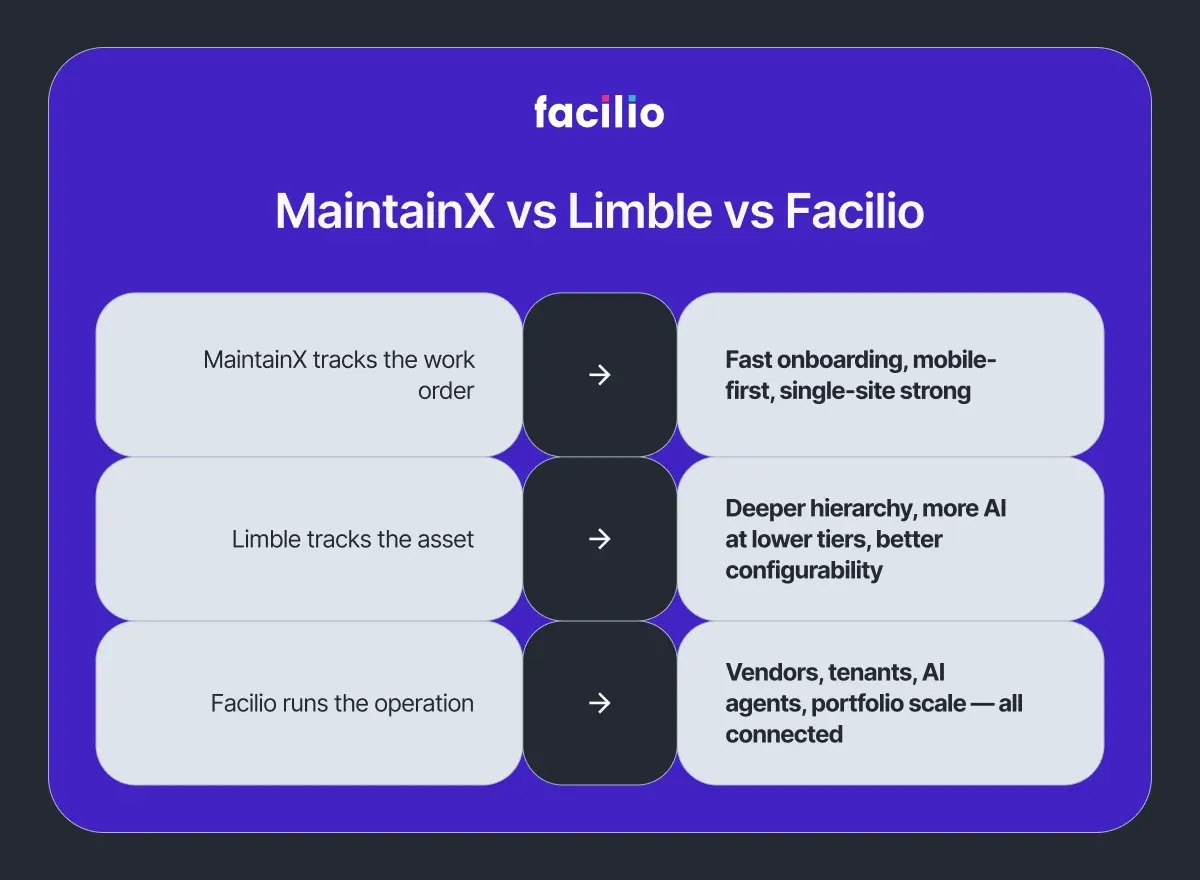
Once maintenance spans a portfolio, the useful comparison is no longer MaintainX versus Limble. It is SMB CMMS versus a connected operating model. This is the gap Facilio set out to close with a connected approach to facility management software, worth understanding as a third reference point even if you ultimately stay on one of the tools above.
A Connected CMMS treats maintenance as one thread in a larger operation rather than the whole picture. It unifies work orders, assets, vendors, tenants, compliance and energy on one no-code platform, overlays and integrates the building systems you already run instead of replacing them, and gives every stakeholder a role-based view. Where SMB tools surface a dashboard and wait, a connected platform adds purpose-built AI agents that can triage requests, route technicians and validate invoices on top of your existing systems, including a dedicated Helpdesk AI agent for intake and response.
| Model | Core strength | Honest limitation | Best fit |
|---|---|---|---|
| MaintainX (SMB CMMS) | Fast mobile adoption, communication | Caps out on multi-site, vendor and tenant workflows | Single-site and frontline teams |
| Limble (SMB CMMS) | Asset depth, reliability reporting | Longer setup; multi-site at enterprise tier | Asset-heavy plants and regulated sites |
| Facilio (Connected CMMS) | Portfolio-wide, multi-stakeholder, AI-driven | Heavier than a team needing only simple work orders | Multi-site FM and property operations |
The proof shows up in deployments. Skeens Warehouse Services replaced a patchwork of tools, emails and manual steps with a single connected platform and reported a 100% reduction in manual contractor check-ins by phone, along with end-to-end digital compliance and real-time visibility across dispatch, contractors and clients. As Riley Skeens, Vice President of Operations, put it, work that used to span multiple tools, emails and manual steps now runs in one visible place. The Skeens case study has the full detail, and Facilio's recognition as a 2025 Verdantix Green Quadrant Leader reflects the same connected approach.
- 276 calls, 175 SRs in 30 days
- Via the helpdesk AI agent
- Across 3 fragmented databases
- MVP live in 5 months
- Compliance fully automated
- Expanded to Canada and the UK
Not features on a roadmap, all running in production today, across 150M+ sq ft globally.
Already on MaintainX or Limble? You may not have to switch
Switching a working CMMS is disruptive, and often unnecessary. If MaintainX or Limble is doing its core job well, you can layer connected capability and AI on top of it rather than ripping it out. Facilio's agents can work alongside an existing system, which means you can add vendor governance, multi-site reporting and automated triage without re-training technicians who are happy with their current tool. Our guides on AI agents for MaintainX and agentic AI for Limble show how that layering works, and teams weighing the platforms head-to-head can review our MaintainX vs Facilio breakdown.
The bottom line is straightforward. MaintainX and Limble are both strong, well-rated CMMS tools, and for a single team or site the choice comes down to adoption and communication versus asset depth and reporting. Pick MaintainX for mobile-first speed and clarity, pick Limble for reliability and control, and look to a connected model when your operation grows past what a single-site CMMS was designed to carry. To see what portfolio-wide, AI-driven maintenance looks like against your own workflows, book a demo and we will map it to your sites.
Frequently asked questions
1. Is MaintainX better than Limble?
Neither is universally better. MaintainX is better for mobile-first adoption, built-in messaging and transparent pricing. Limble is better for deep asset hierarchy, spare-parts control, reporting and regulated compliance. Match the tool to how your team actually works.
2. Does Limble have better AI than MaintainX?
Limble makes AI available earlier, with its AI PM Builder included from the Standard tier. MaintainX offers AI procedure assistance and richer AI at its Premium tier. For AI at a lower price point, Limble has the edge as of October 2026.
3. Is Limble more expensive than MaintainX?
Often, yes, at entry level. MaintainX Essential starts around $20 per user per month with published pricing. Limble quotes via a calculator, with Standard commonly around $28 and up. Final cost depends on users, modules and contract length.
4. Can MaintainX or Limble handle multi-site facility management?
Both support multi-site operations at their enterprise tiers, but each is built first for team and single-site maintenance. Portfolio-wide vendor, tenant and cross-site reporting is where both tools stretch, and where a Connected CMMS is purpose-built.
5. Did Autodesk buy MaintainX?
Yes. Autodesk completed its acquisition of MaintainX on 3 August 2026 in an all-cash deal valued at roughly $3.6 billion. MaintainX now operates within Autodesk Operations Solutions. Limble remains independent and venture-backed.
6. Which is easier to use, MaintainX or Limble?
MaintainX is generally easier to adopt, with a near-identical mobile and web app that teams use within days. Limble is highly usable but trades some simplicity for deeper configuration, so it has a steeper initial learning curve.
7. What is the best alternative to both MaintainX and Limble for multi-site FM?
For operations spanning many sites, vendors and tenants, a Connected CMMS like Facilio is built for portfolio-wide maintenance, with role-based access and AI agents on top of existing systems. See our best CMMS software guide to compare the field.
8. How long does it take to implement MaintainX or Limble?
MaintainX deployments are often productive within two to four weeks thanks to its mobile-first design. Limble implementations typically run longer because of deeper configuration, though that setup pays off for complex asset and compliance needs.
About the Author

More from Facilio