Connected CMMS

 Connected Buildings
 Connected Refrigeration


 Download ebook

 Read case study


 Watch now


 Retail
 Healthcare
 FM Services
 Commercial Portfolios
 Corporate Facilities
 Education
 Data-driven Portfolio Ops
 Facility Management Software
 360° Asset Lifecycle
 Continuous Sustainability

 Blogs
Blogs
 Help docs
 Knowledge Hub
 ROI Calculator
 Ebooks & Guides
 Webinars
 Videos
 Case studies


 About us
 Newsroom
 Careers
 Contact us
 Partners
 Events



UpKeep is a mobile-first CMMS trusted by 4,000+ maintenance teams. This review covers what it does well, where it falls short, and who it is built for — based on verified user data and publicly available product information.
UpKeep
Mobile-first CMMS · Founded 2014
Overview
What is UpKeep CMMS?
UpKeep is a cloud-based Computerized Maintenance Management System (CMMS) founded by Ryan Chan in Los Angeles.
Built on a mobile-first philosophy, it replaces paper-based work orders and aging desktop CMMS tools with a clean, technician-friendly interface accessible from any device.
The platform centralises work orders, preventive maintenance schedules, asset data, and parts inventory.
Backed by $36M in Series B funding led by Insight Partners with Emergence Capital, Battery Ventures, and Y Combinator participating. UpKeep today serves 4,000+ companies across manufacturing, healthcare, property management, and education.
More recently, UpKeep has positioned itself under the umbrella of Asset Operations Management, connecting maintenance, reliability, and operations data in one system. Its AI assistant, Nova, provides automated work order summaries, checklist autogeneration, and voice commands for field teams.
 Jaihind_GN
UpKeep CMMS Features
UpKeep handles the core CMMS jobs well. But there are a few things worth knowing before you assume everything is included in your plan.
a) Work Order Management
This is the fastest part of the platform.
We found work orders can be raised, assigned, and pushed to a technician's phone in under a minute with photos, priority levels, and parts attached. This is what earns UpKeep most of its five-star reviews, and it deserves the credit. It is available on all plans.
What it does well: Speed, simplicity, real-time push notifications.
What it misses: Workflow automation for work orders is Enterprise only.
b) Preventive Maintenance
Time, meter, and usage-based triggers with custom checklists per task. Reliable once configured, but the entire module sits behind Premium. On the Essential plan, you are doing reactive maintenance only; something worth knowing before you commit to a tier.
What it does well: Flexible scheduling triggers, custom checklists per task.
What it misses: Not available below Premium, which starts at $55/user/month.
c) Asset Management
We found it good for basic tracking like maintenance history, QR scanning, and custom fields are all accessible. Where it gets complicated is the deeper features. We found that depreciation tracking, warranty expiry, and downtime logging all require Professional or above. If asset lifecycle management is your priority, make sure you are pricing the right tier from the start.
What it does well: Clean asset records, fast QR access in the field.
What it misses: Depreciation, warranty, and downtime tracking require Professional+.
d) Parts and Inventory
Barcode scanning works smoothly and does what it promises. However, inventory management with costing is not available until Premium, which caught several teams we spoke to off guard. Purchase order management is Enterprise only, meaning mid-market teams wanting to handle procurement inside the same platform will hit a wall.
What it does well: Barcode scanning, location-based stock management.
What it misses: Costing starts at Premium, PO management is Enterprise only.
e) Mobile App (iOS and Android)
The app is well-built, and technicians adopt it with minimal resistance. That said, time and labour tracking requires Premium, so what feels like a core field feature is actually a paid upgrade. Full offline sync with unlimited drafts only kicks in at Professional, something worth knowing if your team works in low-connectivity environments.
What it does well: Clean interface, fast work order updates, strong field UX.
What it misses: Time tracking is Premium+, full offline mode is Professional+
f) Reporting and Analytics
The pre-built dashboards are clean and cover the basics well like work order completion rates, asset reliability, and maintenance costs. But we noticed that full analytics history only becomes available from Professional onwards. Custom dashboards are locked entirely to Enterprise, a ceiling you will hit faster than expected if you are on Premium and building reports for leadership.
What it does well: Clear pre-built dashboards, straightforward day-to-day visibility.
What it misses: Full history requires Professional, custom dashboards are Enterprise only.
g) Integrations and API
UpKeep connects with 100+ tools including Slack, Zapier, and SAP through pre-built connectors, useful for most standard workflows. The REST API is Enterprise only. We confirmed this directly in UpKeep's own API documentation. Worth knowing upfront if integration depth is a deciding factor in your evaluation.
What it does well: Broad pre-built connector library across common business tools.
What it misses: REST API access is Enterprise only, not Professional as some sources suggest
h) Nova AI
We found it more capable than most review pages give it credit for. Rather than a simple chatbot, Nova runs as a background agent monitoring your CMMS data on a schedule, flagging data quality issues, generating work orders from technician notes, and giving field teams voice-first access to asset history. Available from the Essential plan, which is a genuine plus.
What it does well: Autonomous background monitoring, voice-first field access, no manual prompting required.
What it misses: Scope is limited to maintenance workflows only, no helpdesk dispatch, invoice verification, or compliance automation.
UpKeep pricing plans
UpKeep runs on a per-user, per-month model. Both the Essential and Premium have fixed published rates, Professional and Enterprise are quote-only.
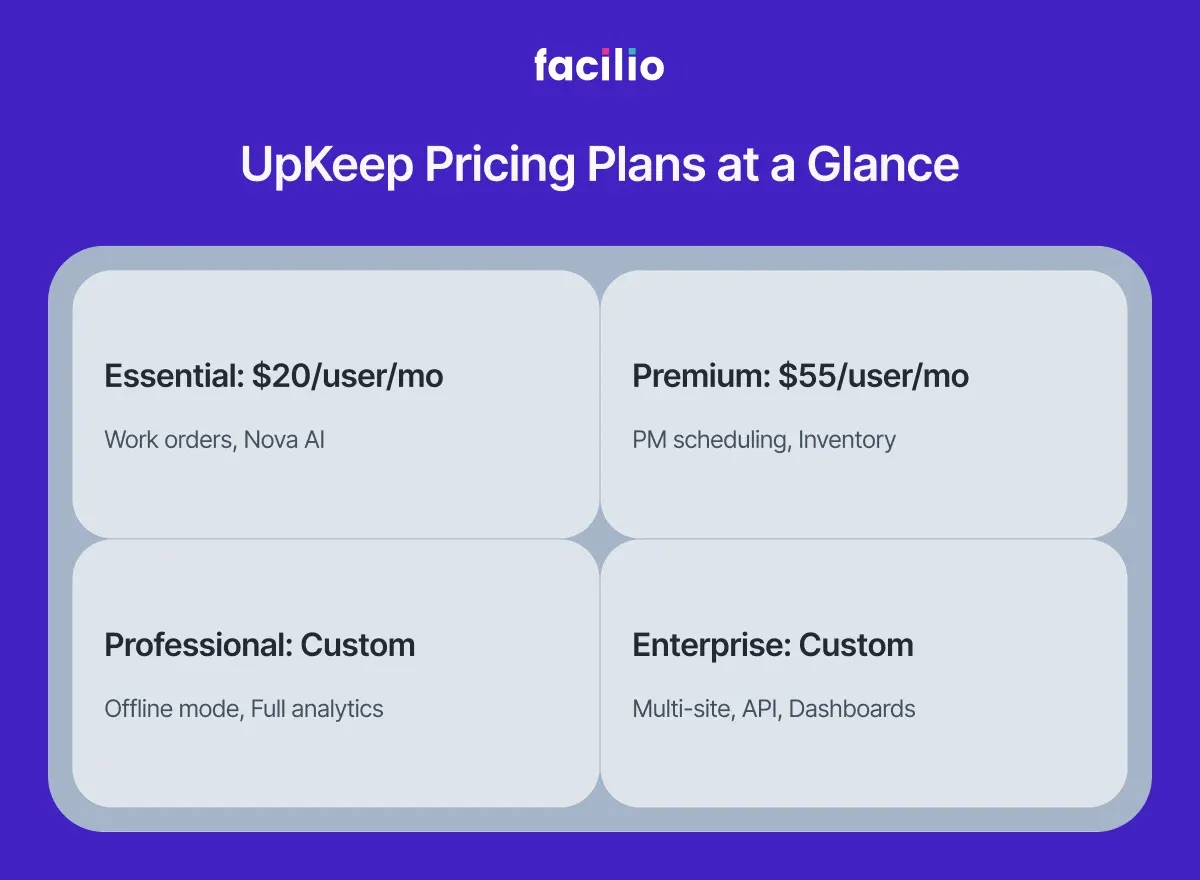
One thing we noticed quickly: the features most teams actually need like PM scheduling, inventory, time tracking, all sit behind Premium.
In practice, very few real-world operations run on Essential for long.
Essential
Single-site teams, first-time CMMS users
- Unlimited work orders
- Asset management
- Location management
- Nova AI
Premium
Teams adopting preventive maintenance
- PM scheduling
- Custom checklists
- Inventory + costing
- Time & labor tracking
- 30-day analytics
Professional
Multi-asset teams needing deeper analytics
- Mobile offline mode
- External request portal
- Full analytics history
- Asset lifecycle tracking
- Signature capture
Enterprise
Multi-site orgs needing automation and governance
- Multi-site modules
- Workflow automation
- PO management
- Custom API integrations
- SSO & custom roles
Note: Implementation is sold separately — Quickstart ($1,500), Advanced ($5,000), Enterprise (custom pricing). IoT sensors are an additional add-on. Per-user pricing scales quickly for teams over 20 people.
UpKeep reviews & ratings
Across G2, Capterra, and Software Advice, UpKeep holds a consistent 4.5 out of 5 with 1,090+ verified reviews on G2 alone. The scores reflect something real: when UpKeep works, it works well for the teams it was built for.
What comes up most in positive reviews: fast onboarding, responsive support, and the mobile app. The unlimited free requester accounts are a genuine practical advantage, anyone submitting work requests doesn't need a paid licence.
The recurring complaints: per-user pricing gets expensive at scale, analytics depth is gated, and custom dashboards are Enterprise only. IoT and predictive features are also a separate paid add-on, not something you'd always expect from the marketing.
User Feedback
UpKeep reviews & ratings
G2 Sub-scores
Pros & Cons
What users like
- + Technicians are productive within an hour
- + Fast to deploy, minimal IT required
- + Responsive, accessible customer support
- + Real-time work order push notifications
- + Unlimited free requesters on all plans
- + Nova AI cuts manual data entry
Common complaints
- − Per-user pricing gets expensive at scale
- − Advanced analytics behind higher-tier plans
- − Custom dashboards only on Enterprise
- − Printing/exporting work orders requires multiple steps
- − Multi-site capabilities limited below Enterprise
- − IoT and predictive features are separate products
Verified User Quotes
"This has been day vs night compared to our prior CMMS software. I love the easy to navigate user interface. The mobile app has been extremely handy to use. I love that I can quickly interact with an actual human being for customer support!"
"Very intuitive. From the get-go, it's very easy to navigate. Other CMMS systems I've used in the past always had a massive learning curve. You had to keep cheat sheets until you memorized everything. My first day of training, I was basically a pro after about an hour."
"The aesthetics are straightforward and uncomplicated, which I appreciate. The design is simple without being confusing. There are many potential filters that are missing, such as the ability to filter by location. It would be much more convenient if I could sort open work orders based on their location."
Is UpKeep really right for your team?
UpKeep is a well-built, mobile-first CMMS for small to mid-size maintenance teams that need to digitise work orders and get off spreadsheets fast. Its mobile app is among the best in its category, Nova AI adds genuine day-to-day utility, and the $20 entry point makes it accessible for lean operations.
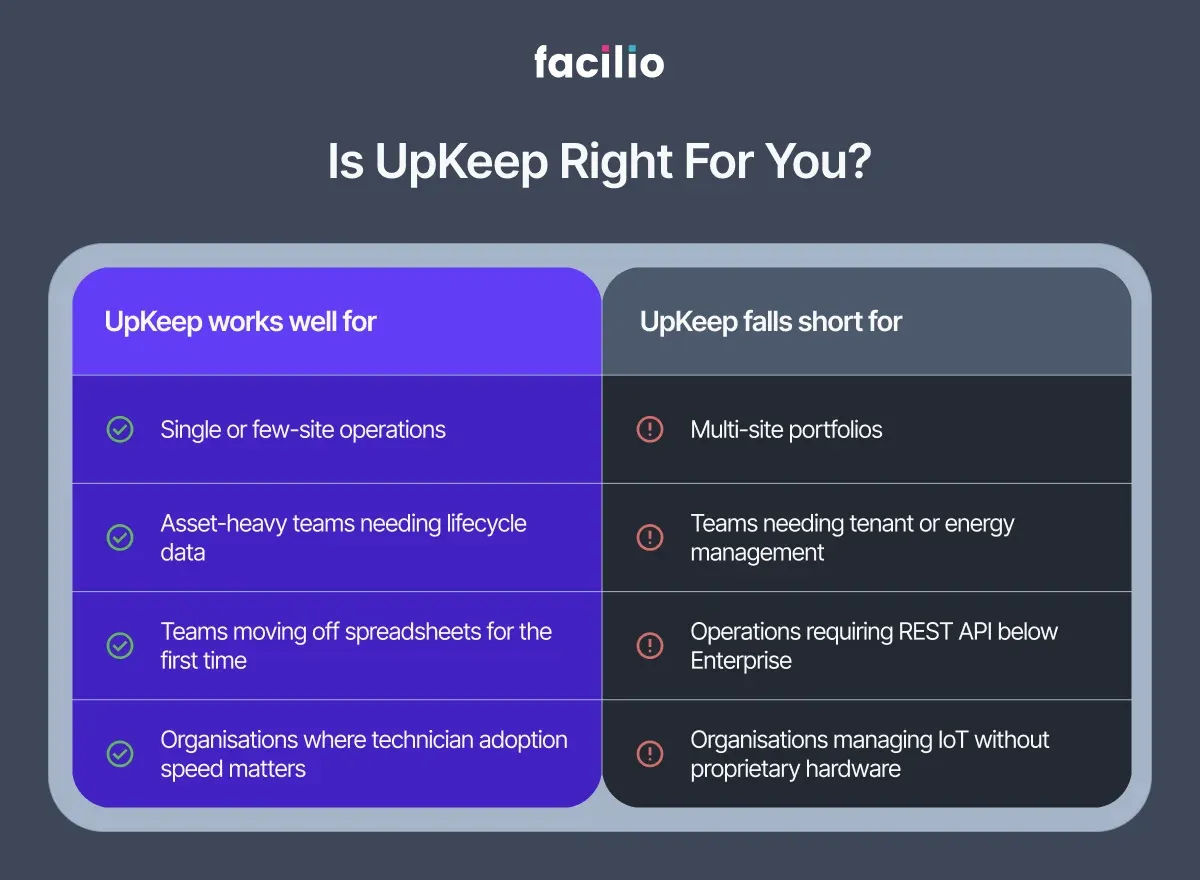
That said, its limits surface quickly at scale.
Multi-site management, IoT-driven condition monitoring, energy management, tenant workflows, and advanced analytics are all either gated behind Enterprise pricing or require separate UpKeep products. For single-site and small teams, it delivers. For growing portfolios, it starts to feel like a workaround.
Jaihind_GN
Why Facilio is built for the scale UpKeep wasn't designed for
For enterprise property owners and operators, Facilio is not just a CMMS software with more features, it is a fundamentally different architecture. Maintenance, vendors, tenants, compliance, and energy management sit on a single connected platform, built for portfolios from day one, not bolted on at Enterprise tier.
The AI gap is where the difference becomes most tangible.
UpKeep's Nova is a capable background agent within maintenance workflows, monitoring data, generating work orders, and offering voice-first field access. It is genuinely useful. But it operates within one domain.
Whereas Facilio's Atom AI suite operates across your entire operation. If you want to understand what agentic AI actually does to FM operations beyond maintenance, that context is worth reading first.
The Helpdesk AI handles 24/7 service intake autonomously across calls, WhatsApp, chat, and email with deployments already achieving 80% end-to-end autonomous resolution.
The Invoice Validation Agent validates invoices against work orders and contracts in real time. In one live pilot, it processed 2,100 invoices in four months, caught 30% of mismatches before approval, and eliminated over 70 hours of manual FM work. This is what AI-driven work order and invoice analytics looks like when it runs on your existing CMMS data — not a separate system, not a migration.
The FM Copilot answers operational questions, closes work orders, and reschedules jobs mid-workflow, removing the search overhead that adds up quietly across every FM manager's day.
Together, Facilio's Atom suite automates up to 40% of repetitive back-office FM work, not by replacing your team, but by removing the coordination burden that slows them down. And if you are already on UpKeep, Atom connects on top without migration — your team keeps working in UpKeep, the AI acts on the data it is already generating.
UpKeep helps maintenance teams work better. Facilio helps entire operations run autonomously.
Our verdict: If you manage one or a handful of sites and need a fast, well-designed maintenance tool, UpKeep is a strong choice and one of the most technician-friendly platforms in its class. If you are managing a multi-site portfolio with vendors, tenants, compliance obligations, and an eye on what AI can actually do for FM operations today, Facilio is worth a serious look.
The best way to understand the difference is to see Facilio running on an operation like yours.
See Facilio in action
Frequently asked questions
1. What is UpKeep CMMS?
UpKeep is a mobile-first computerised maintenance management system built for maintenance and operations teams. It centralises work orders, preventive maintenance, asset tracking, and parts inventory in one platform, designed to be used from a phone as much as a desktop.
2. How much does UpKeep cost?
UpKeep's Essential plan starts at $20/user/month. Premium is $55/user/month. Professional and Enterprise are custom-priced. There's no free plan, but only a 7-day trial. Key features like PM scheduling, offline mode, and analytics are locked behind higher tiers, so the plan you actually need is often more expensive than the entry price suggests.
3. Is UpKeep good for small businesses?
Yes, for the right kind of small business. If you're managing a single site with asset-heavy operations and need structured work orders and basic inventory tracking, UpKeep delivers well at the Essential tier. Where it gets expensive is when small teams need features like PM scheduling or time tracking and for those require Premium at $55/user/month.
4. What are UpKeep's biggest limitations?
We found three limitations come up consistently in reviews: advanced features are tiered aggressively, with PM, offline mode, and custom dashboards all behind higher plans; the per-user pricing scales poorly for larger teams; and multi-site management requires Enterprise. For organisations managing portfolios or needing tenant and energy management, UpKeep wasn't designed for that complexity.
6. Does UpKeep work offline?
Partially. Full offline sync with unlimited drafts requires the Professional plan. On lower tiers, offline access is limited. If your technicians regularly work in low-connectivity environments, this is worth confirming against your plan before committing.
7. What integrations does UpKeep support?
UpKeep connects with 100+ tools including SAP, Slack, Zapier, and Azure through pre-built connectors. REST API access is available on the Enterprise plan only. If you need custom integrations, factor Enterprise pricing into your evaluation from the start.
8. What are the best alternatives to UpKeep?
The most commonly evaluated alternatives are Facilio, MaintainX, Limble CMMS, and Fiix. MaintainX is better for teams prioritising mobile UX and adoption speed. Limble is stronger on customisation and reporting. For enterprise property portfolios needing multi-site management, tenant workflows, IoT connectivity, and energy management in one platform, Facilio is worth evaluating separately. It was built exactly for that complexity rather than adapted to it.
About the Author