 Connected CMMS

 Connected Buildings
 Connected Refrigeration


 Download ebook

 Read case study


 Watch now


 Retail
 Healthcare
 FM Services
 Commercial Portfolios
 Corporate Facilities
 Education
 Data-driven Portfolio Ops
 Facility Management Software
 360° Asset Lifecycle
 Continuous Sustainability

 Blogs
Blogs
 Help docs
 Knowledge Hub
 ROI Calculator
 Ebooks & Guides
 Webinars
 Case studies


 About us
 Newsroom
 Careers
 Contact us
 Partners
 Events


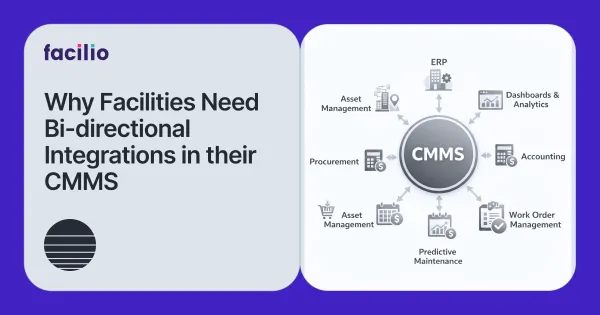
As a facility manager, your days are already packed—juggling work orders, vendor coordination, asset breakdowns, compliance tasks, and budget planning.
The last thing you need is to waste time dealing with inconsistent data across systems or re-entering the same information into multiple platforms.
This is where bi-directional sync in a CMMS software becomes a must-have.
If you’re in the market for a new CMMS or evaluating the limits of your current one, this article will walk you through:
- What bi-directional sync actually means
- The problems it solves for facility and CRE teams
- When it matters most
- The questions you should be asking CMMS vendors
What is Bi-Directional Sync?
Bi-directional sync means that your CMMS can both send and receive updates from other systems it connects with—automatically, and without manual intervention.
For example:
- You update a work order status or asset detail in your CMMS. With bi-directional sync, that change is also reflected in your ERP or procurement system.
- Your finance team updates vendor information in their system. That information is reflected back in your CMMS as well.
It’s a two-way flow of information, which keeps systems aligned and reduces discrepancies.
Why Bi-directional Sync is Critical in Facilities Management
1. Reduce Double Data Entry and Manual Work
Without bi-directional sync, you and your team might spend hours each week:
- Re-keying the same work order information into multiple systems
- Sending emails just to confirm status changes
- Manually updating reports so finance and operations match
A CMMS with robust, two-way sync handles these updates in the background. Work orders, POs, asset details, and vendor data are kept in sync automatically, across tools.
This gives your team more time to focus on hitting core facility management KPIs like uptime, response times, and cost control—instead of doing admin work by hand.
2. Cut Miscommunication Between Maintenance, Finance, and Vendors
Misalignment between systems shows up as:
- Invoices raised for work that was canceled
- Vendors chasing approvals that already happened in another tool
- Teams debating which system is “right”
With bi-directional sync:
- When a job is canceled or rescheduled in CMMS, related records in ERP or purchasing can be updated automatically.
- When finance updates vendor info, payment terms, or cost centers, the CMMS reflects those changes so planners and technicians aren’t working from outdated data.
Everyone sees the same status and the same information, regardless of which system they’re using.
3. Connect CMMS With the Systems You Already Use
Most organizations already rely on multiple systems, for example:
- ERP for finance and procurement
- BMS for building performance and alarms
- IoT platforms for sensor and condition data
A modern CMMS software doesn’t replace these systems—it connects to them and keeps data consistent between them.
Bi-directional sync helps your CMMS act as the operational hub for:
- Work orders and maintenance workflows
- Asset and equipment history
- Costs, contracts, and vendors
This is how you move away from a patchwork of disconnected tools toward a more unified operations stack.
4. Give Field Technicians Reliable, Up-to-Date Information
When technicians are on-site, they need:
- Accurate asset history
- Current parts availability
- The latest instructions and approvals
With bi-directional sync:
- Updates from the field are captured in CMMS and shared back to the systems that depend on them (finance, inventory, compliance, etc.).
- Technicians also see up-to-date information that originates in other systems (e.g., updated vendor details, warranty info, correct cost centers).
That reduces rework, return visits, and the common complaint that “the system is always wrong.”
When is Bi-Directional Sync Most Useful?
Bi-directional sync becomes especially important when:
- Multiple departments rely on the same data
- Example: maintenance, finance, procurement, and sustainability teams all use the same asset and work order data, but for different reporting and decision-making.
- Updates happen from multiple places
- Desktop users, mobile apps, vendor portals, BMS alarms, and IoT events can all create or update records.
- Data accuracy is critical for compliance and KPIs
- Audit trails, regulatory inspections, and leadership reviews depend on systems telling the same story—especially for maintenance KPIs like MTTR, PM completion, and asset uptime.
If your team operates across multiple buildings, vendors, systems, or regions—or you’re aiming to scale—bi-directional sync quickly moves from “nice to have” to “essential.”
What to Ask Vendors About Bi-Directional Sync
Here are some key questions to ask:
- Which systems does your CMMS integrate with, and is the sync truly bi-directional?
- Ask for specific ERPs, BMS platforms, procurement tools, or IoT systems—not just “we integrate with everything.”
- Is the sync real-time or scheduled?
- Clarify how quickly changes move between systems. Event-based or near real-time behaviour is very different from once or twice a day.
- How does your platform handle data conflicts?
- What happens if both systems update the same field?
- Can you choose which system should be the “source of truth” for different data types (e.g., cost vs. status)?
- Can we control which data is synced and how?
- Can you configure which fields sync in each direction?
- How easy is it to change these rules if your process changes?
- How are errors logged and resolved?
- Can your team see when something failed to sync and why?
- Is there a simple way to retry or fix issues without raising IT tickets every time?
A reliable vendor will have clear, concrete answers to all of these questions—and ideally, examples or case studies that show it working in live environments.
Final Thoughts: Make Bi-Directional Sync Work for You
A CMMS is meant to simplify facility operations, not add more manual work or confusion.
Bi-directional sync helps your CMMS act as a central hub that:
- Keeps data consistent across systems
- Reduces double entry and miscommunication
- Supports better reporting, compliance, and performance against your key KPIs
If you’re investing in a CMMS, don’t settle for outdated, one-way integrations or heavy manual processes. Look for a platform that offers modern, bi-directional sync capabilities and is built as a connected platform like Facilio, that can grow with your portfolio.
That’s how you protect your team’s time, improve data accuracy, and keep your facilities operation running smoothly—even as your assets, systems, and stakeholders become more complex.
Looking for a CMMS that integrates seamlessly with your tech stack?
Talk to us