Xero Integration for Facilio
Introduction
Efficient financial management and accounting integration are essential for facility management operations. Xero integration with Facilio's Connected CMMS enables seamless synchronization of financial documents, automated accounting workflows, and centralized financial tracking within Facilio.
With Xero integrated, teams can:
- Automatically synchronize Quotes, Invoices, Purchase Orders, and Bills to Xero
- Maintain consistent contact records across both platforms
- Track real-time status updates from Xero
- Reduce manual data entry and improve accuracy
- Streamline procurement and billing workflows
Configuring Xero Integration
1. Authorizing Xero Connector
To configure Xero:
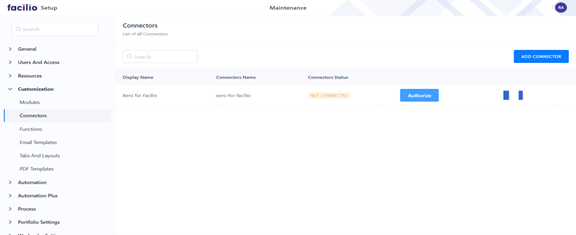
- Navigate to Customization → Connectors
- Locate the Xero connector from the list
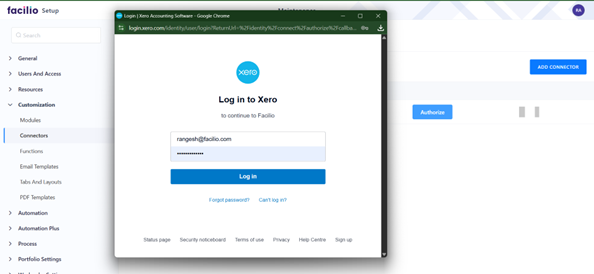
- Click Authorize
- Enter your Xero username and password
- Grant the required permissions
2. Syncing Contacts to Xero
Before syncing financial documents, you must first synchronize your contacts:
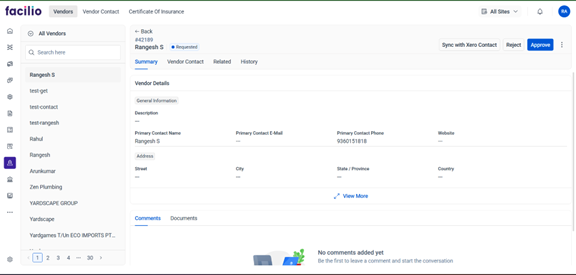
- Create a Vendor, Client, or Tenant record in Facilio
- Open the record summary page
- Click Sync Contact to Xero
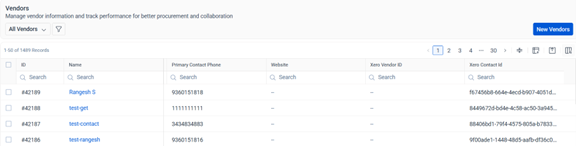
The integration will either create a new contact in Xero or retrieve the existing one (matched by name). The Xero Contact ID is automatically stored in Facilio for future reference.
3. Syncing Financial Documents
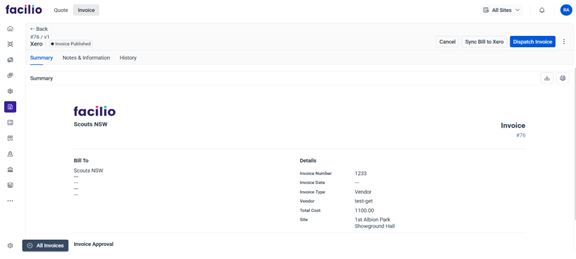
After creating a Quote, Invoice, Purchase Order, or Bill in Facilio, you can manually trigger synchronization:
- Open the document summary page
- Click the appropriate sync button:
- Sync Quote to Xero
- Sync Invoice to Xero
- Sync Purchase Order to Xero
- Sync Bill to Xero
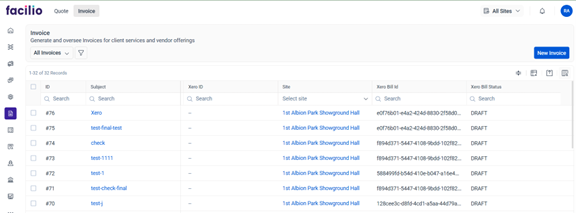
The integration sends the record data to Xero and creates the corresponding document. Once confirmed, the Xero ID and synchronization status are automatically updated in Facilio.
3. Automating Xero (Functions & Schedulers)
Functions Installed
CreateInvoice
Creates an Invoice in Xero using the site, workorder, and line-item details stored in a Facilio Invoice record. After successful creation, the returned Xero Invoice ID and status are stored back in Facilio for tracking.
Parameters:
| Parameter | Type | Description |
|---|---|---|
invoice | Map | Full invoice information from Facilio including organization, line items, totals, tax, contact, and currency. |
CreateQuote
Transfers a Facilio Quote into Xero’s Quotation module. Automatically maps customer, pricing details, tax amounts, and item lines from Facilio.
Parameters:
| Parameter | Type | Description |
|---|---|---|
quote | Map | Quote metadata including customer, item lines, pricing, currency, and tax. |
CreatePurchaseOrder
Creates a Purchase Order in Xero using Purchase Order record in Facilio. Captures vendor details, line items, taxes.
Parameters:
| Parameter | Type | Description |
|---|---|---|
purchaseOrder | Map | Includes supplier, item list, quantities, tax structure, and total payable amount. |
CreateBill
Generates a payable Bill in Xero based on expense records captured in Facilio, typically created from a Facilio Invoice. Supports Tracking Categories, Cost Accounts.Parameters:
| Parameter | Type | Description |
|---|---|---|
bills | Map | Vendor, billing date, due amount, taxes, account code, and descriptions. |
trackingList | List | Optional list of tracking category values defined in Xero. |
5. syncWithXeroContact
Description: This function creates a new contact in Xero using the Vendor, Client, or Tenant name and details stored in Facilio. After creation, the Xero Contact ID is returned and stored in the respective Facilio record. If the contact already exists in Xero (matched by name), the function does not create a duplicate—instead, it fetches and returns the existing Xero Contact ID.
Parameters:
| Parameter | Type | Description |
|---|---|---|
Entity | Map | Entity details: name, location, email, phone, tax info, billing details. |
moduleName | String | Identifies the module source: Vendor, Client, or Tenant. |
Automated Status Synchronization
Three daily schedulers ensure real-time bidirectional updates:
- Xero-Quote-Status-Update – Retrieves updated quote statuses from Xero
- Xero-PurchaseOrder-Status-Update – Retrieves updated purchase order statuses from Xero
- Xero-Invoice-Status-Update – Retrieves updated invoice statuses from Xero
Each scheduler retrieves updated statuses from Xero and writes them into Facilio, ensuring billing and procurement workflows stay aligned.
Scope Used
Scope :openid profile email accounting.transactions accounting.contacts offline_access.
openid
- This is part of the OpenID Connect (OIDC) standard.
- It allows your application to authenticate the user via Xero and obtain an ID token to confirm their identity.
- Needed whenever you want to log in users securely.
profile
- Lets your app access the user’s basic profile information, like name, user ID, and avatar.
- Gives access to the user’s email address.
accounting.transactions
- Allows your app to read and write accounting transactions in Xero.
- This includes invoices, bills, payments, credit notes, and other transactional data.
accounting.contacts
- Allows your app to read and write contact information in Xero.
- Useful for syncing customers, vendors, and other contact details.
offline_access
- Lets your app obtain a refresh token, so you can access Xero APIs even when the user is offline.
- Without this, the access token would expire quickly, and users would need to reauthorize frequently.
Features Installed Automatically
The Xero integration extension automatically installs:
- Custom Xero Connector
- Predefined Functions for Xero Sync
- Automatic Status Synchronization (Schedulers)
- Module-Level Action Buttons
- Custom Data Fields in Quotes, Invoices, Purchase Orders, Bills, Vendor, Tenant, and Client modules
Benefits of Xero Automation
- Real-time financial document synchronization
- Reduced manual data entry and errors
- Centralized financial tracking across platforms
- Automated status updates from Xero
- Seamless integration with Workflows and Stateflows
Troubleshooting & Support
If Xero synchronization fails:
- Ensure Xero username and password used for authorization are correct
- Verify that required fields in Invoices, Bills, Quotes, and Purchase Orders are populated
- Review Facilio logs for error codes and messages
- Confirm Xero subscription and API access are active and not restricted
- Check that contacts are synced before syncing financial documents
- Verify network connectivity and API rate limits
For unresolved issues, contact support@facilio.com.
Frequently Asked Questions (FAQ)
Do I need to manually configure the Xero connector?
What happens if a contact already exists in Xero?
Can I automate document synchronization?
How often are statuses updated from Xero?
What data is synced to Xero?
Summary
Facilio's Xero integration enables reliable, automated financial document synchronization for facility management workflows. By combining automated contact syncing, real-time status updates, and workflow automation, organizations can streamline accounting processes and improve financial accuracy.
For additional guidance or troubleshooting, contact support@facilio.com.