Twilio Integration for Facilio
Introduction
Effective communication is crucial for facility operations, maintenance, and customer-facing teams. Twilio integration with Facilio’s Connected CMMS enables seamless SMS notifications, automated communication workflows, and centralized message logging within Facilio.
With Twilio integrated, teams can:
- Send real-time SMS alerts for Work Orders, Announcements, and operational workflows
- Track detailed SMS delivery status and error responses
- Maintain full communication history for audit readiness
- Improve team response times and reduce manual messaging
Configuring Twilio Integration
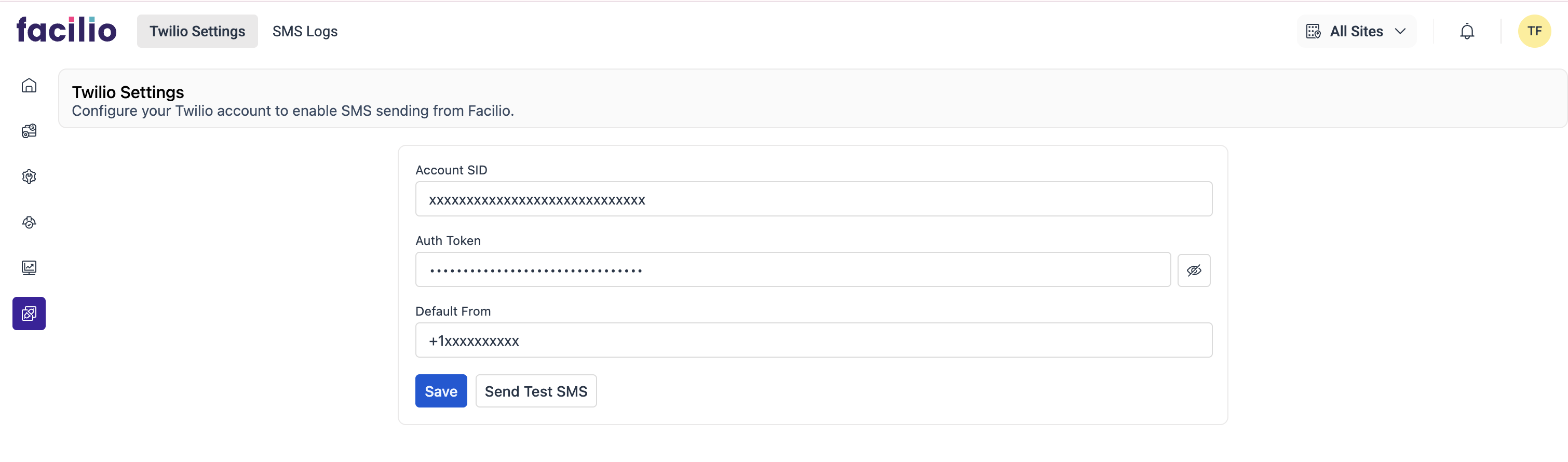
1. Accessing Twilio Settings
To configure Twilio:
- Go to your Facilio account
- Select Twilio Settings
- Enter your Twilio credentials and default sender number
2. General Configuration Fields
- Account SID – Your Twilio account identifier
- Auth Token – Secure token for authentication
- Default From Number – Twilio-verified sender number
Click Save to store the configuration.
Sending a Test SMS
- Open Twilio Settings
- Click Send Test SMS
- Enter recipient number in E.164 format
- Type your message
- Click Send

Note: Test SMS messages are not saved in the SMS Logs.
Viewing SMS Logs in Facilio
All automated or workflow-triggered SMS messages are recorded in SMS Logs.
Fields Available in SMS Logs
- ID – Unique log entry
- Name – Outbound message
- From – Sender number or sender ID
- Recipient – Receiver number
- Status – Delivered, Queued, Failed
- Message SID – Twilio message reference
- Source – Module or workflow that triggered the SMS
- Date Created / Date Sent – Timestamp details
- Message Body – The exact SMS text sent
- Error Message – Twilio error description
- Error Code – Twilio error code for troubleshooting
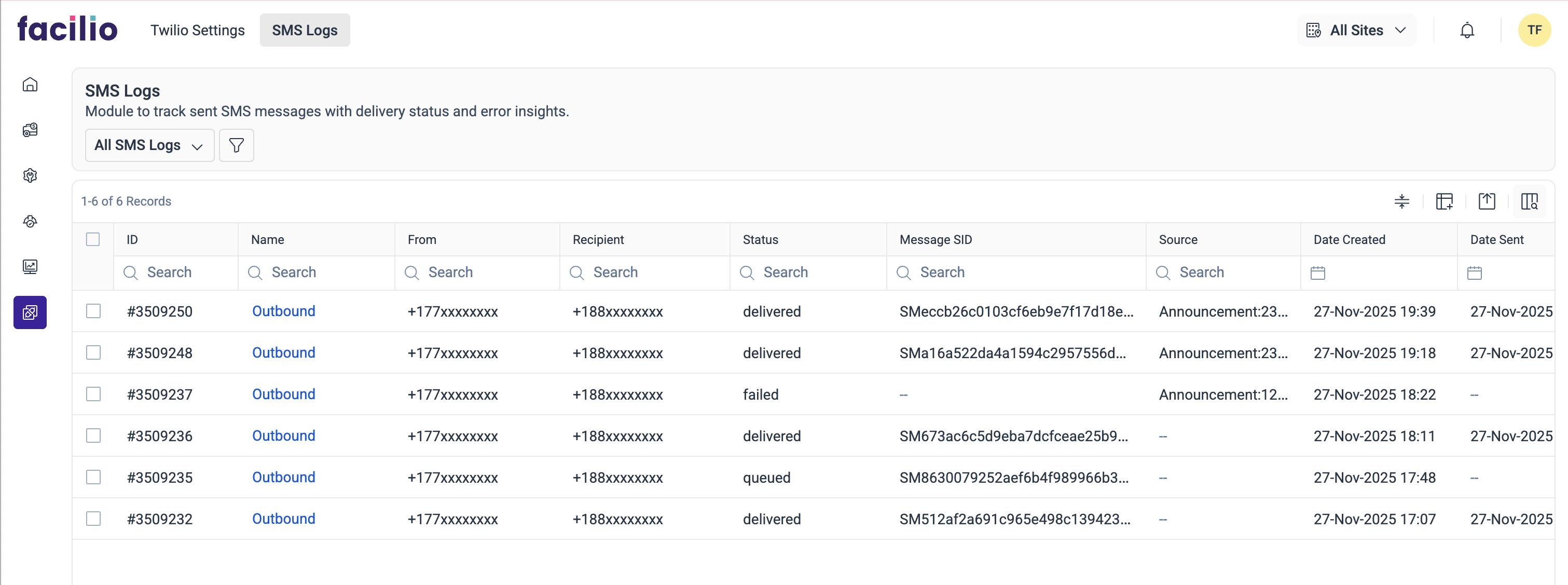
Note: SMS are sent immediately by Twilio, but the delivery status will be fetched and updated in the SMS Logs only after 10 minutes.
Automating Twilio SMS Notifications
This section provides an overview of how to automate Twilio SMS communication using custom functions, which can be used in Workflows and Stateflows. These functions enable seamless interaction with Twilio for sending SMS messages, allowing automated alerts, reminders, and notifications to be triggered based on operational events. This ensures timely communication with technicians, tenants, and on-site teams, improving responsiveness and streamlining operations.
1. Send SMS (Default From Number)
Function: sendSMS(String toNumber, String message, String source)
Description: Sends an SMS using the default Twilio from number configured in Twilio Settings.
Parameters:
| Parameter | Type | Description |
|---|---|---|
toNumber | String | The recipient's phone number in E.164 format (e.g., +15551234567). |
message | String | The SMS text content to be sent. |
source | String | A short label indicating the origin of the message (e.g., Work Orders). |
Returns:
A Boolean value:
- `true` → SMS request successfully sent to Twilio
- `false` → SMS request failed (check SMS Logs for error details)
Example Usage in a Workflow Script:
status = new NameSpace("twilio").sendSMS(
  "+1xxxxxxx",
  "Your work order has been assigned.",
  "Work Order Assignment"
);
console.log(status);
📌 Use Case in Workflows:
- Notify technicians when a Work Order is assigned
- Send reminders for upcoming preventive maintenance tasks
- Trigger announcements to tenants for scheduled downtime or service updates
- Broadcast emergency notifications to on-site teams
- Send quick alerts for inspections, checklists, or follow-ups
2. Send SMS with Custom From Number
Function: sendSMSFrom(String fromNumber, String toNumber, String message, String source)
Description: Sends an SMS using a custom sender, allowing you to override the default Twilio number and use a specific Twilio phone number or an Alphanumeric Sender ID (when supported by your Twilio account and the recipient’s country). This is useful when you need to send messages using site-specific numbers or country-specific numbers.
Parameters:
| Parameter | Type | Description |
|---|---|---|
fromNumber | String | Sender identifier — must be a Twilio-verified phone number in E.164 format (e.g., +15551234567) or an Alphanumeric Sender ID, if supported. |
toNumber | String | The recipient's phone number in E.164 format (e.g., +15551234567). |
message | String | The SMS text content to be sent. |
source | String | A short label indicating the origin of the message (e.g., Work Orders). |
Returns:
A Boolean value:
- `true` → SMS request successfully sent to Twilio
- `false` → SMS request failed (check SMS Logs for error details)
Example Usage in a Workflow Script:
status = new NameSpace("twilio").sendSMSFrom(
  "+1xxxxxxx",   // Custom sender number or Alphanumeric Sender ID
  "+1xxxxxxx",   // Recipient number
  "Your work order has been updated.",
  "Work Order Update"
);
console.log(status);
📌 Use Case in Workflows:
- Use country-specific numbers for region-based communication
- Use site-based numbers for large portfolios or multi-campus operations
- Send messages using a branded Alphanumeric Sender ID (if approved and supported)
- Notify tenants using a public-facing sender name
- Trigger emergency alerts from a designated high-priority sender
- Send leases, announcements, or utility outage messages from department-specific numbers
Recommended Phone Number Format
All phone numbers must follow E.164 international format, such as:
+15551234567
+971501234567
+919876543210
Using phone numbers in E.164 format will significantly improve SMS delivery success and routing accuracy.
Benefits of Twilio Automation
- Real-time technician, vendor, and customer alerts
- Complete message visibility and auditability
- Reduction of manual communication tasks
- Centralized communication history
- Availability of region-specific or site-specific sender numbers
- Seamless integration with Workflows and Stateflows
Troubleshooting & Support
If SMS delivery fails:
- Verify Account SID, Auth Token, and From Number
- Ensure recipient number is in E.164 format
- Ensure Twilio account has sufficient credits
- Confirm Sender ID is supported in the destination country
- Check SMS Logs for Error Code and Error Message
- Review Twilio’s regional SMS guidelines
For unresolved issues, contact support@facilio.com.
Frequently Asked Questions (FAQ)
What is the recommended phone number format?
Does Facilio track Twilio SMS credits?
Is Alphanumeric Sender ID supported for sending SMS?
Twilio only delivers Alphanumeric Sender IDs if:
* The Twilio account< supports Alphanumeric Sender IDs
* The destination country allows them
* Required registrations/approvals are completed

Facilio passes the “From” value exactly as provided, but Twilio determines whether delivery is allowed.
Why is my SMS status showing “failed”
* Incorrect phone format (not E.164)
* Twilio credit exhaustion
* Sender ID restrictions
* Carrier filtering
* Invalid phone number
* Incorrect Twilio credentials

Review SMS Logs for detailed error messages.
Can I send SMS using region-specific or site-specific numbers?
Does Facilio retry failed messages automatically?
What is the maximum SMS message length?
Overall maximum limits with segmentation:

    A. GSM-7 encoding:

        1) Single message limit: 160 characters

        2) Segmented limit: ~1,600 characters total

        3) Each segment after splitting carries 153 characters

    B. UCS-2 encoding (Unicode, emojis, non-Latin):

        1) Single message limit: 70 characters

        2) Segmented limit: ~737 characters total

        3) Each segment after splitting carries 67 characters

Anything beyond these total limits will be truncated and not delivered.
Twilio charges per segment, not per original message.
Summary
Facilio’s Twilio integration enables reliable, automated SMS communication for operational workflows. By combining configurable sender options, detailed message tracking, and workflow automation, organizations can streamline communication and improve service response times.
For additional guidance or troubleshooting, contact support@facilio.com.